Cloud image contains outdated agent. This affects the time necessary to start the agent & Agent has unregistered (will upgrade)

Hello,
During the past couple of months we've been having problems with TeamCity. We have it installed on a Windows Server and running as a windows service.
The builds are correctly triggered and queued from BitBucket, but its agents for some reason won't run. They run but after me removing the ones with a message "Agent has unregistered (will upgrade)". And that error is really random, because sometimes the agents just stay idle for a really long time without doing anything and, when I go to check on them, the panel says: "Cloud image contains outdated agent. This affects the time necessary to start the agent".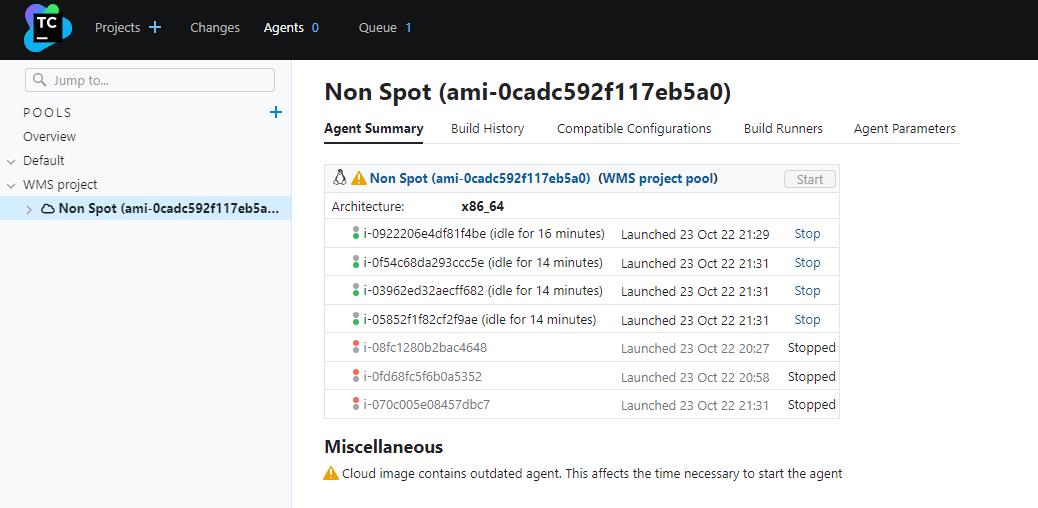
I have Teamcity running as a Windows Service under a LOCAL SYSTEM account. I'm trying to check the logs to see if I can get more info but I'm not sure where to look at in Windows Server.
Any ideas of how to solve it?
Teamcity somehow manages to run the deploy after me restarting and killing the agents like 20 times or so.
Thanks in advance,
Please sign in to leave a comment.
First of all, apologies for the delayed response here.
"Cloud image contains outdated agent" means that the image you are using is older than the latest version of the agent expected by the server. There are two possible reasons for that:
1) the server has been upgraded, and image has older binaries of the agent part;
2) new plugins or tools were installed on server and agent image does not have them yet.
Whenever this is detected, TeamCity will send missing data to the agent and instruct it to restart. I assume that for some reason agent process does not come back after restart - agent-side logs would come handy. If the issue is still topical for you, can you please upload them to uploads.jetbrains.com and share the upload ID?
Going forward, we recommend to update the cloud image when you see this warning - in order to do that, please start the agent manually, wait until it is upgraded and re-capture the image as per this guide: https://www.jetbrains.com/help/teamcity/teamcity-integration-with-cloud-solutions.html#Capturing+Image+from+Virtual+Machine.
I hope this helps; for any questions or concerns, please let me know.