Cross platform build

I am trying to set up a TeamCity build server to build a cross platform project. The TeamCity server is installed on a Windows platform and the local build agent can build Windows and Android projects without any issues.
I am using TeamCity server version is 2021.2 (build 99542).
My reasoning was that for iOS builds I would simply install a remote build agent on my Mac Mini and that the XCode build steps would simply be executed on the remote agent on the Mac Mini. I added an XCode build step to my project to handle the iOS build and now the project refuses to build all together.
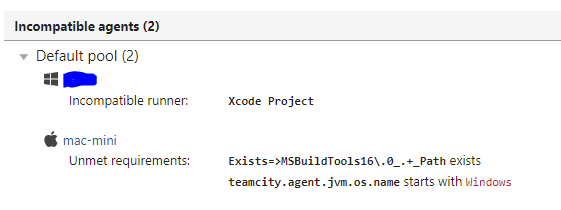
The build gets stuck in the build queue with the following reason:
There are no compatible agents which can run this build
If I am reading this correctly the build cannot run because the Windows build agent cannot compile XCode projects - that part is expected.
But the second part is somewhat confusing. Apparently the Mac Mini is supposed to have a path to MSBuildTools16 and the jvm is supposed to be running on Windows... Clearly that cannot happen at the same time. So I am probably... "holding it wrong"?
I have tried to tamper with the Agent Requirements for the Project, but cleverly the "Build Steps Requirements" are read-only and probably imposed by the build steps I add to the project.
There is an obvious solution... I need to redefine the entire build project and break it down to subprojects for each platform. So instead of having just:
/<Root project>/AppName
I need to have:
/<Root project>/AppName
and then subprojects with build steps:
/<Root project>/AppName/Windows
/<Root project>/AppName/iOS
/<Root project>/AppName/Linux
/<Root project>/AppName/OSBla....
It is a bit of a dissapointing realization since the build steps are handled by build agents and matching of a build step to a build agent could be done on a per-buildstep basis... but it looks like the build agents are assigned on a per-project basis.
Can somebody please confirm what I think the solution is, or advise on how to make the remote Mac Mini agent build the XCode build step in a single project build configuration.
Thanks!
Please sign in to leave a comment.
Hello Alles,
It is recommended to have a separate build configuration for each sequence of builds (that is performing a specified task in a dedicated environment). This allows for proper features functioning, like detection of new problems/failed tests, first failed in/fixed in tests status, automatically removed investigations, and so on. You can read more about build configurations here:
https://www.jetbrains.com/help/teamcity/build-configuration.html
If you would have all the build steps within a single build configuration, you would also be forced to rerun every step and recompile every platform every time you would need only one, that would me more efficient.
Please let me know if you have any more questions.
Guilherme
Hello Guilherme,
I have already separated the build into separate build configurations. And to a large extent I agree with what you wrote. This approach also gives faster build results as different build agents can process diffierent build configurations in parallel. It was also to easy to copy the build steps from one configuration to a different one. I appreciated the copy configuration feature as I was breaking up one configuration into several build configurations.
I do have one question... Now that the build configurations have been split, is there a way to make two build configurations run in sequence? In my case I would like the Linux build to run after the Win build is complete.
Thanks for getting back to me.
Ales
Hello,
You can use Finish Build Triggers for that purpose. You can set them under the menu option Triggers in your build configuration.
Thank you,
Guilherme