How can I get full list of tests by build id from the REST api
Answered

Hi, could somebody help me with such a question.
I want to get a full list of tests with one REST API request using build-id. I want to create a service which will mark the test cases in other service using information from the test metadata. So the most preferable way for me is to get the list of tests with metadata and result by one call to Teamcity REST API.
I was trying to get list from /app/rest/ui/testOccurrences?locator=build:(id:buildid) but I've got only the first 100 results and without metadata.
Please sign in to leave a comment.
Hello!
Yes indeed, this call will, by default, return a page of results (note that the response will contain nextHref/prevHref for pagination in this case), and for each entity included there would be a minimal set of fields extracted (see the https://www.jetbrains.com/help/teamcity/rest-api.html#API+Client+Recommendations and https://www.jetbrains.com/help/teamcity/rest-api.html#Full+and+Partial+Responses article for more details).
Speaking of the limited number of entities, here is what you could do:
1) you could increase the count property of locator:
This would make the call return up to 500 entities per page. Please mind the call may become heavier as the count scales, so the next approach is preferable.
2) you could make your logic utilize nextHref links to fetch next page of the resources.
Speaking of the limited entity fields included into response:
1) you may choose what fields should the response include, by explicitly specifying them in the call:
This request will return just the id/name of the test instance and the date of when the build was finished on the agent side:
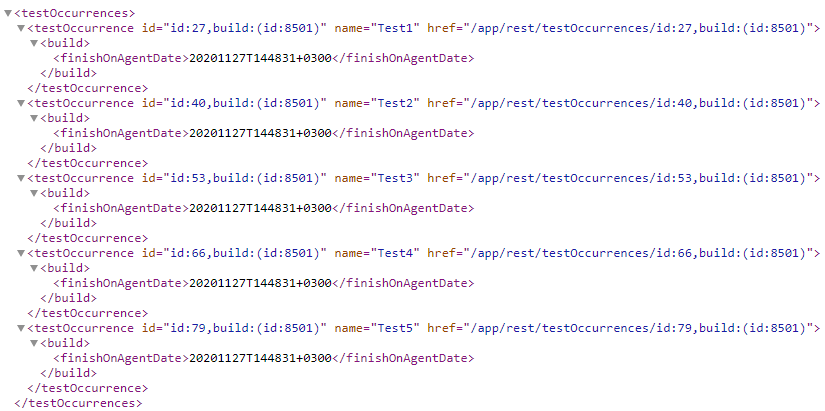

2) you may use the href property of the entities to request full data about entity; in the example above, if I would invoke any of the href-provided endpoints, I would receive this response:
The example is minimal, but if you have any metadata on the test, it would be included there as well. Of course, you can also use this schema to select the fields you need to include with the fields:() URL part.
I hope this helps.
Thank you for your help. Now it's clear and I've got what I want from the call.
Could you help me with such a question? Instead of getting all testOccurrences and filter it by part of the name on the code side I want to filter it on the response side by some regex. I was tried to do something like this:
http://<teamcity>/app/rest/ui/testOccurrences?locator=build:(id:12816333),name:(value:(<regex>),matchType:matches),count:500&fields=testOccurrence(metadata,name,status)
But it works only without matchType:matches and using full test name. Could you give me advice about this?
Hello!
Please mind that the matchType is usually used with the property dimension (which, in turn, is invoked as name:<property name>,value:<property value or regexp>,matchType:<one of match types>). The name dimension here accepts just a test name, though, and looks up a test with an equal name.
Unfortunately, neither testOccurrences nor tests endpoints do not support property dimension; however, if this could work for you, and you have a list of test names locally, you could invoke the following:
The item dimension allows to list several dimensions inside and provide a union of their results. In this example, I have asked for instances of Test1, Test2 and Test6. Test6 never existed on my system, so only the Test1 and Test2 are effective, returning two instances of testOccurrence. If a list of tests is short enough to be covered within the endpoint, maybe this could do as a workaround?
Otherwise, please feel free to create a feature request for the property dimension support here: https://youtrack.jetbrains.com/issues/TW
I hope this helps; let me know if there is anything else I could assist with.
Hi, Fedor. I really appreciate for such a quick answer.
Unfortunately, the workaround will not be helpful in my case, because I have to filter tests by a part of the name. I'll think about the opening feature request after basic implementation on my side. But again thank you for the explanation!
Best regards
Dmitriy