How to track VCS build success - 'Red' indicator after successful build
Answered

Hello,
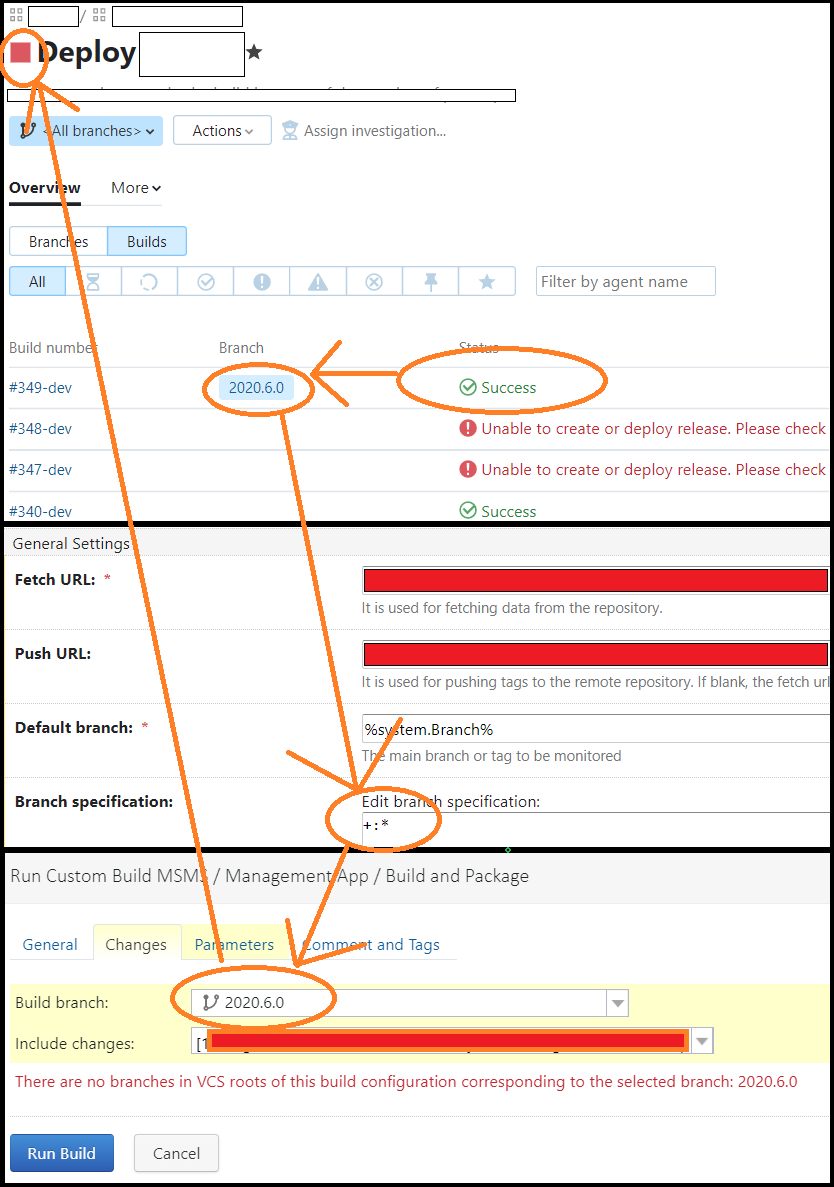
I'm not sure if this is an issue with 'Branch Specifications', but sometimes custom builds show a 'red / failed' indicator even though the most recent build was successful. I would have thought +:* would mean 'any branch', but that does not seem to be the case.
I build off of 'refs/heads/release/version.number.here', 'refs/heads/develop', 'refs/heads/features/*' and I tried to set the Branch Specifications to represent that, however, it still had the 'red indicator'.
+:refs/heads/features/*
+:refs/heads/release/*
+:refs/heads/hotfix/*
+:refs/heads/develop
+:*
Please let me know if there are any suggestions on how to approach/fix this (building / tracking w/ branches).
Thank you
Please sign in to leave a comment.
Hi, when you have <All branches> selected in the branch dropdown on the build overview page, the status icon is displayed for the default branch. If you select the correct branch in the dropdown, you will see the corresponding indicator. See the below examples:
Also note, the icon on the sidebar always represents the status of the last build in the default branch: