Server disk space summary seems incorrect

We run TeamCity 2019.2.2 (build 71923) on AWS. We run a variety of build configs, some of which produce artifacts. Following a low disk space warning, I set up clean-up rules on several build configs which appear to be working correctly. However, the Disk Usage summary claims that some configs are taking up a lot of space owing to artifacts and logs which have been deleted.
In the first screenshot below, you can see that the top build in the Disk Usage summary claims to use 1800 MB for artifacts and 253 MB for logs. Yet when I query the specifics (hover-over), you can see in the screenshot that there are 185 builds with 21 artifacts (correct, as most builds have had their artifacts cleaned up) and that the average artifact size is 1.71 KB (again, correct). Why does the summary think that this build config is taking 1800 MB for artifacts?
This build is used as a snapshot dependency for other builds, but the artifacts for those builds are counted in their own disk space usage, so I don't think this is a problem. 'Keep artifact dependencies' is not ticked for the main clean-up rule, which keeps only the history and statistics for most builds.
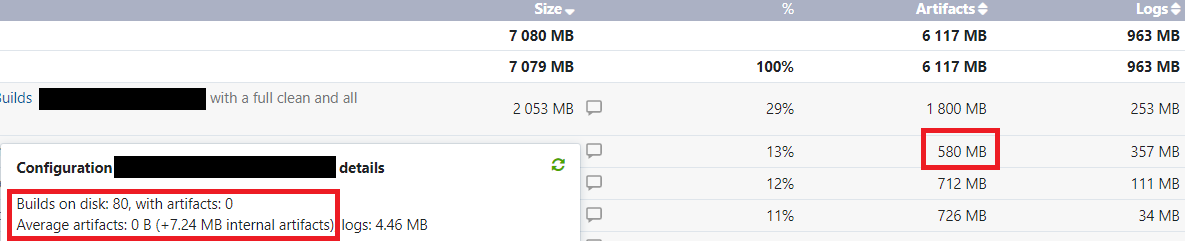
The second build in the list does not produce any artifacts (and never has). The 'hover-over' correctly shows this, as shown in the second screenshot below. Yet that build is alleged to be taking up 580 MB of space with artifacts.
I have tried clicking 'Rescan now' to no avail. This has not changed for several days despite overnight clean-up.
Please can you explain where these numbers in the 'Artifacts' column are coming from?
Kind regards,
Neil Talbott
Screenshot 1:

Screenshot 2:
Please sign in to leave a comment.
On the first one, you have 185 builds on the disk. Each of these builds has an average of 9.72MB of artifacts, which brings the total to ~1800MB. (185 x 9.72MB) This includes hidden artifacts in the .teamcity directory.
One the second build, you have 80 builds on the disk. Each of these builds has an average of 7.24MB of artifacts, which brings the total to ~580MB (80 x 7.24MB) This includes hidden artifacts in the .teamcity directory.
There is typically a list of builds and the amount of storage being used, that is helpful to determine which builds are taking up space. Please refer to the documentation covering Disk Usage found here: https://www.jetbrains.com/help/teamcity/2019.2/disk-usage.html
You can adjust your cleanup rules to help determine what builds and files should be retained during cleanup. Since you're running 2019.2.2, you can take advantage of the newer, more flexible cleanup rules. See here for more details on that: https://www.jetbrains.com/help/teamcity/2019.2/what-s-new-in-teamcity-2019-2.html#WhatsNewinTeamCity2019.2-Newflexibleclean-uprules
It is also worth pointing out that there are some circumstances that will prevent cleanup from removing files. These include:
pinned builds
builds used as an artifact of snapshot dependency in other builds when the "Prevent clean-up" option for dependencies is enabled in the build configuration. Such builds are marked with the link.png icon in the build history list
builds of build configurations that were deleted less than one day ago
Hi Eric Borchardt,
The key here was the hidden artifacts. I had not appreciated that the hidden artifacts and logs applied on a per-build basis. (This seems obvious now I look at the numbers!) Thank you for explaining that.
By applying a project-level clean-up rule to the ".teamcity" folder, I've now cleaned up the majority of the hidden artifacts and resolved the disk space problem.
Thank you very much for your prompt response - much appreciated.
Kind regards,
Neil Talbott