Invalid server path
Answered

Hi,

After transferring the project from TFS to Git, I want to connect TeamCity to TFS (with project in Git).

Teamcity version: TeamCity Professional 2020.1 (build 78475)

tfs Server: http://tfs2018:8080/tfs/devcollection/
tfs Root : $/TLW/_git/TLW-Git


When I test connection in "Edit VCS Root" in teamcity I am getting error saying "Test connection failed in *****
Failed to connect to TFS root: Invalid server path: $/TLW/_git/TLW-Git" I tried with different roots as well
e.g. "$/TLW-Git", "$/TLW/TLW-Git", "$/_git/TLW-Git", "$/TLW/TLW Team/_git/TLW-Git" and all possible combination.

I am testing with my own credentials. I can see the project in TFS, I have permissions to clone the repo.
Also I can connect to the project with Team Explorer via Visual Studio 2019 (Image 1). It shows link to the project
as following: http://tfs2018:8080/tfs/devcollection/TLW/_git/TLW-Git

I have included logs from Teamcity.tfs.log file.

Please Help.
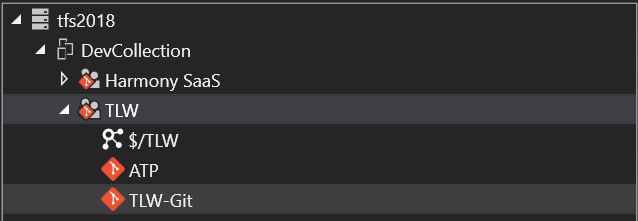
Connection test:
  Server='http://tfs2018:8080/tfs/devcollection/'
  Username='shakhbozn'
  Root='$/TLW/_git/TLW-Git'
[2020-07-06 13:05:51,270]  DEBUG - JetBrains.TeamCity.Tfs.Command - Authenticating on server http://tfs2018:8080/tfs/devcollection/
[2020-07-06 13:05:51,468]  DEBUG - JetBrains.TeamCity.Tfs.Command - Received tfs server connection
[2020-07-06 13:05:51,470]  DEBUG - JetBrains.TeamCity.Tfs.Command - Received vcs client
[2020-07-06 13:05:51,470]  DEBUG - rains.TeamCity.Tfs.ItemCommand - Start for item: $/TLW/_git/TLW-Git
[2020-07-06 13:05:51,674]  DEBUG - JetBrains.TeamCity.Tfs.Command - Disposing vcs client
[2020-07-06 13:05:51,676]  ERROR - JetBrains.TeamCity.Tfs.Program - Invalid server path: $/TLW/_git/TLW-Git
[2020-07-06 13:05:51,676]   INFO - JetBrains.TeamCity.Tfs.Program - System.ArgumentException: Invalid server path: $/TLW/_git/TLW-Git
   at JetBrains.TeamCity.Tfs.Command_ConnectionTest.DoWithTfs(VersionControlServer vcs) in C:\BuildAgent\work\ad5ec2089550fd13\TfsNativeAccessor\src\Command_ConnectionTest.cs:line 30
   at JetBrains.TeamCity.Tfs.Command.DoWithConnection(TfsTeamProjectCollection server) in C:\BuildAgent\work\ad5ec2089550fd13\TfsNativeAccessor\src\Command.cs:line 91
   at JetBrains.TeamCity.Tfs.TfsLoginBase`1.DoWithAuthenticatedConnection(String server, String username, String password, JBAction`1 action) in C:\BuildAgent\work\ad5ec2089550fd13\TfsNativeAccessor\src\TfsLogin.cs:line 50
   at JetBrains.TeamCity.Tfs.Command.Do() in C:\BuildAgent\work\ad5ec2089550fd13\TfsNativeAccessor\src\Command.cs:line 30
   at JetBrains.TeamCity.Tfs.Program.Main(String[] args) in C:\BuildAgent\work\ad5ec2089550fd13\TfsNativeAccessor\src\Program.cs:line 614
stderr: [2020-07-06 13:05:51,676]  ERROR - JetBrains.TeamCity.Tfs.Program - Invalid server path: $/TLW/_git/TLW-Git
[2020-07-06 13:05:51,693]   WARN - vcs.tfs.net.TfsNativeExeRunner -  "tfs" {instance id=-72, parent internal id=-1, parent id=dummy_tfs, description: "tfs: http://tfs2018:8080/tfs/devcollection/ $/TLW/_git/TLW-Git"}: Invalid server path: $/TLW/_git/TLW-Git
[2020-07-06 13:05:51,693]   INFO - s.tfs.TfsTestConnectionSupport - Failed to test connection to the repository TfsRoot{tfs: http://tfs2018:8080/tfs/devcollection/ $/TLW/_git/TLW-Git, user: shakhbozn}: jetbrains.buildServer.vcs.VcsException: Failed to connect to TFS root: Invalid server path: $/TLW/_git/TLW-Git
[2020-07-06 13:05:51,694]  DEBUG - s.tfs.TfsTestConnectionSupport - Failed to test connection to the repository TfsRoot{tfs: http://tfs2018:8080/tfs/devcollection/ $/TLW/_git/TLW-Git, user: shakhbozn}
jetbrains.buildServer.vcs.VcsException: Failed to connect to TFS root: Invalid server path: $/TLW/_git/TLW-Git
Please sign in to leave a comment.
For anyone else wondering, this question was handled via a closed channel, but the solution is to use a VCS Root of Git type for TLW-Git.
This article should help to obtain a proper fetch URL: https://docs.microsoft.com/en-us/azure/devops/repos/git/clone?view=azure-devops&tabs=visual-studio