TeamCity versioned settings and features branches
Answered

good day
i have following configuration:
my vst root with settings:
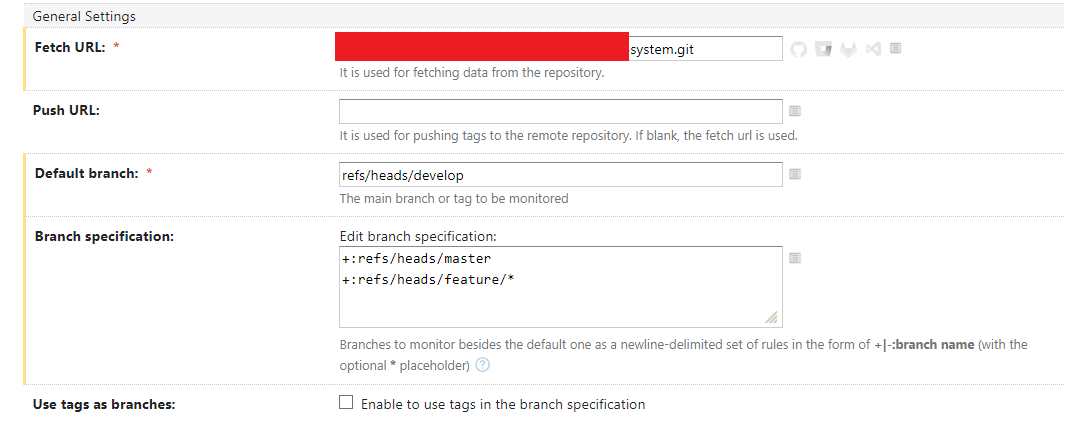
i have following definition of build process (fragment) in .teamcity/settings.kts
object Build : BuildType({
name = "Build"
vcs {
root(WIPVCS)
}
steps {
...
}
}
where WIPVCS defined as show on next image:
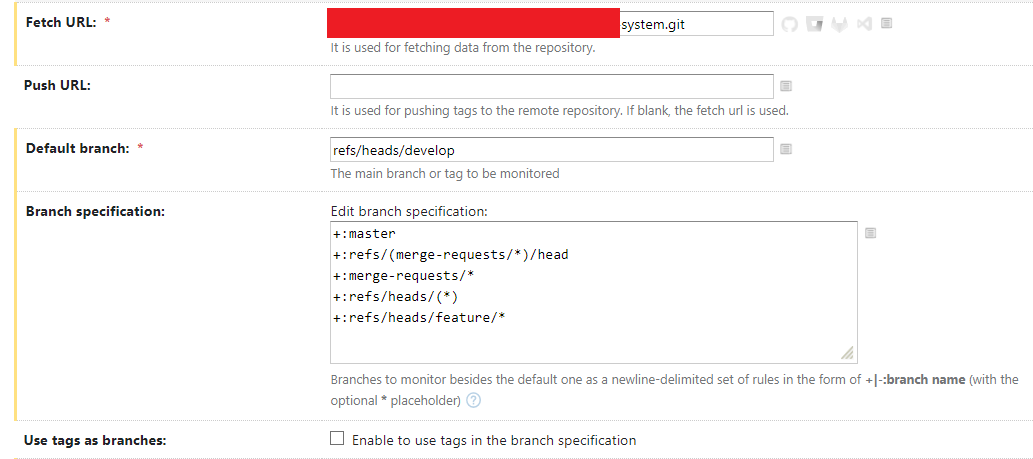
my features names as feature/PRJ-1, feature/PRJ-2, and so on
now i made changes inside settings.kts and add new build step, but this does n't reflect in build process.
i found following message in build log:

so i understand that i have some misconfigured vcs rules, but i can't find where
Please sign in to leave a comment.
Hi Anatoly. Please check 'Current Status' in the project settings > Versioned Settings. Make sure the latest revision of the versioned settings is applied. If there is a problem with versioned settings, typically you would see an error message on the Versioned Settings page when editing the project. If there is no error and the latest revision is already applied, let me know which to branch have you committed the new build step, and in which branch are you triggering the build?
Additionally, I can see that branch specification is different in settings VCS root and in WIPVCS. For troubleshooting reasons, please try using an identical branch specification in both VCS Roots.