Github rules for agent-side checkout
Completed

I have GitHub VCS root and would like to checkout a specific the release, what would be default branch and how would the checkout rule look like?
Please sign in to leave a comment.
Hello Kyle,
General information regarding feature/release branches and default branches is available here: https://www.jetbrains.com/help/teamcity/working-with-feature-branches.html
For example, if you have a refs/heads/release branch which you want to be checked out by TeamCity, you could either set it as a default branch, or update branch specification to include it (+:refs/heads/release). If you could elaborate on what do you plan to build, I would be able to suggest further.
We have a current process to manage a manifest that defines what versions of what are defined for a given system. We are wanting to move off of Subversion to use GitHub Enterprise. The current has a Subversion project and the changes are tag branches with a current checkout rule +:%system.ProjectName%/tags/rel_%system.ReleaseId% => ./manifest
We converted the SVN project to Git repos and now that the tag releases have been converted to releases and the branches have been removed. Web address to this release looks like ReleaseManager-AGM/releases/tag/rel_44, the only branch is master. We could like to fetch the release from the VCS root.
The release contains two CSV lists one with the list of versions of the components and one with the map to the teamcity jobs that builds them.
We would like the QA testers, and release engineers to be able to select the version to populate .
Hello Kyle,
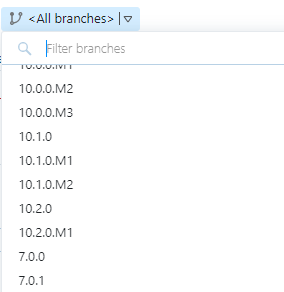
Thank you for the clarification. For GitHub, I have just done a quick test with random public repository; notable settings are as following:
Default branch: refs/heads/master
Branch specification: +:refs/tags/*
Use tags as branches: true
This is a minimal setup which will allow to fetch all of the revisions under release tags (and, correspondingly, choose them as for build):
Please let me know if this setup works for you.