Publishing build status to Azure DevOps Pull Requests

I'm trying to connect TeamCity 2019.1.3 to Azure DevOps to publish build statuses. VCS roots work fine.
I added a build feature "Commit Status Publisher" using:
- VCS Root: (same as project, which is SSH using publickey)
- Publisher: Azure DevOps
- Access Token: (token, with Code status and Code read scopes)
- Server Url: https://myproject.visualstudio.com
- Options: Publish pull request statuses (checked)
When the build finishes, when I turn on Teamcity debug logging, I can see:
[2019-11-26 23:11:45,036] DEBUG - .CommitStatusPublisherListener - Event: publishBuildStatus.buildFinished, build #2.0.336 {build id=165643, buildTypeId=Admin_ApplicationBuild}, publishers: [tfs]
[2019-11-26 23:11:45,447] DEBUG - blisher.tfs.TfsStatusPublisher - Branch refs/heads/feature/PFC-448-test for commit 3946ff4014c72c6d185a4e2fb08dfb38e1c1fa9d does not contain info about pull request, status would not be published
I've tried this with and without a URL, and without the "Publish pull request statuses" checked.
Is there a way to make this work?
----
I can see in the source for TfsStatusPublisher (https://github.com/JetBrains/commit-status-publisher/blob/master/commit-status-publisher-server/src/main/java/jetbrains/buildServer/commitPublisher/tfs/TfsStatusPublisher.java#L341):
// Captures pull request identifier. Example: refs/pull/1/merge
private static final Pattern TFS_GIT_PULL_REQUEST_PATTERN = Pattern.compile("^refs\\/pull\\/(\\d+)/merge");
//....//
final Matcher matcher = TFS_GIT_PULL_REQUEST_PATTERN.matcher(branch);
if (!matcher.find()) {
LOG.debug(String.format("Branch %s for commit %s does not contain info about pull request, status would not be published", branch, commitId));
return;
}
It looks like this is designed to only work if I name my branches "pull/123/merge", where "123" is the pull request Id? I'm unclear how that would ever work -- you can't create a Pull Request in Azure DevOps without having a branch, and you obviously can't name your branch based on a pull request id prior to creating the pull request.
Has anyone done this using gitflow-style branching?
Please sign in to leave a comment.
Hi @...! Did you ever figure out this issue? I'm running into the same problem and I hope it wouldn't require that naming convention on the branch for the exact reason you already mentioned. I've used this with BitBucket at my last company and that wasn't a requirement so I'm hoping they've done the same for Azure DevOps.
Unfortunately no.
I ended up building a little service (running as AWS lambda) that accepts a webhook from https://github.com/tcplugins/tcWebHooks and then uses the rest API on DevOps to post status. It's pretty rudimentary though, and I'm not prepared to open source it right now.
Some tips though:
I mapped the buildTypeId to DevOps "context" and this works to allow multiple builds to push to the same PR (eg: with build chains) and updates then when the build is rerun.
I had to use the "legacy JSON" webhook because it was the only one that contained the vcsroot url used to look up which repository.
The limitations:
It only works when a build completes AFTER a PR is created: to go the other way would require a hook from DevOps to do a lookup in teamcity, and I don't think there's an easy way to find builds by repository url, so this quickly gets complicated and requires either hard-coded mappings or indexing all teamcity builds and keeping a lookup in memory, so I didn't do that effort yet.
The other really annoying thing is a couple limitations of Azure DevOps (especially compared to bitbucket):
You can setup a PR policy requiring a specific buildTypeId to be successful for a single branch of a single repository, or for a branch pattern for ALL repositories. We have a couple repositories using a release/x.y.z branch pattern, so we're effectively can't require builds on those, because there isn't a way to make a rule requiring a specific buildTypeId for a pattern on a single repository.
The other thing is there's no way to clear these statues after a push. The webhook posts a "build started" message which is reflected in DevOps, but it takes a minute or so after a push before teamcity picks up the change. If you look at the PR in DevOps during this time it shows "build success" and isn't obvious it's outdated, and so it's very possible to merge a broken build.
---
I think there's a few things DevOps would need to do to support teamcity properly, but looking at their roadmap, the top community requests, the split focus of their team on both GitHub and DevOps, the fact they have both GitHub Actions and DevOps Pipelines already and the seemingly extremely small number of users with Teamcity and DevOps, I have little hope of anything happening.
Now of course, the post was written before that version was released, but did you try using it with TeamCity 2020.1 which supports Azure DevOps pull requests? If I use a branch specification of `+:refs/pull/*/merge` and a Commit Status Publisher configuration similar to yours, updates show up on Azure DevOps as expected, regardless of branch naming.
I added that branch specification in the VCS root and ended up getting this situation:
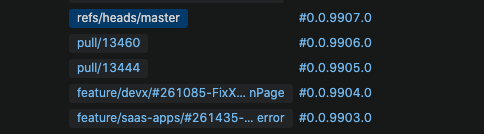
The same branch would build twice, once for the feature, and once for the pull request. Due to limitations on the number of build agents we have and the compile/unit test time on this particular repository, we were clogging our build queue and incrementing our version numbers a lot faster (that part wasn't as big of a problem, but it still dismayed some devs).
However, I had turned off the build feature to publish back to Azure DevOps. I wasn't getting any build statuses back because I had already created the PR before I enabled the feature and it seems like those builds kick off when the PR is created. So, I never got to see if it published the status to Azure DevOps. If my team is ok with the tradeoffs (double builds, clogged build queue, and increased rate of version incrementing), we might end up using it.
I'd write my own thing like Gred did, but it seems to have it's own limitations. I'm almost to the point where I'd rather it just build in Azure DevOps AND TeamCity -- Azure DevOps so we can get the build validation and TeamCity because we're not ready to migrate this particular pipeline yet. We get the equivalent of one build agent in Azure DevOps for free anyway -- may as well use it.
Thank you @... for taking the time for such a thorough response! And thank you @... for validating that it is possible!
Hi @....
Is the Azure REST API simple enough to take a single POST from tcWebHooks?
As the author of the tcWebHooks plugin I'd be interested in seeing if we can make something work that other users of tcWebHooks could use to get this integration going.
I'll have a look and see if I can reproduce the issue you had with vcsroot url in other webhook formats, especially the templated ones.
Nick, because you have both branches and pull requests in your branch specification? The docs do seem to suggest that something like that is unsupported:
> The branch specification of the VCS root must not contain patterns matching pull request branches.
But I'm in the same boat as you. My preferred workflow would be that it runs the pull request build in case the branch is associated to a pull request, and if not, just runs it as if it were just matching as a branch in the branch specification. I don't know if something like that is already readily doable though.
Edit: I added the latter as a feature request on YouTrack.
Net Wolf Thanks for that plugin, it's awesome!
I think the challenge is around the AzDevOps API being fairly verbose and requiring specific (internal) IDs for each operation
A bit more detail on the API calls I do:
and
I'm being lazy, and step 1 happens because i just defined a webhook at the root level for all builds, and so it works across several repositories. This step could be skipped if part of configuring the webhook was to specify a repositoryid, in which case the hook would have to be defined project-by-project.
I think the challenge is that step 3 requires a pullrequestid, which is why step 2 exists, but that also brings this beyond a simple fire-and-forget webhook.
There's also a more complex iterations API which allows posting statuses for each separate push. This actually requires another GET step between 2 and 3 to get the iterationids for a pull request, and correlate those results to the commit hashes based on what was actually built. I didn't bother with this at this point because while it would prevent a PR from saying "build success" in the time window between a push and an actual build starting, it's just not worth the complexity.
The bigger limitation of this to me is still handling the workflow the other way -- when the PR is created after the build is complete, because that event originates in AzDevOps.
Hi @...
Thanks so much for the thorough explanation of the process. It does seem like something that would be best implemented as a separate TeamCity plugin, and triggered from a repo change (our TeamCity is not accessible from the internets). It's certainly difficult (impossible) from tcWebHooks.
For us, I'll look at upgrading to 2020.1 and look at the plugin from Jetbrains for AZ PRs.
With regards to the repositoryid, if you defined that at a relevant level as a TeamCity parameter with the prefix webhook(dot) it would appear in your webhook payload. I think it would even be able to defined at _Root, and overridden at project or build level.
eg. webhook.repositoryid will appear in your webhook payload as just repositoryid (the webhook(dot) is stripped off).