Unable to install .net framework 4.5 on windows agent if .net 4.6 is already installed

Im trying to run unit tests using vstest 2015 in x64 platform. this is adding an agent requirement of .net framework 4.5. i already have .net4.6 installed on my wndows agent and even though i install .net 4.5 im not able to find it on my windows agent.may be because of the backward compatibility of .net 4.6. due to which my build is failing. im using teamcity enterprise version 9.1.1 (build 37059).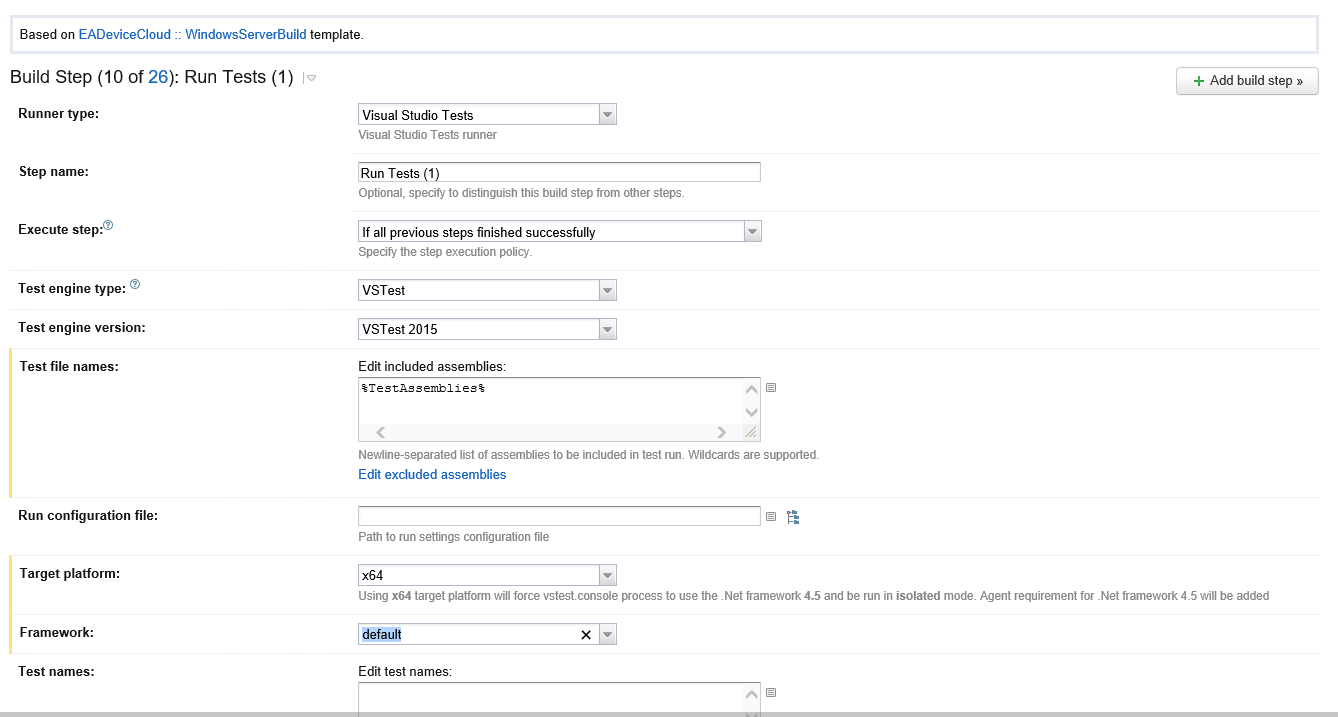

Please sign in to leave a comment.
Could you also attach a screenshot for Compatible Agents page? Are there any other settings that you have in build steps (e.g. code coverage)?
yeah we are using command line to get the code coverage. but this issue exists prior to the implementation of code coverage.
Have you restarted the agent after you've installed 4.5 Framework? Could you please provide teamcity-agent.log, covering the time when the agent was starting and logging what software was found on the machine?
Yeah we have restarted the agent after installation. but it didnt work
can .net 4.5 and .net 4.6 co-exist on windows agents?
Starting from .NET Framework 4 all versions updates are `in-place`, that means that only one 4.x version can be installed on the machine. Please check the related Microsoft documentation page.
It's still not quite clear for me why you have this requirement, as Visual Studio step requires only `teamcity.dotnet.vstest.15.0` parameter to be defined:
Not sure, May be because of the teamcity version.
You can find which step creates the requirement by disabling all of them and trying to enable one after another.
this step is adding the requirement. if you can see the line prompted below the platform tab.
I treid the way you suggested and confirmed
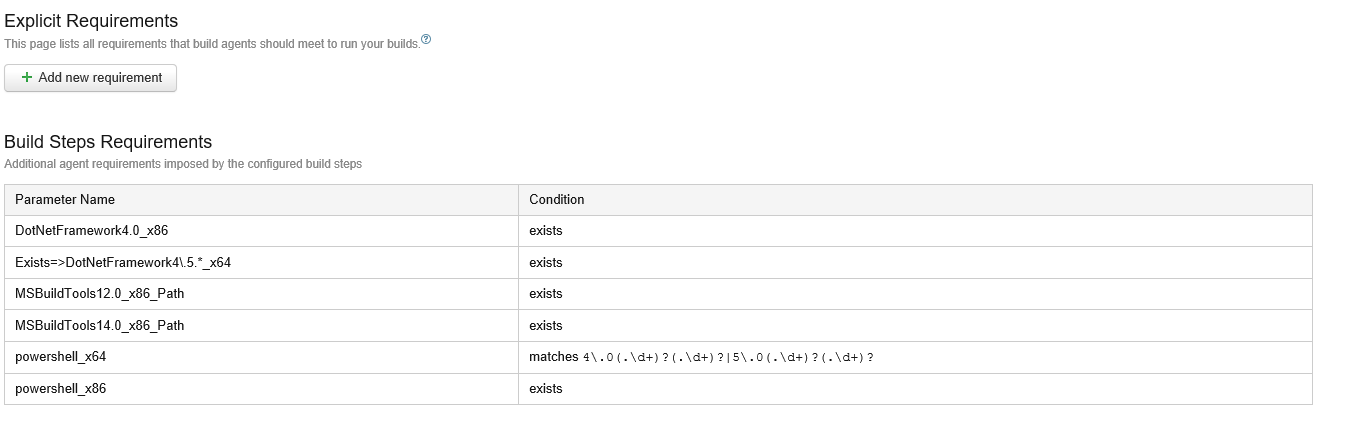
These are the .net frameworks installed on my windows agent, though i install 4.5 its not refelecting.

And if i uninstall .net 4.6 and install .net 4.5 somehow it is updating to .net 4.6. We have vs2013,vs2015,vs2017 installed on our windows agent.
Do you have a test coverage enabled for the Visual Studio Tests build step?
What is the OS version? How did you install\uninstall the framework (manually or enabling\disabling Windows feature)?
Could you please also manually check which .NET Framework is actually installed on the agent using steps, described here?
We are not using test coverage in visual studio tests build step.
Installation was manual.
I tried to Enable and disable Windows feature but it was not helping so just ran 4.5 installation.

So, you have 4.6.2 Framework installed on the agent, and it causes incompatibility with a build configuration because all .NET Frameworks after 4.0 are in-place updates.
I'm afraid I'm unable to help you to configure your agent because I don't know how did you install 4.6 version (most likely it was some Windows update) or how to revert it, but it seems not the TeamCity-related issue.
Yes, 4.6.2 installation done through Windows update. This doesnt look like incompatibility issue because when we run through commandline vstest.console.exe in the build server we are able to execute the tests but If we try to setup the build step with runner type Visual Studio Tests, then it prompts for dependency on .net framework 4.5 on selecting X64 framework.
Is there way to remove this requirement dependency which gets added with runner type Visual Studio Tests?
Could you please send us `buildSettings/settings.xml` file from hidden artifacts for a finished build? You can either create an issue in our YouTrack (and attach the data there, visible only to the teamcity-developers group) or use "Create ticket" action here (that will create a ticket in our Zendesk).
Without this information, I cannot tell you why you have this requirement or how to disable it.
enabling this step the build fails, so how to get a finished build?
It doesn't matter if a build failed or not. If it finished you can download hidden artifacts from it. Please, check the documentation link provided above.