Failing build with DotCover

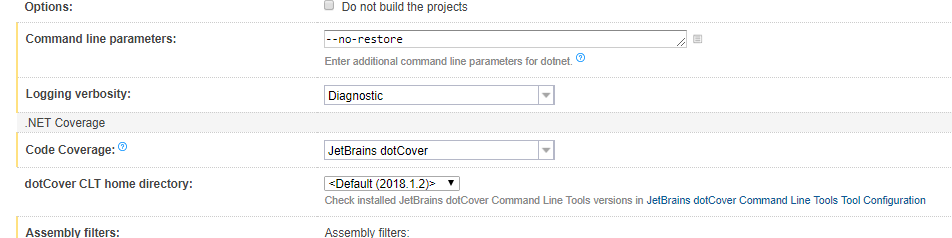
We have a series of .NET core apps that are built using the .NET CLI, part of that build process is obviouslly .NET test where we have JetBrains dotcover enabled as seen below:
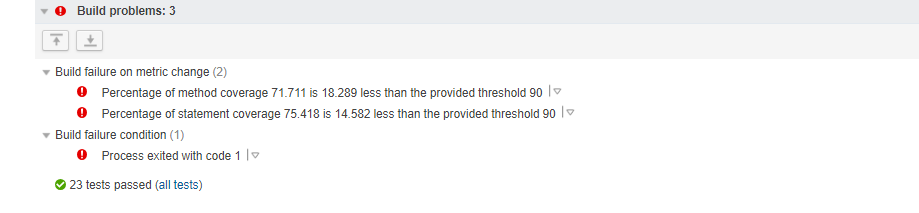
We have three build failures enabled regarding code coverage, these are metric percentages as seen here :

All of our steps post-test are configured to run only if build status is successful :

The expectation is, the build will run, tests will run and if those tests fail the builds fails; if code coverage fails during the tests the build should fail and stop as well. however, this doesn't entirely seem to be the case.
When running a build the tests pass and we continue on to the next step (expected) but if the dotCover fails the build always continues on, an example looks like the below :
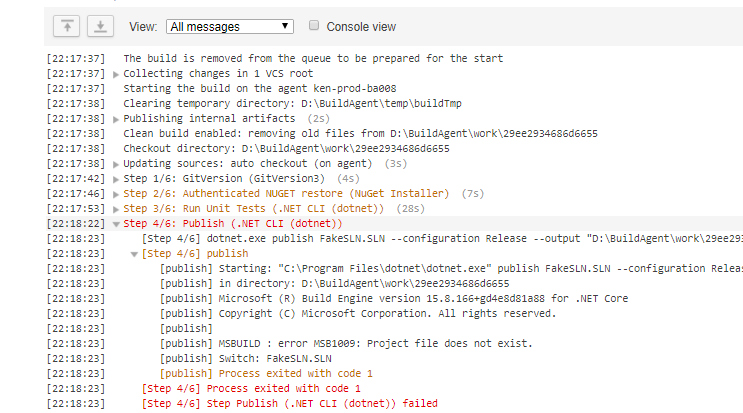
Ideally, the end goal in the above is that publish is not run due to the failing code converge. But it appears as if the code coverage does not report back and update the status until the entire build has completed or failed due to a non zero exit code? Is there some workaround I can put in place here or have is there a misconfiguration im overlooking? This has been plaguing me for quite some time and all configurations I have tried result in the above.
Please sign in to leave a comment.
Hi Joseph,
the "only if build status is successful" condition should only be used understanding its limitations, as described in the documentation: https://confluence.jetbrains.com/display/TCD18/Configuring+Build+Steps
which links to this issue: https://youtrack.jetbrains.com/issue/TW-17015
In your scenario, it seems like you could use "if all previous steps finished successfully", which is processed locally on the agent. If only the last steps have that condition, then it might not be suitable, but other than that it does look like the easiest way around it.
Hey Dennis,
Thanks for the reply. Hmm i have tried "if all previous steps finished successfully", with the above setup, originally that was the run condition for the final steps; however, it just gives the same results. I ended up breaking the build config into two seperate configs, the build without the tests has a trigger and build dependancy on the build containing the tests. Its a... dirtier solution than i wanted but it works for the time being.
Thank you for the link to the issue by the way, i had not seen that.
Thanks!
Joseph