VCS Trigger triggers on default branch and latest changes when using branch filter

Hello,
I have a problem with a trigger triggering the default branch when it should trigger a tag if matched.
I have a VCS root with the following specification configured for a build configuration called Development.
Default branch: refs/heads/%Branch%
Branch specification: %BranchSpecification%
Enable to use tags in branch specification: true
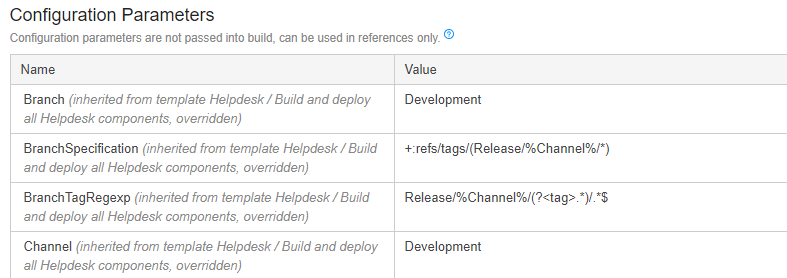
The build configuration has set the following configuration parameters
%Branch%: Development
%BranchSpecification%: +:refs/tags/(Release/%Channel%/*)
%Channel%: Development
%teamcity.vcsTrigger.runBuildInNewEmptyBranch%: true
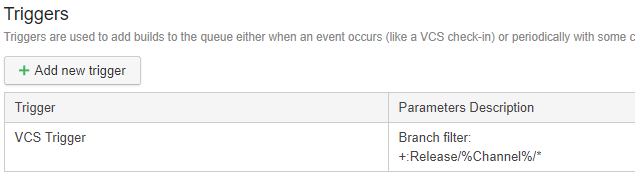
And then setup trigger as following
VCS Trigger, branch filter: +:Release/%Channel%/*
But it triggers on the default branch refs/heads/Development when ever a refs/tags/Release/Development/* tag is pushed to the origin.


The trigger is set as following and should match all logical branches with name Release/Development/*
Build starts for refs/heads/Development when tag Release/Development/hash is checked in.

Please sign in to leave a comment.
Update
I was able to pin down that the trigger was not the issue but the "Build branch" itself.
Running build on a branch, starts a build on default and not the branch itself, check images.
I made another project exactly the same and it works as intended. Any ideas how this happen? It worked in this project before.
Can find any setting that differs from the new project which works.
Run custom dialog to ensure branch is selected
Build is started on refs/heads/Development
Here is the teamcity-server log entry from when I press run on a branch, this seems to be a bug, or at least very erratic behavior.
[2018-10-29 16:02:33,307] INFO - tbrains.buildServer.ACTIVITIES - Build added to queue; Queued build {Build promotion {promotion id=543, configuration={id=X, internal id=bt1}, branch=<default>, queued}, triggered by "'admin'(X) {id=1}" (##userId='1' type='user')}
Hi,
I have not been able to replicate the issue, triggering on branches seems to run on whatever branch I select on the "Build branch" folder, as expected.
I would recommend checking the XML files in the data directory for differences in the settings between the two projects, as that might have something to do. It's not impossible that some internal state is damaged, but it would be really strange. If you can't find the differences, I'd suggest sending us the files for the two projects that are the same but have different behavior using the "Submit a request" above for a deeper review.
https://teamcity-support.jetbrains.com/hc/en-us/requests/1864406?page=1