Managing multi repository maven configuration with TeamCity

I want to use TeamCity to manage building projects. Before I discuss my problem, let me describe how I compile my project on a local machine. First, I do `git clone` on three projects, which gives me three directories:
- java_proj
- ut
- ut-flex
Next step is to go to `java_proj/backend/backend-all` and run the following task `mvn clean install`. Nothing fancy. However, I cannot get this working. I've set up repositories as follows so they make up a single project.
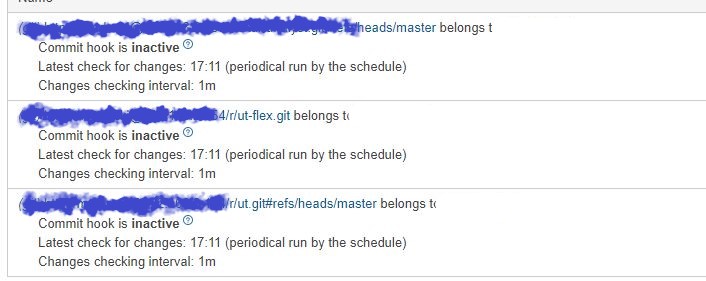
TeamCity fails to build the project and throws the following error:
> [Step 1/2] Error reading Maven project: Some problems were encountered
> while processing the POMs: [FATAL] Non-resolvable parent POM: Could
> not find artifact com.github:backend-parent:pom:0.0.1-SNAPSHOT and
> 'parent.relativePath' points at wrong local POM @ line 5, column 10
This error is perhaps due to the fact that in `java_proj/backend/backend-all/pom.xml` I have the following entry
`<relativePath>../../../ut/backend-parent/pom.xml</relativePath>`. This entry is OK when I compile the project on my machine but when compiled by TeamCity it is not resolved because the file `../../../ut/backend-parent/pom.xml` doesn't exist (it is located on repository). How do I fix this? I run latest TeamCity 2018.
Please sign in to leave a comment.
Hi, and thanks for the detailed description.
Your setup looks mostly correct, but the obvious problem here is that the working directory is different in your local environment and in teamcity. By default in teamcity, the work directory is the same as the checkout directory, which means that the relative path from maven is probably going three folders up and then trying to access something that obviously doesn't exist.
There are multiple options here. While it might seem to be obvious, adjusting the relative path for TeamCity is probably a bad idea.It would fail on your own installation and keeping two separate versions isn't something really manageable.
The next option would be to modify TeamCity's working directory for this specific build: https://confluence.jetbrains.com/display/TCD18/Build+Working+Directory. You would need to specify which directory to use on the build, which needs to exist, but it should still work and generate the rest of artifacts just fine.
I think this would be the best option, please check if you can set it up.
Dear Denis,
Thanks for your reply. I can't agree more that keeping two separate versions is a bad idea.
Let me describe my directory structure on my local machine.
I have three directories. Each directory comes from different remote repository
- java_proj
- ut
- ut-flex
When I want to compile the project I go to:
java-proj\backend\project-all\ (where pom.xml exists) and execute
In TeamCity I set:
Goal: -DskipTests=true package
Path to POM file: backend/project-all/pom.xml
Working directory: backend/project-all
Unfortunately, it won't work. Would you be so kind to tell me how to fix this?
I also tried
but it still shows me the following error