"Upper limit revision" kicks in after making a tag

For some reason, TC is no longer detecting changes to the development branch after we tagged a release. Up until last Friday, there were no tags, and TC had been building fine up until that point. I don't see why tagging a release should affect the VCS procedure, given that nothing change there.
Relevant output from build log
[10:18:29][Compute revision for 'app-develop branch'] Upper limit revision: 1ec51e6c701548753678c18c20e24c87a6c189f7
[10:18:29][Compute revision for 'app-develop branch'] Latest commit attached to build configuration: 1ec51e6c701548753678c18c20e24c87a6c189f7
[10:18:29][Compute revision for 'app-develop branch'] Computed revision: 1ec51e6c701548753678c18c20e24c87a6c189f7
When I manually ssh into the CI server and go to the build directory I see that the remote `develop` branch can be seen, but the local is not updated:
* cf2c86a - (origin/develop) Handle special users when formatting names (67 minutes ago) <Carl-Erik Kopseng>
* 70cadf0 - Fix bug in formatting (82 minutes ago) <Carl-Erik Kopseng>
* 8f24c0d - Move user formatting util over to domain class (83 minutes ago) <Carl-Erik Kopseng>
* 1ec51e6 - (HEAD, tag: sprint-15-demo, develop) Merge pull request #826 from mycomp/nim-605 (7 weeks ago) <Carl-Erik Kopseng>
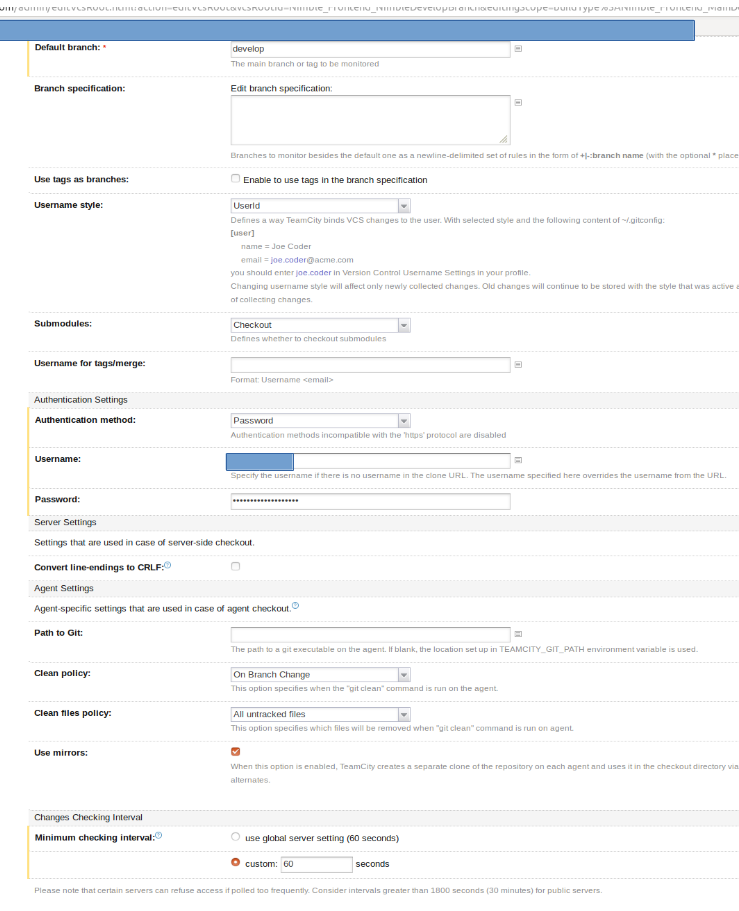
This is our config for the VCS settings
Please sign in to leave a comment.
I tried deleting the working directory to no avail
$ sudo mv d24c997083c5a87e{,.bak}# starting the build manually in TC
$ cd d24c997083c5a87e
$ git branch -a -v
* develop 1ec51e6 [behind 3] Merge pull request #826 from diffia/nim-605
remotes/origin/develop cf2c86a Handle special users when formatting names
No dice :(
I found a solution to my problem on Stack Overflow, but I am not sure why it worked:
My default branch was develop. This has worked up until now. I also tried deleting the tag on the remote repo to no avail, although I would probably have needed to clear it from the checked out repo on the CI server if that had anything to do with it.
I then changed it to refs/heads/develop. That was it. Prepending refs/heads was all, but I don't know why ...
Hi Carl-Erik,
sorry for the delay, I saw that you had figured out a workaround on your own and had a lot of backlog to do so I left the post unanswered. May I ask you to open an issue in our tracker? https://youtrack.jetbrains.com/issues/TW
I'm not really sure what can be the cause to this or the other issue you mentioned in SO, opening a ticket will be the best way to handle it.
I faced this issue recently. Here the ticket - https://youtrack.jetbrains.com/issue/TW-65966