How to use "Scramble Secure Value..."?

Hello,
When I go to:
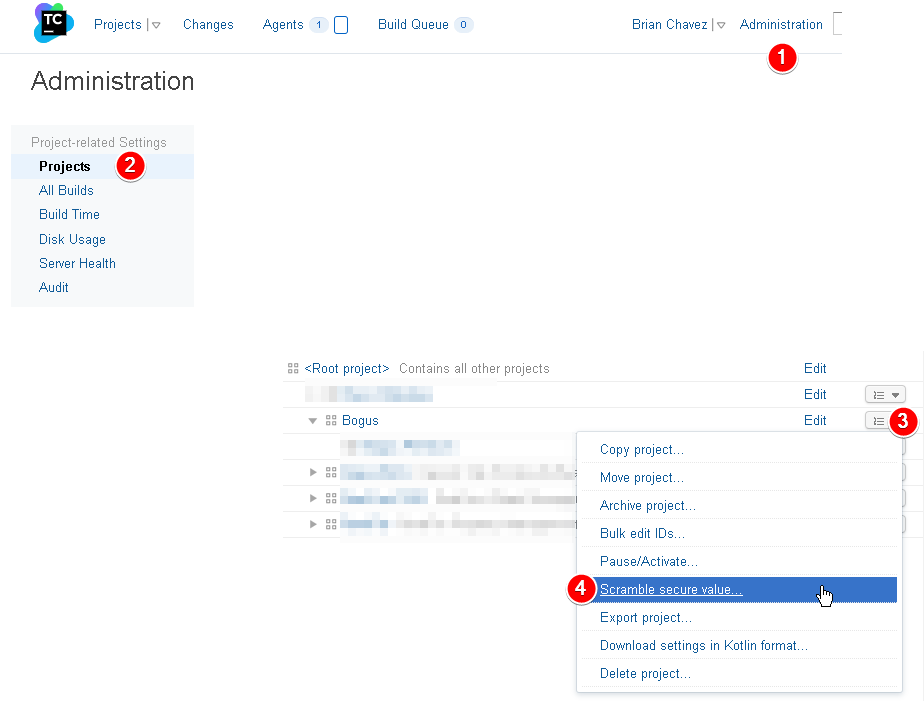 I'm able to generate a "secure token".
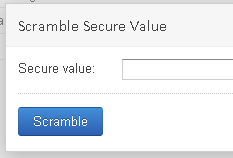
When type a "secure value" of "abcd" and then I press "Scramble" it generates a token like zzz289a9afdef. How do I use this scrambled value in my build scripts? For example, I use F# FAKE build scripts, is there some API call I can use to ask TeamCity to translate the scrambled value "zzz289a9afdef" back into "abcd" clear text?
If you could tell me how this can be done step-by-step, that would be really helpful. I read through some documentation and I can't seem to find anything that uses or describes this TeamCity "scramble" feature.
Thanks,
Brian
Please sign in to leave a comment.
Hi Brian,
This feature isn't meant to be used directly in build scripts, but, as is explained after you scramble some text, directly in the configuration files. This is a very marginal case, the most common scenario is when the configuration files are stored into version control settings. If using TeamCity's feature of version control for the settings, then the action is documented here: https://confluence.jetbrains.com/display/TCD10/Storing+Project+Settings+in+Version+Control#StoringProjectSettingsinVersionControl-tokensGen
As mentioned in that article, if you want to store secure values, it's recommended to use parameters and assign them the password type.
Hope this helps.
Thank you Denis.
It would be great if TeamCity supported scrambling values from WebUI then using those scrambled values inside build scripts. It would be similar to how AppVeyor does secure environment variables:
https://github.com/bchavez/Bogus/blob/3724fae2be3659982a24ed41c6c31f4a112eae38/appveyor.yml#L4-L6
The value was scrambled in AppVeyor's WebUI, then used in a build script to setup secure environment variable during build.
Thanks,
Brian