Migrate to MS SQL Server

hi,
I want migrate from Internal Database to External MS SQL Server
but I get the error
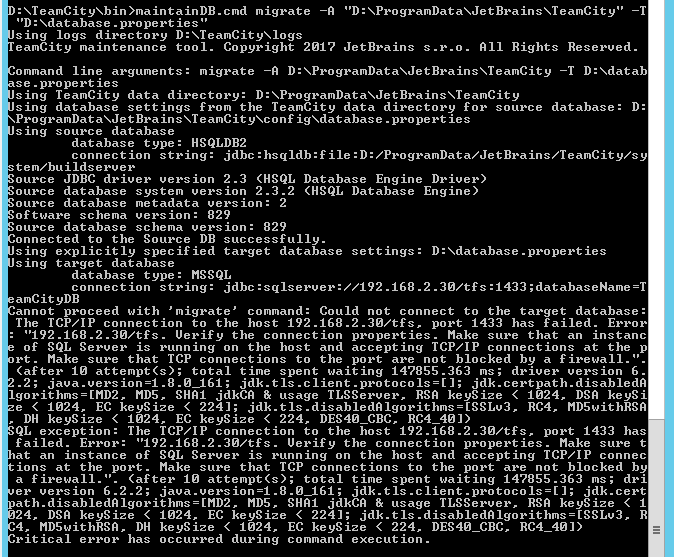
Firewall is already turn off , PORT 1433 is been open.
Database is been create with permission Owner.
as below the step I have done
- Create a temporary properties file with a custom name (for example, <database_type>.properties) for the target database using the corresponding template (<TeamCity Data Directory>/config/database.<database_type>.properties.dist). Configure the properties and place the file into any temporary directory. Do not modify the original database.<database_type>.propertiesfile.
-
- Run the maintainDBtool with the migrate command and specify the absolute path to the newly created target database properties file with the -T option:
maintainDB.[cmd|sh] migrate [-A <path to TeamCity Data Directory>] -T <path to database.properties file>
Please sign in to leave a comment.
this is the database.properties I setting it
connectionUrl=jdbc:sqlserver://192.168.2.30/tfs:1433;databaseName=TeamCityDB
connectionProperties.user=teamcity
connectionProperties.password=xxxxxxxx
maxConnections=50
testOnBorrow=true
am I right?
I run the command , the Teamcity Server Service is turn off.
Hi Kelvin,
As the message suggests, you need to make sure the database can be connected to via the address configured.
In this case, "192.168.2.30/tfs:1433" is not a valid address, it should probably be "192.168.2.30:1433"
In this case, "192.168.2.30/tfs:1433" is not a valid address, it should probably be "192.168.2.30:1433"
I have 2 instance name of the SQL Server , and I want install at TFS instance name.
So is that still no need add "192.168.2.30/tfs:1433" ? just "192.168.2.30:1433" will connect ?
Kelvin,
For the instance name, "\" should be used as the delimiter (which is escaped to "\\" in the properties file), so the line in the database.properties should probably be like:
connectionUrl=jdbc:sqlserver://192.168.2.30\\tfs:1433;databaseName=TeamCityDB
ok , thanks