Steps in build chain is sometimes skipped, why?

I just realized that some build configurations is skipped if more recent build (with same sources revision) of the dependencies is build!
- But it's not what i want...
I searched the documentation and find the side about 'Snapshot Dependencies'
https://confluence.jetbrains.com/display/TCD10/Snapshot+Dependencies
I thought the mistake was occurred cause I had a 'check' in 'Do not run new build if there is a suitable one' :D
- But after changing that for all build configurations in the pipeline I queued 2 builds manually + 1 triggered by VCS changes (Enabled Versioned Settings) and this happen!
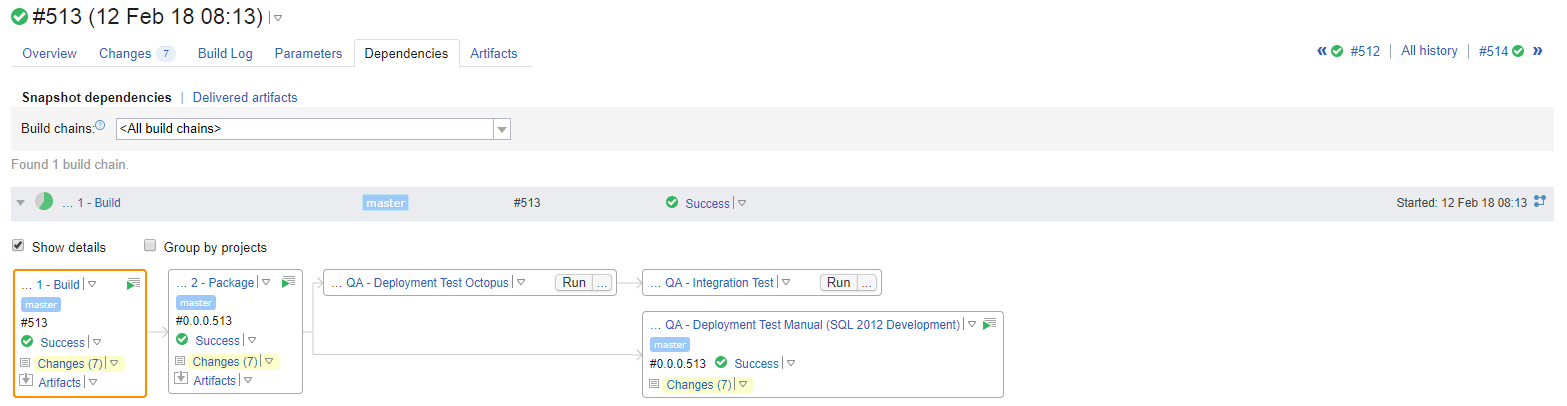
#513
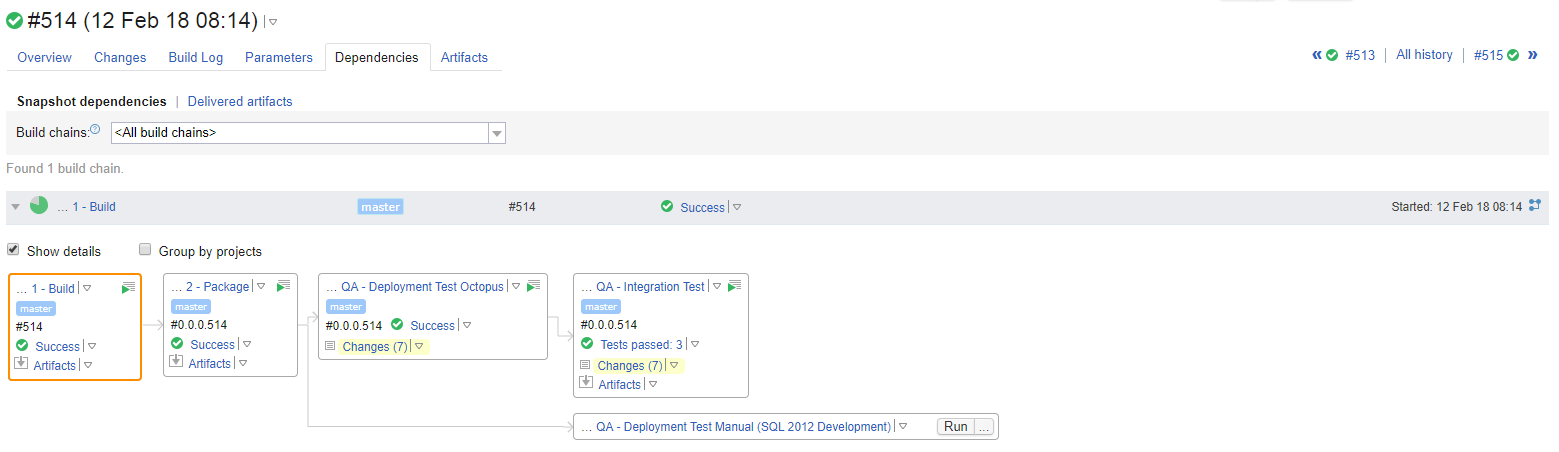
#514
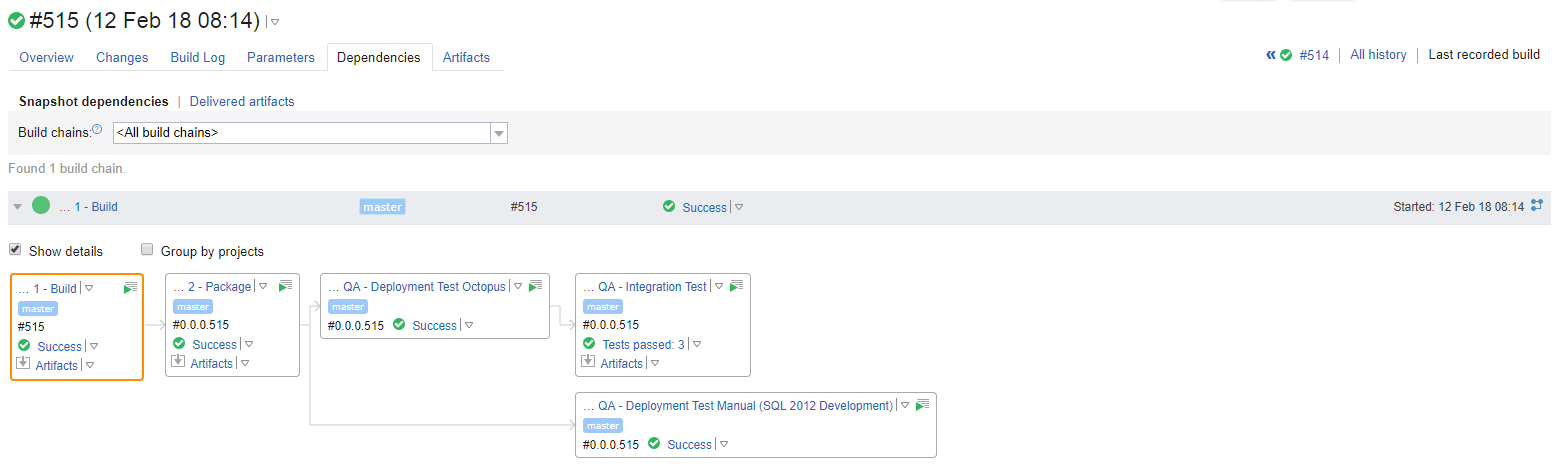
#515
This is my current dependency settings for the build configurations:

As seen in #513 I have 7 changes after removing the 'check' from all my build configurations but two builds is skipped and the changes is first collected in #514, where one other step is skipped...
- #515 is how I want it to look every time!
How do I make all builds in all chains, build?
- And not skip anything because of newer build with same sources revision?
Please sign in to leave a comment.
Hi,
while the snapshot dependency is important to be configured to always run build if you want that to be the case, you have two final configurations (Integration Test and Deployment Test). If you want both of the builds to run, you need to have the triggers set up on both.
When you triggered manually both of them, they are represented as separate "chains", as you see in 513 and 514, each of the "branches" of the chain is run separately. The VCS Trigger I assume is available on both, and thus when triggered, completes the full chain instead.
The best option if you want to every time have the full chain, would be to add a final build to the chain, even a dummy one (no build steps) simply to connect the separate branches, then move the trigger to that last build. Triggering this dummy build would bring up the whole chain all the time.
Let try make it clearer:
The Build Configurations
"1 - Build" use VSC trigger
"2 - Package" trigger on successful build in "1 - Build"
"QA - Deployment Test Manual (SQL 2012 Development)" trigger on successful build in "2 - Package"
"QA - Deployment Test Octopus" trigger on successful build in "2 - Package"
"QA - Integration Test" trigger on successful build in "QA - Deployment Test Octopus"
The Builds
#513 - "1 - Build" were triggered by VSC change
#514 - "1 - Build" were triggered manual by pressing run in TC GUI
#515 - "1 - Build" were triggered manual by pressing run in TC GUI
So in #513 I expect that "QA - Deployment Test Octopus" were trigger by a successful build in "2 - Package"
And in #514 the same for "QA - Deployment Test Manual (SQL 2012 Development)"
As you can see on the picture i'm not even informed what happens to my build?
- It's not even canceled or failed, but more like a ghost in the wind :D
Conclusion:
If I use "trigger on successful" my builds will magically disappear, if a newer build is running in the dependencies with exact same VCS!
- For me it sounds like a bug if i have to create that work around?
Can you share screenshots of all of the triggers for the build chain?
With snapshot dependencies, you can move the triggers to the end of the chain, and that will automatically pull all of its dependencies to the build queue without the need for additional triggers. The problem in your scenario is that you have 2 ends of the build chain, which means that under certain triggering conditions, they can be considered two different chains.
Your 514 build on the last screenshot is not a ghost in the wind. It didn't happen at all, there was no build, or so it seems.
I know that the trigger can be moved to a dummy build... But for me it seems like a "work around" and it's not logical and will probably confuse all other people in my team because they don't have the same all around knowledge about TeamCity.
I took the freedom to take screenshots of both the triggers and the dependencies.
-----Build-----
-----Package-----
-----Deployment Test Manual-----
-----Deployment Test Octopus-----
-----Integration Test-----
Btw. We are running: TeamCity Enterprise 2017.1.4 (build 47070)
Hi Nikolaj,
I'm trying to set up the scenario to replicate it, to have an easier time making suggestions, but I'd have a question:
-You start saying you run 3 builds, 2 manual and 1 via VCS Trigger. Are all of them in "1"? Or which manual builds do you trigger?
-Also, a rather side comment: All your builds seem to depend on 1 separately. Build dependencies are transitive, which means that, by definition, even if you removed 1 explicitly from all builds except 2, all would still depend on 1. Is there any particular reason for this dependency to be there?
I changed the snapshot dependence to "Always run a new build" and #513 (the 7 VCS changes) were automatic started (configuration changes saved with "Versioned settings" which trigger VCS).
- Right after i press "RUN" two times on the "1 - Build" in the GUI, for getting some builds running at the same time for testing the occurring of my "error".
Yes all my builds is depending on "1 - Build" because it's the only build checking out the repository, so all the other builds need some artifacts from that to execute my custom meta-runners and test.
If there is an "online" TeamCity i can try set it up myself, if that helps? :)
Just as reference, because snapshot dependencies are transitive, you can drop the dependency on 1 on every step (except 2) yet still use the artifacts of 1 from the same build chain.
We do have a test drive online: https://blog.jetbrains.com/teamcity/2017/10/welcome-teamcity-testdrive/, but if you want to simply pass us the project for testing, then you can simply export the project and send it to us via the submit a request button on top of the page. Mention this thread so that I'll get it assigned to me and will answer as soon as possible.
Actually I didn't knew snapshot dependencies was transitive :D
Don't know how politic about sharing our project in my organisation (Better safe than sorry)
- I just created a project in the cloud and fortunately the same "error" occurred.
Link:
https://teamcity.jetbrains.com/project.html?projectId=TestDrive_ReconstructionOfProblem&tab=projectOverview
Invite:
https://teamcity.jetbrains.com/invitations.html?token=xj3blvrgMZtOHGL2r9XV4542fQlpGtsQ
Hi Nikolaj,
thanks for setting up the project. I've been playing with it for a bit and have only replicated the issue whenever I clicked rather fast on it, so queuing both at around the same time generates "the problem", although the problem is slightly different to what you seemed to have. You can see in the projects that either the first build runs or all of them run, I haven't seen also your exact reproduction of the first screenshots, but it seems like what i just mentioned.
I'm considering it might be possible that there is some sort of "race condition", where the server eventually joins both chains together, but I can't currently confirm it. I'm going to ask around for confirmation but we might ask you to run the test again in your local installation, as we might need some internal server logs that on our server would be too crowded to find what we're looking for.
Yes i saw that too..
-I'm pretty sure the same will happen if the steps took some time (but the agents didn't have powershell so i gave up to add a sleep timer)
-Plus there is plenty of agents so the steps execute fast and is never waiting for other to finish (so the builds doesn't stack up)
But i'm looking forward to hear what you find out :)
- Don't know how much server log i can get from the IT department... but i can try hear them!
- We have something like 150+ agents don't know how much logs that produce :D
I just realized that i forgot to add my shared resources + i added some command line sleep so the steps take some time and now you can see that the build chain is "totally" reproduced! :)
#24 - 4 step out of 5
#25 - 2 step out of 5
#26 - 5 step out of 5
Hi Nikolaj,
I've created the issue https://youtrack.jetbrains.com/issue/TW-54043 in our tracker. The issue seems reproducible now and we have the server's project to run our tests. I think we have enough details now to try and debug it on our end, as it doesn't really seem to be a matter of configuration beyond using the finish build triggers instead of simply the snapshot dependencies, but that doesn't mean that it shouldn't work.
I can recommend using the workaround of having the last, combined build to run everything under the same chain with a single click. Another option could be removing all of the finish build triggers except Deployment Test Manual, triggering manually QA - Integration Test . That should pull 3 builds automatically to the queue, plus the finish build trigger would trigger the last, separate build.
Sounds great - and thanks for your time and the great support! :)
I will follow the issue and for now live with one of the workarounds!
Denis - could I create a second thread off this topic please. I am having a nearly identical issue but I'm not clear what your comment
"I think we have enough details now to try and debug it on our end, as it doesn't really seem to be a matter of configuration beyond using the finish build triggers instead of simply the snapshot dependencies, but that doesn't mean that it shouldn't work. "
implies. Does that mean that adding a trigger should fix it because in my scenario it's not.
Setup;
I have a 3 build chain --
Step 1) Master Load : runs powershell that calls step 2 via the API (no trigger specified); has a dependency on a 4th job that creates an artifact that is used for all steps
Step 2) Load : runs an ETL; has a couple input parameters (id # and agent). Multiple unique instances of this will be spawned as master load processes.
Step 3) Post Load: triggers on finish of load and carries the parameters and zip dependency.
Issue: Post Load is not firing consistently, only occasionally. I tried the same as the OP to uncheck the 'do not run new build if there is a suitable one' but it has not changed the behavior.
I can't understand what could be setup wrong here and why it wouldn't always trigger a postload at the completion of every successful load. Can you help me with this or at least provide a functional work-around? The idea of chaining a dummy job after post load doesn't feel like it's going to help this at all.
TC Version Info: 2017.1 (build 46533)
Hi Bryan,
how the builds and triggers are set up is also important. You misunderstood what I had to say, it shouldn't "fix it", it should work straight away, but depending on your configuration it might or might not. The Finish Build Trigger should be unnecessary when there is Snapshot dependencies if you have the VCS Trigger (or schedule, trigger manually, etc) to "PostLoad" instead of Load_LEA. If for some reason you prefer to have the VCS trigger on Load_LEA and then add a finish build trigger, it should indeed work. The best option is definitely to move the VCS triggers to the end of the chain and remove the finish build triggers, as using snapshot dependencies makes it redundant.
Why it doesn't trigger might be logged in the teamcity-server.log at the time it should trigger, but it might not depending on why it's not triggering.
Thanks for the response!
We don't currently use VCS triggers of any kind, simply a trigger like this on the Load job that occurs when it finishes a build.
So Master Load calls Load which when finishes is supposed to call Post Load.
I looked at the log and can only find the instances where it puts it in the queue but none where it does not, which is not unsurprising.
Question: Did you mean to say we should invoke PostLoad (the last step ?) or was that a misunderstanding of how the flow goes? It would be unusual, but not impossible, to call the final step and the system understand what pre-requisites need to occur first.