All new builds marked as History builds

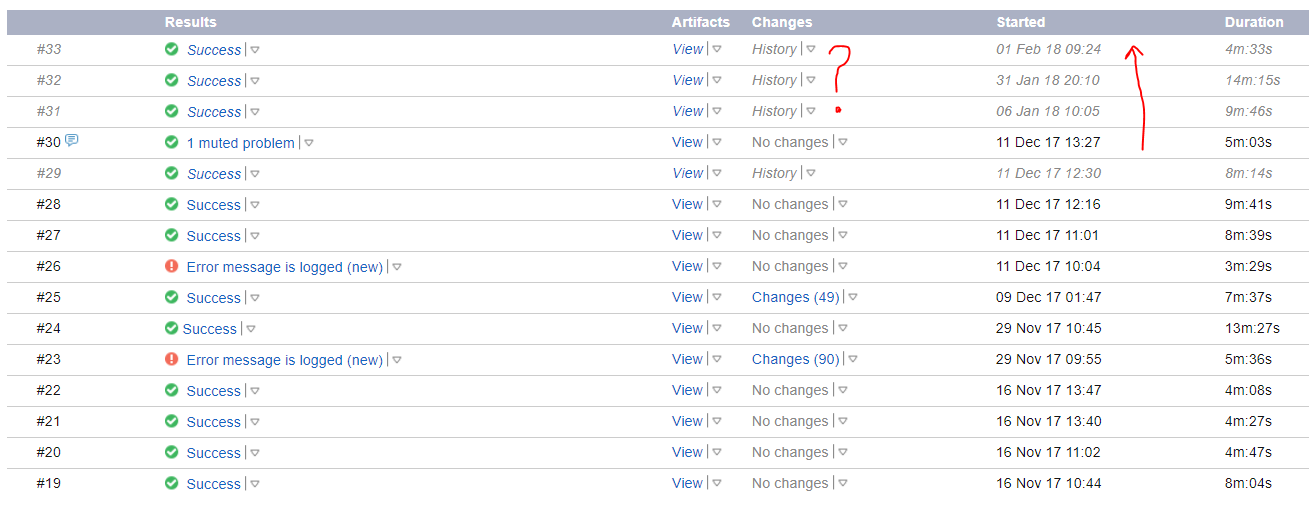 Picture is worth a thousand words: so please see attached. Additional information: No vcs settings as this is a processing step really, that will eventually be replaced, so best to be not part of other build configurations. It works on a folder so also does not have any artifact dependency. Yes, like everything else this build configuration has changed several times in the past. I just added snapshot dependency, but that has not changed the display. What we do not understand is why all new builds are being marked as History builds? Any ideas?
Why is this an issue: older builds are being shown in higher level abstractions, and confusing the people who triggered the build chains.
Please sign in to leave a comment.
Which version are you using? As we can see in the "Changes" column, it does not have a VCS attached now, but it at least used to have one. There used to be an issue that after removing a VCS Root from a step, under some circumstances, new builds would get marked as history.
I am having the same problem as the original poster. No VCS attached to this build config and I do not believe there was one ever. I am using 2017.2.2. I have a couple very similar build configs (all with no VCS) and this is the only one with this history build issue.
Hi Drew,
there is a different set of reasons for builds to be marked as history, so while the symptoms might be the same, the root cause is likely different. In your case I can see that you have a build chain attached to the build.
Could you share a screenshot with the build chains tab, with the chain from #5 and #4 expanded, if possible.
Hi Denis,
Here is a screenshot of the build chains. I did check the dependent builds and all the earlier steps of the chain look to be using the versions i would expect. They used the latest builds that were available at the time the chain was run. It looks to be only this one build config that has any odd behavior associated with it. Please let me know if there are any other details i can provide a closer look at. Thanks for the help
EDIT: turned on details an uploaded a more helpful image with build numbers.
We're getting the same. The overview page only shows builds from 15 days ago. When you go into a build you see recent builds but they're all marked history despite many new commits since. In our case it's for two composite builds.
We have two independent scenarios with History Builds now turning up. Neither is using any of the features causing History Builds according to documentation.
One uses Finish Build Trigger. We can perhaps revert to Snapshot Dependency.
The other is not in a build chain.
Perhaps it would be a good idea, if
1) TeamCity were to write on the build itself, the reason for it marking a build as History Build.
2) There was an option in TeamCity to make sure latest build is always shown on overview and build configuration pages. Failing builds are marked as History Builds and not shown, unless we select the individual build branch.
3) Option to disable History Build.
Reverting to Snapshot Dependency did not work. It seems, the two builds are ignoring the latest check-ins, but insist on building dated code.
Hi Christian, and other posters. History builds, as previously mentioned, have a number of different reasons. In the build log, under "Collecting changes", there should be some information as to which revision is actually being used. If you are faced with History builds that you consider shouldn't be, please take the full build log, teamcity-server.log and teamcity-vcs.log from the server and send them to us for review using the Submit a Request button on top of this page.