clean up rules with 2nd-successfull build, older than x-days and VCS with branch placeholder

I got a problem that one simple change in clean-up settings will result in very to early or very to late clean-up.
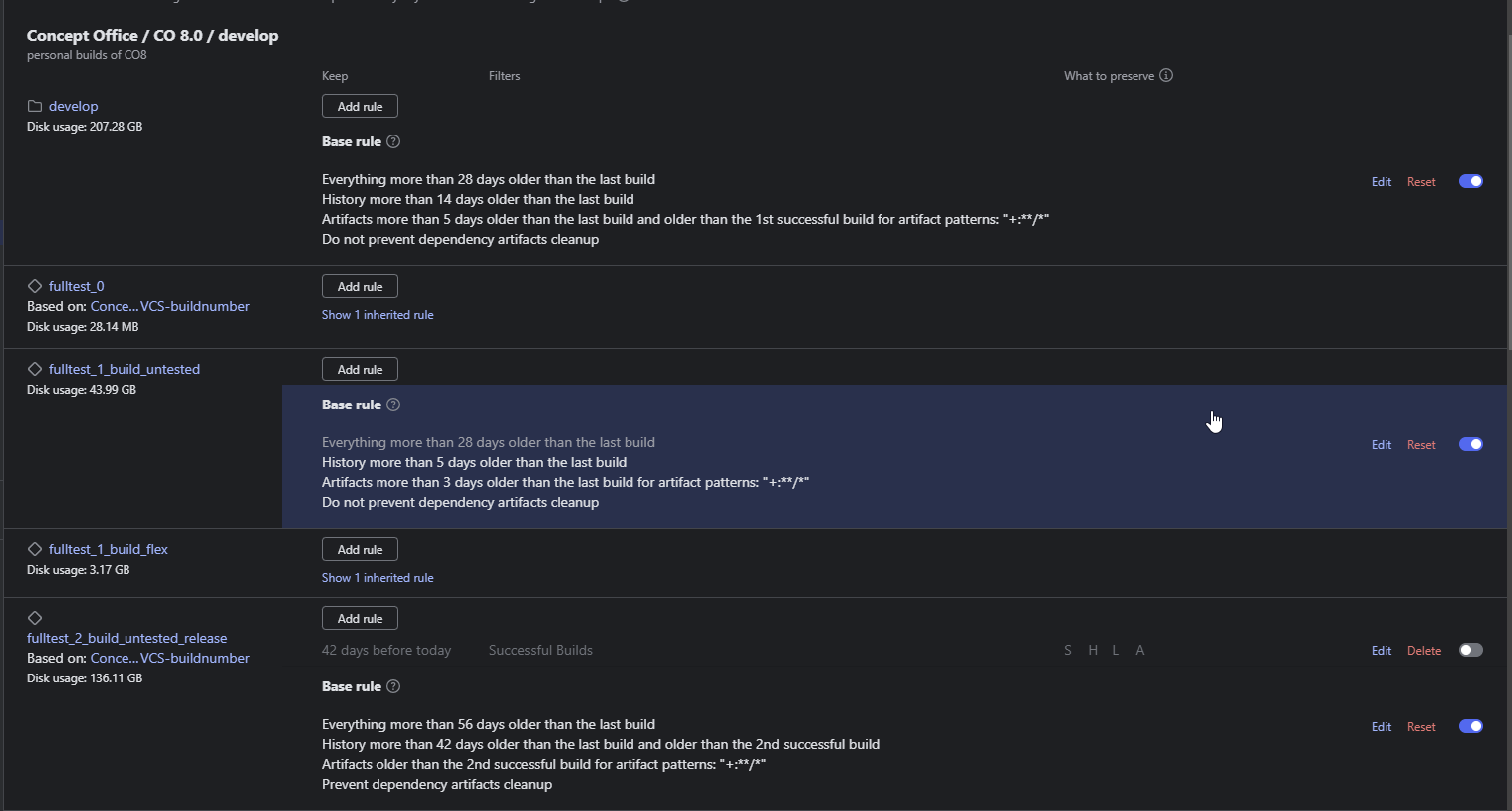
My Basic rule say's to clean-up every artifact older than 5 days and older than the last successfull artifact. So for the basic build configurations everything is fine. But i now need one release build configuration to stay for ~40 days, where i only want to keept the 2nd-last successful builds. So if i have 30-commits in the last 40 days i only want to have 2 artifacts. So I only have here the rule with these 2nd- successfull builds, but it seems these 5 days from the parent clean-up rule still cleans up here, no matter there are two successful builds left.
Otherwise if i specify the 40 days here, everything will be keept for 40 days not only the 2nd succesful builds.
Or could it be this is because it is an VCS with an variable part in branch specifications?
So what I have to do, to come to my preferred preserved artifacts?

Please sign in to leave a comment.
Could you please share a screenshot of the base rule and keep rule for your cleanup policy?
Additionally, please provide the teamcity-cleanup.log covering the timestamps when the issue occurred.
For more details on debugging the cleanup process, you can refer to Cleanup Diagnostics (https://www.jetbrains.com/help/teamcity/teamcity-data-clean-up.html#Cleanup+Diagnostics).
Files can be uploaded via https://uploads.jetbrains.com/. Please let us know the exact id after the upload.
Best Regards,
Tom
base rules details
there is no keep rule
the develop-branch is dynamic, so i want to keep the artifacts of this build queue for multiple branches (deveop-8.0-CO-123, develop-8.0-CO-456, develop-8.0-CO-789) always the last 2-successful builds for 42 days.
thats why i don't want to have a days rule on this one. But it seems to use the rule form the project, not the build queue
massive delete took place on 15.03.2025.
Logs: Upload id: 2025_03_31_2BaZQcyWkvuFLwSZ1JDQ9m (file: 2025-03-24-KWD-TeamCity-Clean-Up.zip)
Hi,
> Or could it be this is because it is a VCS with a variable part in branch specifications?
It should not matter if there are multiple branches. In TeamCity, each build configuration can have its own cleanup rules. So you could go to the release build configuration's settings and override the project cleanup policy.
>the develop-branch is dynamic, so I want to keep the artifacts of this build queue for multiple branches (deveop-8.0-CO-123, develop-8.0-CO-456, develop-8.0-CO-789)always the last 2-successful builds for 42 days.
In this case, I recommend adding a keep rule, as it allows us to define cleanup policies based on branch names. You can adjust the branch filter accordingly.
To investigate why a build was not removed, label it with the `diagnostics:cleanup` tag (https://www.jetbrains.com/help/teamcity/build-actions.html#Add+Tags+to+Build). During clean-up, TeamCity identifies all tagged builds and generates a detailed report explaining why these builds were kept. This report is saved as a build artifact (https://www.jetbrains.com/help/teamcity/build-artifact.html) to the hidden `.teamcity/cleanup/` directory.