TeamCity 5.1 + NCover 3 + publish coverage data via service messages?

Referring to the docs that are new in TeamCity 5.1, I need a bit more help. I am using the rake runner to compile, run tests, and then run tests again but with the ncover (v3) profiler hooked onto it. I'm doing this because I want to run the tests by themselves, first, to fail faster and allow for splitting up the build into a pipeline of stages.
In the build, after running ncover.console.exe, the script outputs a message like:
##teamcity[importData type='dotNetCoverage' tool='ncover3' path='C:/BuildAgent/work/9c024de989888dac/project/build/out/reports/ncover/Foo.UnitTests.coverage.xml']
In the build, ncover.reporting.exe is also run against the coverage files (both individually, and against a new one that is the result of merging each of the individual ones together) to produce a variety of ncover's reports - these end up in a directory each, like project/build/out/reports/ncover/{name-of-report-set}.
We have installed TeamCity 5.1, and I was kind of expecting that new builds produced would get the integration (by that, I mean the summary view linked from your blog post and the graph (although rake-dotnet already publishes enough information to build this graph by itself)) happening, since we already publishing the XML data via service-message (just, pre-5.1, TC didn't know what to do with it).
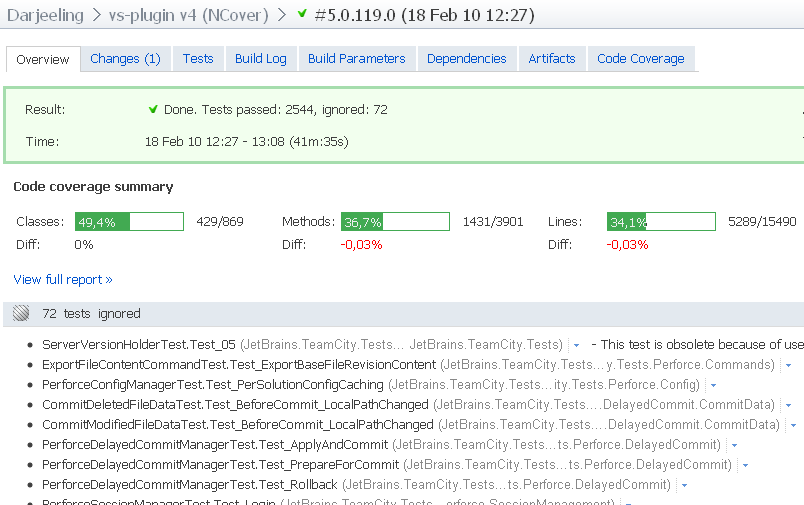

I have not made our build-script publish service messages like:
##teamcity[dotNetCoverage key='ncover3_reporter_args']
What are those for? I mean, is TeamCity going to run further reports...?
Are you guys producing your summary view and graph details by parsing reports, or raw coverage data? I assume the former, by extrapolating from your needing the ncover3_home and ncover3_reporter_args service messages - but I find the documentation ambiguous.
Also, how does your integration deal with there being several raw-coverage-files to consider - does it automatically merge them together?
Finally, there are no sample ncover3_reporter_args in the documentation for me to try to get further than I am.
Any help appreciated!
Please sign in to leave a comment.
TeamCity parses generated NCover report files to get coverage values. It will merge all produced report files.
I've improed documentation pages, I believe there are enough examples added.
http://confluence.jetbrains.net/display/TCD5/Manually+Configuring+Reporting+Coverage
To make importData service message work for your build, please issue NCover3 service messages to setup paths to NCover:
##teamcity[dotNetCoverage ncover3_home='path to NCover3 installation']
##teamcity[dotNetCoverage ncover3_reporter_args='//or FullCoverageReport:Html:{teamcity.report.path}']
After printing those messages, TeamCity will process all
##teamcity[importData ...
messages.
At the end of the build TeamCity will merge generated reports by calling NCoverReporter with necessary arguments.
Statistics values are computed from merged report by use of NCoverReporter.
It seems that you have implemented bigger part of this functionality inside your rake build scripts.
Thanks!
So, coming back to this after a dog's age:
* I'm still using the rake-runner, and still attempting to do a manual integration.
* I'm using v5.1.2.
* where should teamcity.report.path point at? The file that ncover.reporting creates (ie, FullCoverageReport.html) or the directory that it is writing reports into?
* I think I have followed the instructions correctly, but the integration is still not kicking in. An excerpt from a build-log is below, with pertinent lines highlighted. When I go to that build-configuration's overview tab, I do not see code-coverage summary, nor do I see a code-coverage tab.
I am sending the ncover3_home and ncover3_reporter_args messages before running ncover.console, line 265 "##teamcity[dotNetCoverage ncover3_home='C:\BuildAgent\work\4a8afb6036bf1052\3rdparty\NCover\x86']" and line 382 "##teamcity[dotNetCoverage ncover3_reporter_args='//or FullCoverageReport:Html:C:\BuildAgent\work\4a8afb6036bf1052\project\build\out\reports\ncover\FooBar.merged/FullCoverageReport.html']".
I am sending the importData service message on line 467 "##teamcity[importData type='dotNetCoverage' tool='ncover3' path='C:/BuildAgent/work/4a8afb6036bf1052/project/build/out/reports/ncover/FooBar.merged/FullCoverageReport.html']". The report file exists at the path.
Referring here, does the ncover3_reporter_args refer to the location to pull the report into artifacts, or the artifact that the integration's coverage-report tab will point at?
Referring here, should the teamcity_reporter_args be //or FullCoverageReport:Html:{teamcity.report.path} _literally_? I'd thought {teamcity.report.path} was an instruction to the user to substitute in the path to where the report will be written - but is it actually a literal?
This '{teamcity.report.path}' is a string that TeamCity will replace. All other parameters seems right.
Ah, ok. I've changed that. Now, I get the following. I guess the integration wants the coverage XML (or list thereof), not the fullcoveragereport.html that the main build-script has already produced. That confused me - why would TeamCity want to generate something again?
I wish it were possible to just tell TeamCity, via a service message, to import a report that has already been created in the main build-script.
I also found this bug-report. Still relevant?
Yes, the issue is still actual. Do you see generated merged report? In the logs I found that NCover report generator failed with an error. Please attach the list for report files, the text of service messages that were used.
"Do you see any generated merged report" - where?
Service messages:
##teamcity[dotNetCoverage ncover3_home='C:\BuildAgent\work\1f1b7bbbe0101dc6\3rdparty\NCover\x86']
##teamcity[dotNetCoverage ncover3_reporter_args='//or FullCoverageReport:Html:{teamcity.report.path}\index.html']
##teamcity[importData type='dotNetCoverage' tool='ncover3' path='C:/BuildAgent/work/1f1b7bbbe0101dc6/project/build/out/reports/ncover/FooBar.merged/FullCoverageReport.html']
Importing data from 'C:/BuildAgent/work/1f1b7bbbe0101dc6/project/build/out/reports/ncover/JustEat.merged/FullCoverageReport.html' with 'dotNetCoverage' processor
Resulted in the attached log excerpt (at the end of the build-success) below.
It looks like Instead of
##teamcity[importData type='dotNetCoverage' tool='ncover3' path='C:/BuildAgent/work/1f1b7bbbe0101dc6/project/build/out/reports/ncover/FooBar.merged/FullCoverageReport.html']
I should write out
##teamcity[importData type='dotNetCoverage' tool='ncover3' path='C:/BuildAgent/work/1f1b7bbbe0101dc6/project/build/out/reports/ncover/FooBar.merged.xml']
(which is the coverage file that I want the stats to be taken from).
?
In 'importData' service message you should put NCover result .xml file. TeamCity will generate html report for you. Even more, TeamCity will merge all sent NCover report into one report automatically by calling NCover reporting tool.
So TeamCity first calls ncover.reporting.exe to merge coverage XMLs that come from ncover.console.exe running tests from different libraries, and second to run a FullCoverageReport against that merged file?
NCover 3 only supports that in the complete-edition, I thought? I mean, our build-agents have that, but that's not mentioned in the documentation.
I wish it were possible to just tell TeamCity "here's a FullCoverageReport.html I already generated - please just use it". That said, now I know how to integrate, should be fine to do.
We will improve documentation for this issue.
Please try that:
http://confluence.jetbrains.net/display/TCD6/Including+Third-Party+Reports+in+the+Build+Results and that
http://confluence.jetbrains.net/display/TCD5/Build+Script+Interaction+with+TeamCity#BuildScriptInteractionwithTeamCity-ReportingCustomStatistics
But I know how to include reports as a tab, and report custom statistics to generate a custom chart (and I was able to do that fine, from the existing documentation); what I'm actually trying to do is trigger the TeamCity integration for coverage report on the overview tab - since that makes the coverage information more "in your face" for browsing developers.
I would have expected an edit to http://confluence.jetbrains.net/display/TCD5/Manually+Configuring+Reporting+Coverage.
This is not possible to do in current version of TeamCity. Please feel free to create a plugin for that.