TeamCity v6.0.1 interprets %time% in a custom build script as an agent property.

Hi,
I have the following custom script defined in a build step that uses %time%: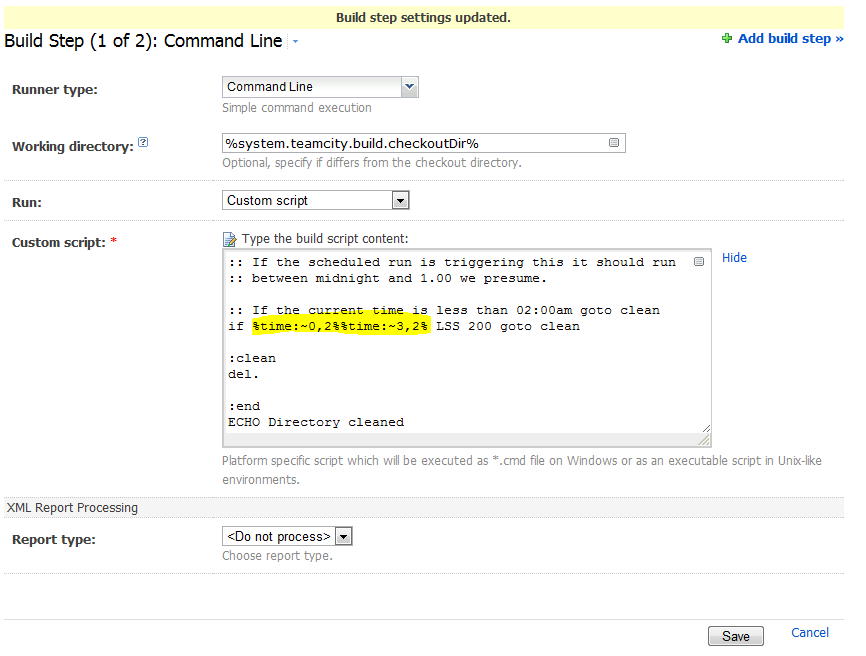
This script line with %time% in works fine in a .cmd but when tried to use it on teamcity the agent requirements look like this: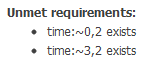
It seems like TeamCity thinks that %time% (or derivations of anything with % around it) is an agent property rather than a batch script system variable. Is this a bug? Is there a way around it?
Cheers,
Andrew
Please sign in to leave a comment.
TeamCity treats any string inside % as a reference to a parameter. To avoid this you can use double %, ie: %%time:~0,2%%
Awesome, thanks for the help, marked as the correct answer :). ECHO %%time%% in the custom script produced:
[14:29:12]: [Step 3/3] Using runner: simpleRunner
[14:29:12]: [Step 3/3] Starting: E:\TeamCity\buildAgent\temp\agentTmp\custom_script2511186484963637492.cmd
[14:29:12]: [Step 3/3] in directory: E:\TeamCity\buildAgent\work\1dc880a8ee2d4468
[14:29:12]: [Step 3/3] E:\TeamCity\buildAgent\work\1dc880a8ee2d4468>ECHO 14:29:12.29
[14:29:12]: [Step 3/3] 14:29:12.29
[14:29:12]: [Step 3/3] Process exited with code 0
A note about this should be added to the documentation, not sure if this is the right spot.
Cheers,
Andrew