dotCover Summary showing, but Code Coverage tab not visible

Hello all... I have a dotCover setup to run on our NUnit build task.
The coverage report seems to be generated correctly, as the Code Coverage Summary is displaying properly on the Overview tab. However, the Code Coverage tab which contains details of the coverage report is not visible.
Any ideas?
Thanks!
Attachment(s):
tc_coverage.png
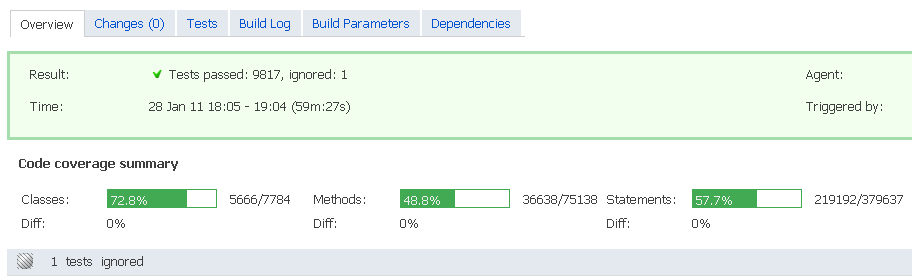
Please sign in to leave a comment.
Hi Tom
Please check settings in Administration | Server Configuration | Report Tabs.
There should be an item with
Title: Code Coverage
Path: coverage.zip
Page: index.html
If it's deleted by some reason, you can add it again manually.
Michael
The Code Coverage report tab is listed on that config page, however it still is not showing up. I tried deleting and recreating it but to no avail. The way I have it setup is to run overnight so we can see the results in the morning. I am wondering if there is a cleanup of the coverage.zip perhaps?
I think I may have found the problem... it seems that the artifact file is not being written because it exceeds the maximum artifact file size defined in the configuration. This was defaulted to 300 MB. The fact that this coverage report is greater than that is a little unsettling to me, but to test it out I have updated it to 1GB. I will let you know what the results are.
We have TW-12243 request for that, please vote.
Michael
Sorry for the delay, but this was the problem. Hopefully in future versions this file can compressed somehow? This is HUGE.
Hi Tom
The archive size seems abnormally large.
How many statements do you have in the report?
You could use filters to limit coverage scope, but it's a kind of workaround.
Michael
I've tried this, but it always seems to end up filtering out everything. Is there a way to filter out by class name?
ex) Class=*Test
or Class=*View
Or something similar? I've tried to exclude assemblies, but that ends up not working.