Problem with default branch

I have a project configured with git, default branch is "master" as follows:
I've also a Service Hook in github configured as follows: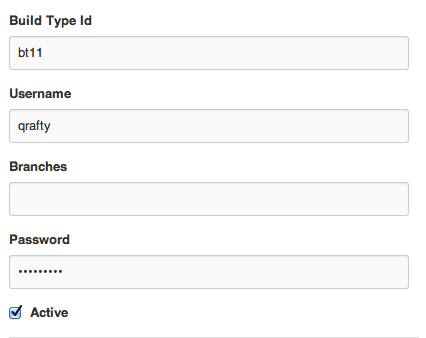
When I push a change to master in github, teamcity starts with "branch: master" but when I click "run" from the ui with "DEFAULT BRANCH" selected... it starts with no branch. So, my build history looks like this: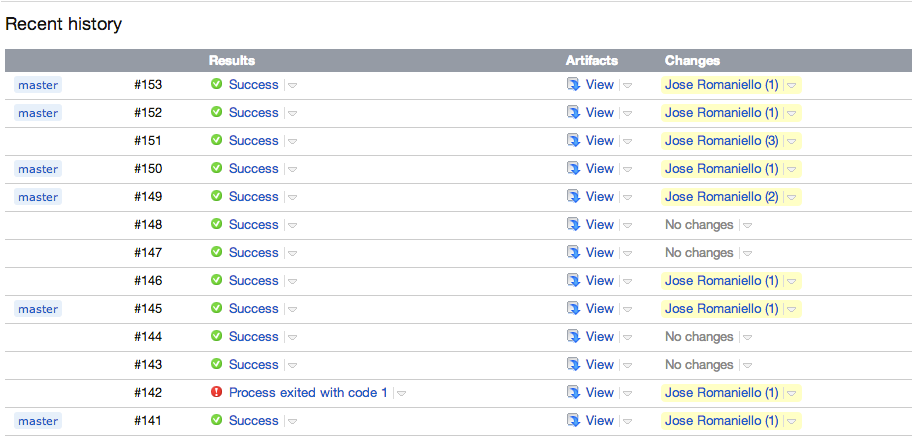
149 has 2 changes, 150 has 1 change. Then I went to the ui and clicked on "run", 151 started with 3 changes which are actually the 2 from 149 and the one from 150.
What am I doing wrong? thanks
Please sign in to leave a comment.
same problem than here:
http://stackoverflow.com/questions/16695038/finish-build-trigger-only-fires-when-parent-build-is-called-manually
Hi Jose,
a github service hook marks a build with a branch name, that is why some of the builds have label 'master', you can do that by hand by running a custom build with parameter teamcity.build.branch=<some value>. Since your VCS root doesn't have a branch specification defined, it tracks a single branch (master) and in such a case we don't label builds to make UI cleaner. Let me know if it helps.
Yes, it does help. The problem I've as reported here:
http://youtrack.jetbrains.com/issue/TW-30177
is that when it build with branch: master (from github hook), it doesn't trigger the Build Finish Trigger of other build.
Please specify a TeamCity version you use in the issue.
Hi Dmitry, done
Thanks, this has been fixed in TeamCity 8.0, so upgrade should help.