Challenges faced during Configuration of TeamCity - Email Notifications

Hi group,
It would be highly appreciated if someone could help me in resolving Challenges faced during Configuration of TeamCity - Email Notifications. I have installed TeamCity Professional version 8.1.2 on my machine having Operating system - Windows 7 Professional (64-Bit).
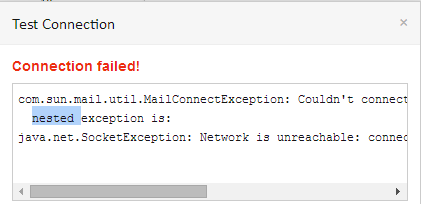
During Configuration of TeamCity - Email Notifications, when I performed Pilot testing, it encountered with the following error message “ Connection failed!.. com.sun.mail.util.MailConnectException: Couldn't connect to host....nested exception is: java.net.SocketException: Network is unreachable: connect” (Please check attachment for more details). Also, I tried sending mail to Port 25 through Telnet commands & the messages were sent successfully.
My TeamCity -> Server Administration -> Email Notifier settings are as follows :
SMTP host: testing.demo.com
SMTP port: 25
Send email messages from : my e-mail ID
SMTP login : my Login credentials
SMTP password : My Password
Secure connection : SSL
Regards,
Sobers
Attachment(s):
TeamCity Connection failed issue.png
Please sign in to leave a comment.
Hi,
Have you tried to send mails from 25 Ports? Can you please check that 25 port is not blocked by Firewall.
If there is no problems with Firewall, can you please attach teamcity-notifications.logs and teamcity-server.logs.