How to reveal a branches drop-down list in TeamCity?

Hello,
I try to reveal a drop-down list for a build configuration in TeamCity. Here you have the screenshot of what i want to do: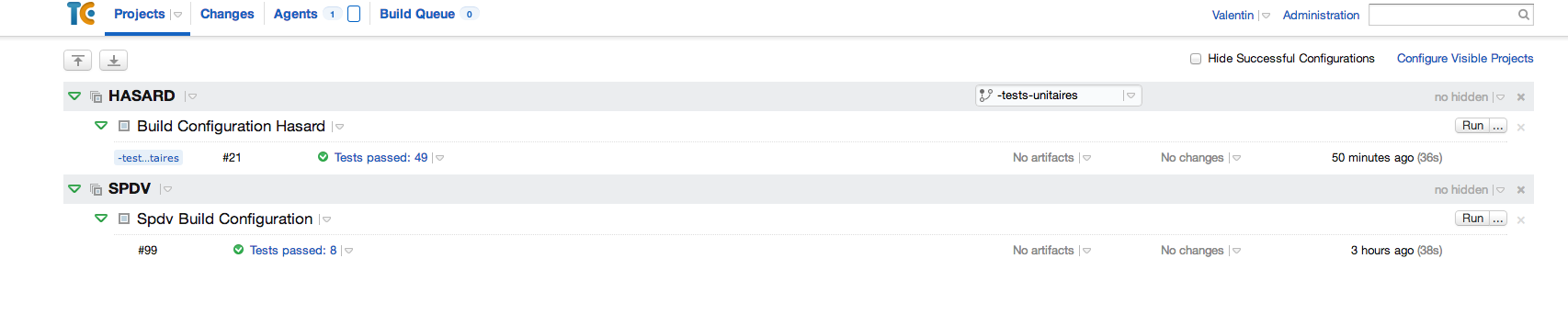
As you can see, for the Hasard project i can choose my branch with a drop-down list whereas for the other one i didn't manage to do it.
How can i make this drop-down list appear?
Thank you very much for your help.
Valentin Maréchal
Please sign in to leave a comment.
Hi,
There should be such drop-down lists for all build configurations if they have more than one active branches.
Allright thank you very much!!
But for the Hasard project, i have only one active branch, but my default branch is also considered as an active branch. So that's why I have this drop-down list?
Can i remove the default branch from the active branches?
thank you
Hi,
To be more precise this drop-down list apppears if you have default branch + more than one active branch. If active branch is the same as default there is no such drop-down list.No, you cannot remove default branch. You can setup it in VCS Settings of build configuration.