Error creating connection with hosted TFS on Azure VM

Hi there
I have recently moved our Team City Server onto an Azure Windows Server 2012 Virtual Machine.
I have followed a number of tutorials and read a number of forums on how to create a VCS root on TeamCity using the hosted version of TFS(TFS online).
I had mannaged to get it working on my PC which we used as a build server, but when I try and replicate that on the VM I get an error:
Test connection failed in IQS Team Platform :: Build IQS Class Library. TFS failed. ExitCode: 111, command: C:\TeamCity\webapps\ROOT\WEB-INF\plugins\tfs\bin\tfs-native.exe @@C:\TeamCity\temp\TC-TFS-88-9780_450\command.params, in file: {https://ij.visualstudio.com/DefaultCollection, /user:***** /password:***** /hash:S, /noProxy, C:\TeamCity\temp\TC-TFS-88-9780_449.result, ConnectionTest, $/IQS Source}, completed in: 0 second(s)
stdout: TFS Native Verifier v8.0 Copyright (C) 2006-2013 JetBrains s.r.o.
Running under .NET Framework 4.0.30319.18449
INFO -
INFO - Use Team Explorer 2012
INFO -
TFS Native Accessor v8.0 Copyright (C) 2006-2013 JetBrains s.r.o.
INFO - Connecting to server https://ij.visualstudio.com/DefaultCollection
INFO - WebProxy is disabled
Connection test:
Server='https://ij.visualstudio.com/DefaultCollection'
Username='##LIVE##\michaelbarnes'
Root='$/IQS Source'
WARN - Failed to authenticate with TFS. Check you have Team Explorer (or Visual Studio) 2012 Update 1 installed. Type not found
ERROR - TF30063: You are not authorized to access https://ij.visualstudio.com/DefaultCollection.
System.Exception: TF30063: You are not authorized to access https://ij.visualstudio.com/DefaultCollection. ---> Microsoft.TeamFoundation.TeamFoundationServerUnauthorizedException: TF30063: You are not authorized to access https://ij.visualstudio.com/DefaultCollection.
at Microsoft.TeamFoundation.Client.Channels.TfsHttpWebRequest.EnsureTokenProvider(HttpWebResponse webResponse)
at Microsoft.TeamFoundation.Client.Channels.TfsHttpWebRequest.SendRequest()
at Microsoft.TeamFoundation.Client.Channels.TfsHttpRequestChannel.Request(TfsMessage message, TimeSpan timeout)
at Microsoft.TeamFoundation.Client.Channels.TfsHttpClientBase.Invoke(TfsClientOperation operation, Object[] parameters, TimeSpan timeout, Object[]& outputs)
at Microsoft.TeamFoundation.Framework.Client.Registration.GetRegistrationEntries(String toolId)
at Microsoft.TeamFoundation.Framework.Client.RegistrationProxy.GetRegistrationEntries(String toolId)
at Microsoft.TeamFoundation.Framework.Client.RegistrationService.GetInstanceId()
at Microsoft.TeamFoundation.Framework.Client.RegistrationService.get_InstanceClientCacheDirectory()
at Microsoft.TeamFoundation.Framework.Client.RegistrationService..ctor(TfsTeamProjectCollection tfsObject)
at Microsoft.TeamFoundation.Client.TfsTeamProjectCollection.CreateServiceProxy(Type serviceType)
at Microsoft.TeamFoundation.Client.TfsTeamProjectCollection.GetServiceInstance(Type serviceType, Object serviceInstance)
at Microsoft.TeamFoundation.Client.TfsConnection.GetService(Type serviceType)
at Microsoft.TeamFoundation.Framework.Client.PreFrameworkServerDataProvider.FindServiceLocation(String serviceType, String toolId)
at Microsoft.TeamFoundation.Framework.Client.PreFrameworkServerDataProvider.LocationForCurrentConnection(String serviceType, Guid serviceIdentifier)
at Microsoft.TeamFoundation.Client.TfsConnection.EnsureProviderConnected()
at JetBrains.TeamCity.Tfs.Command.Do() in c:\BuildAgent\work\23f504c63c17dfdf\TfsNativeAccessor\src\Command.cs:line 28
at JetBrains.TeamCity.Tfs.Program.Main(String[] args) in c:\BuildAgent\work\23f504c63c17dfdf\TfsNativeAccessor\src\Program.cs:line 134
--- End of inner exception stack trace ---
at JetBrains.TeamCity.Tfs.Program.Main(String[] args) in c:\BuildAgent\work\23f504c63c17dfdf\TfsNativeAccessor\src\Program.cs:line 438
stdout: TFS Native Verifier v8.0 Copyright (C) 2006-2013 JetBrains s.r.o.
Running under .NET Framework 4.0.30319.18449
INFO -
INFO - Use Team Explorer 2012
INFO -
TFS Native Accessor v8.0 Copyright (C) 2006-2013 JetBrains s.r.o.
INFO - Connecting to server https://ij.visualstudio.com/DefaultCollection
INFO - WebProxy is disabled
Connection test:
Server='https://ij.visualstudio.com/DefaultCollection'
Username='##LIVE##\michaelbarnes'
Root='$/IQS Source'
WARN - Failed to authenticate with TFS. Check you have Team Explorer (or Visual Studio) 2012 Update 1 installed. Type not found
ERROR - TF30063: You are not authorized to access https://ij.visualstudio.com/DefaultCollection.
System.Exception: TF30063: You are not authorized to access https://ij.visualstudio.com/DefaultCollection. ---> Microsoft.TeamFoundation.TeamFoundationServerUnauthorizedException: TF30063: You are not authorized to access https://ij.visualstudio.com/DefaultCollection.
at Microsoft.TeamFoundation.Client.Channels.TfsHttpWebRequest.EnsureTokenProvider(HttpWebResponse webResponse)
at Microsoft.TeamFoundation.Client.Channels.TfsHttpWebRequest.SendRequest()
at Microsoft.TeamFoundation.Client.Channels.TfsHttpRequestChannel.Request(TfsMessage message, TimeSpan timeout)
at Microsoft.TeamFoundation.Client.Channels.TfsHttpClientBase.Invoke(TfsClientOperation operation, Object[] parameters, TimeSpan timeout, Object[]& outputs)
at Microsoft.TeamFoundation.Framework.Client.Registration.GetRegistrationEntries(String toolId)
at Microsoft.TeamFoundation.Framework.Client.RegistrationProxy.GetRegistrationEntries(String toolId)
at Microsoft.TeamFoundation.Framework.Client.RegistrationService.GetInstanceId()
at Microsoft.TeamFoundation.Framework.Client.RegistrationService.get_InstanceClientCacheDirectory()
at Microsoft.TeamFoundation.Framework.Client.RegistrationService..ctor(TfsTeamProjectCollection tfsObject)
at Microsoft.TeamFoundation.Client.TfsTeamProjectCollection.CreateServiceProxy(Type serviceType)
at Microsoft.TeamFoundation.Client.TfsTeamProjectCollection.GetServiceInstance(Type serviceType, Object serviceInstance)
at Microsoft.TeamFoundation.Client.TfsConnection.GetService(Type serviceType)
at Microsoft.TeamFoundation.Framework.Client.PreFrameworkServerDataProvider.FindServiceLocation(String serviceType, String toolId)
at Microsoft.TeamFoundation.Framework.Client.PreFrameworkServerDataProvider.LocationForCurrentConnection(String serviceType, Guid serviceIdentifier)
at Microsoft.TeamFoundation.Client.TfsConnection.EnsureProviderConnected()
at JetBrains.TeamCity.Tfs.Command.Do() in c:\BuildAgent\work\23f504c63c17dfdf\TfsNativeAccessor\src\Command.cs:line 28
at JetBrains.TeamCity.Tfs.Program.Main(String[] args) in c:\BuildAgent\work\23f504c63c17dfdf\TfsNativeAccessor\src\Program.cs:line 134
--- End of inner exception stack trace ---
at JetBrains.TeamCity.Tfs.Program.Main(String[] args) in c:\BuildAgent\work\23f504c63c17dfdf\TfsNativeAccessor\src\Program.cs:line 438
Things that I have done(as suggested: http://stackoverflow.com/questions/18446930/conecting-teamcity-to-tfs):
1.) Set up alternate credentials for TFS account (http://www.visualstudio.com/en-us/news/2012-aug-27-vso)
2.) Enter TFS settings like so: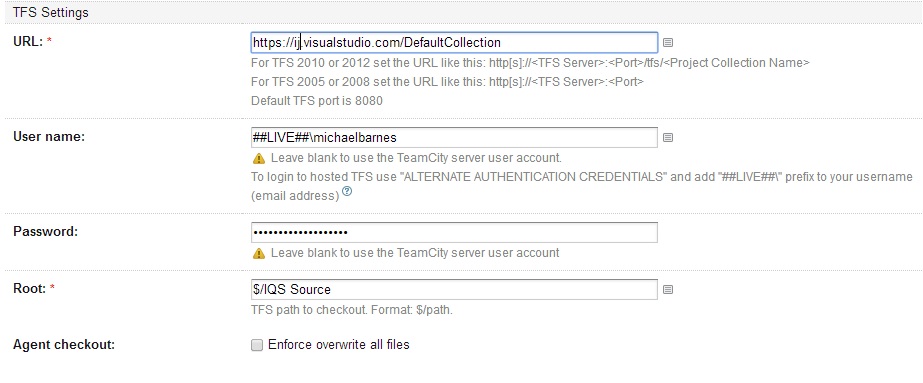
3.) I have installed Team Explorer 2012 with and updated to update 4
4.) I have created firewall rules for ports 8080 and 9191(From other articles I read)
5.) Installed Team City version 8.0.3 (build 27540)
Why can I not access TFS? Even after all of these steps?
4.) I have created firewall rules for ports 8080 and 9191(From other articles I read)
5.) Installed Team City version 8.0.3 (build 27540)
Why can I not access TFS? Even after all of these steps?
Please sign in to leave a comment.
Hi Micheal,
I'm facing same issue on Amazon EC2. Did you find a way for this issue ?
Thanks in advance.
I think you guys need to clean TFS caches. TC uses TFS native client to connect and this is its error.
Thanks for your suggest, Sergey.
I tried to clear TFS cache but still get error on Amazon EC2 server (free tier)
Error
Other info
- I'm using Amazon EC2 (free tier) server: Microsoft Windows Server 2008 R2 SP1 Datacenter edition, 64-bit architecture, Microsoft SQLServer 2008 Express, Internet Information Services 7, ASP.NET 3.5. [English]
- Except about the server, I almost did same thing and got same error as Micheal
- I also install and do same config on my local machine and it works fine
- I tried on TeamCity 8.0.1, 8.0.6 and 8.1.1 on Amazon EC2 server (free tier) but same issue
- I can give you info to access my server if you need it to figure out the issue
Message was edited by: Tam Nguyen Minh
Do you have Compat GDR installed as suggested here: http://msdn.microsoft.com/en-US/library/dd997788.aspx?
Yes, I've installed Team Explorer 2010, Visual Studio 2010 SP1 and Compat GDR as suggested on MSDN site on Amazon EC2 server
Note: I can connect to TFS via Team Explorer on Amazon EC2 server but TeamCity cannot connect ...
Message was edited by: Tam Nguyen Minh
It looks like a general issue with supporting hosted TFS. I filed and issue for this: http://youtrack.jetbrains.com/issue/TW-36694 Add support for TFS online (visualstudio.com)
Thank you so much, Sergey.
Hi all,
I workaround this issue and get TeamCity work on Amazon server with the following config
- AMI: Windows_Server-2012-R2_RTM-English-64Bit-Base-2014.05.20 (ami-f67924a4)
- Visual Studio 2012 Premium with Update 4
- Team Explorer 2012