Fail build if an stderr message is reported in the build log

TeamCity can detect messages on the standard error stream, you can see this as oranje messages in the build log: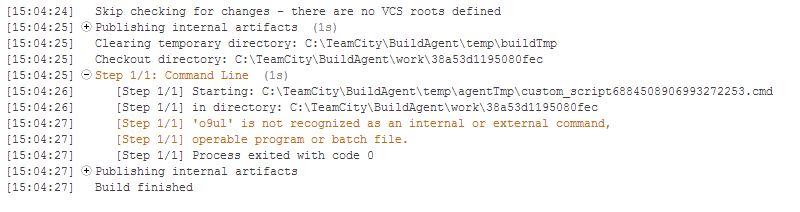
Using the command line build step:
o9ul;yhoi
exit /b 0
The build passes even though the build failure condition 'an error message is logged by build runner' is checked. It seems this checkbox is only for TeamCity service messages with the status error.
I would like to fail a build if any std error stream messages are recording, to put it another way I would like to fail the build if any orange messages occur in the build log. Is there any way to do this? IMHO the checkbox mentioned above should perform this functionality.
We're using TeamCity Enterprise 8.0.6 (build 27767).
Regards,
Andrew Fraser
Please sign in to leave a comment.
Hi Andrew,
There are three message types in TC: error (red), warning (orange) and info (gray).
std error stream corresponds to TeamCity warnings. It is impelented so because lots of messages are put in std error stream (for example timeout), which usually should not fail a build. So for command line only exit code not equals 0 corresponds to TeamCity error message. (For other type of runners there are more cases).
In your case you can:
1. Return non-zero exit code or set build status using service messages from script
2. Use something like this http://www.robvanderwoude.com/errorlevel.php (or bash -e)
I understand and have used service messages. The problem in this case is the build is run by a lot of very large build scripts. I do not want to change the scripts if possible. I take it there's no way to cause the build to fail if a stderr message is reported? If that is the case I may need to write a wrapper that catches the stderr stream and sets the exitcode appropriately if anything is caught, I was hoping to avoid this.
Now there is no other way to perform it. Please watch/vote for this issue http://youtrack.jetbrains.com/issue/TW-6994.
Quote from Hyung Cho on the issue you linked to:
I absolutely agree with this and have voted for the issue. Thank you for getting back to me quickly.