TeamCity 9: issues with ticking/unticking radio buttons in statistics

I'm not sure if this is related to https://youtrack.jetbrains.com/issue/TW-39335
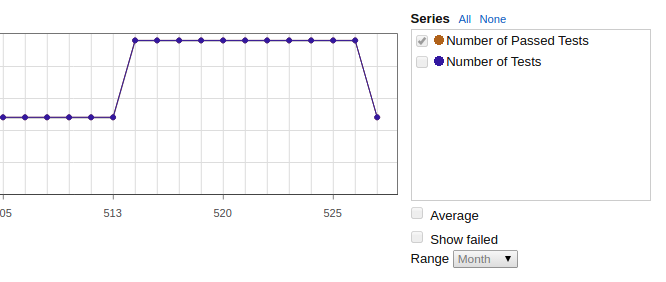
I've created a custom statistic for the general project (not build configuration) that reports the "number of tests" + "number of passed tests" (see attached image) for the acceptance tests.
When I unselect "number of tests", the "number of passed tests" radio button is grayed out and it's not possible to re-select the "number of tests" option - even if the unselected series is still shown. I need to click on "All" to have all the buttons back.
Attachment(s):
Screenshot from 2014-12-18 12:30:02.png
Please sign in to leave a comment.
Hi Alessandro,
I cannot reproduce the issue. What type of browser do you use? Please attach screenshot of edit Chart Settings pop-up.
Hi, I have tried TC on Chrome and Firefox on Linux and Windows.
This behaviour occurs with pretty much any type of statistics graph - default and custom ones.
E.g. Code Coverage Statistics. It's got 4 coverage levels: block, class, line, method.
If you untick all of them, and then tick them all again, and then untick, and so on, at a certain point they freeze. The only way to unfreeze them is to click "All" or "None". That's an unwanted behaviour, though.
I hope this helps.
Hi,
Thank you for provided details, we will continue further investigation. I've created the issue https://youtrack.jetbrains.com/issue/TW-39421, please watch/vote for it.