Most recent commits unavailable when including changes for custom build

In TeamCity 9.1.3, in the Changes tab of the Run Custom Build dialog, the latest commit in the Include Changes combobox for the branch in question is 9 days old.
However, the Change Log tab for the project displays the current state of the branch/repo, with all of the commits up through today displayed. Surely, I am missing something simple?
Please sign in to leave a comment.
Hi Vern,
Is the branch in question merged into other branches? If yes, do you see these changes in run custom build dialog for that branch? Are the missing changes in question are reachable from the branch in question and no other branch?
Hi Alina,
Yes, the branch in question is merged into the default branch, and I can view all of the missing changes on that branch. However, because of the merge into the default branch, I can see all changes on the default branch in the custom build filter, including those listed in the non-default branch filter. Per TW-29788, I shouldn't see any available changes in the non-default branch filter?
Our need is to be able to deploy a "stable" codebase while allowing feature development to continue. Should I should reverse the default and non-default branches in this case, so the feature branch, being the furthest ahead, is the non-default?
Hi Vern,
could you please attach a screenshot of the build configuration Change Log tab with <All branches> selected in the branch filter and 'show graph' and 'show builds' options enabled.
Are we on a different TeamCity build than you? As above, we're on 9.1.3 (build 37176) currently. I didn't see a "show builds" option. However, here is the change log with all branches and "show graph" selected.
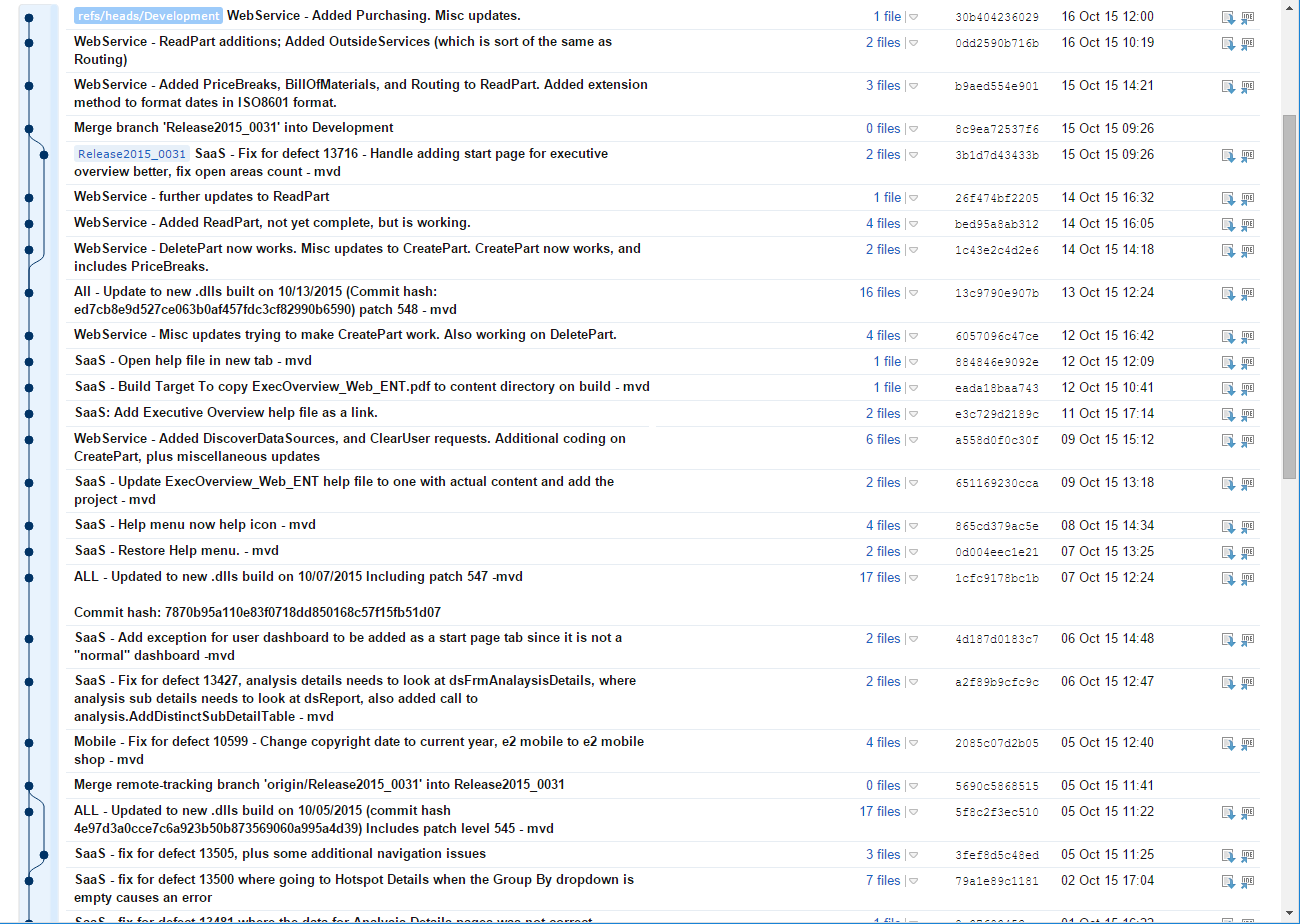
The 'show builds' option is shown near the 'show graph' option. It is not shows on the project's Change Log tab, but is shown on build configuration Change Log tab.
The change log with builds:
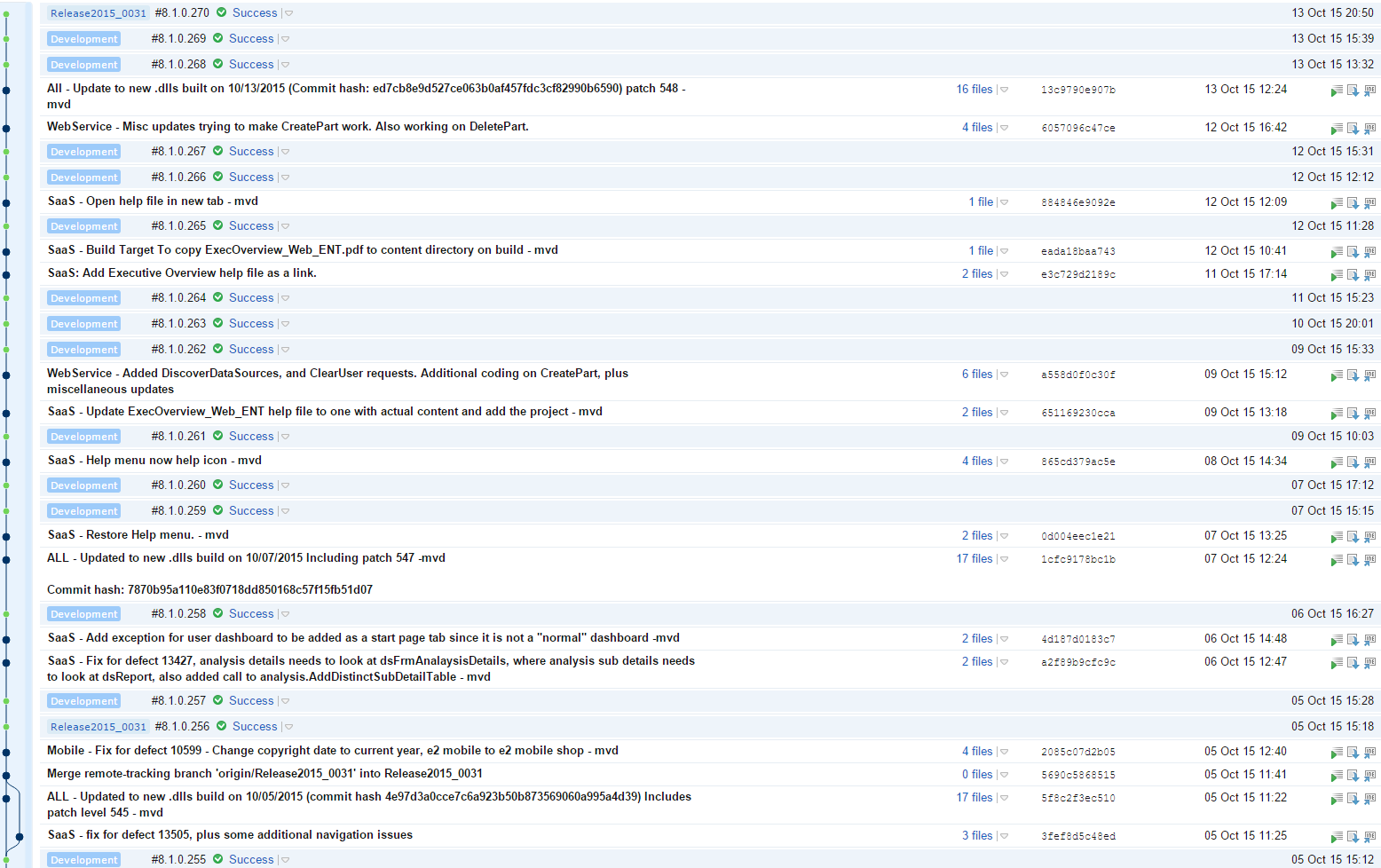
Thanks, now it's clear why this happens. In order to compute changes in branch, the 'custom build' dialog takes all builds in the selected branch and take changes from them. The latest build in the 'Release2015_0031' branch has no changes, since there is a build in the default branch 'Development' on the same revision. Previous build in the 'Release2015_0031' branch has only 4 changes, last of them is from the 5th October.
Thanks. We need to be able to deploy the current state of the Release2015_0031 branch to a different location than the Development branch. We also would like for a non-developer to be able to do this. He or she does not have Git knowledge, and would not know how to cherry pick the Development revision containing the current state of Release2015_0031. Are we forced into swapping in Release2015_0031 as the default branch to accomplish this? This wouldn't be too big a deal, but it does require maintenance of the default branch every few weeks as the branch changes.
Do you deploy by running a build in TeamCity and the build checks teamcity.build.branch parameter? If so, then you can create a dedicated typed parameter of type select and TeamCity will show a chooser in the 'run custom build dialog' where the user can select a deploy target. You can find more info on typed parameters in the documentation: https://confluence.jetbrains.com/display/TCD9/Typed+Parameters.
Let me know if it solves the problem.
The crux of the issue is enabling a non-developer to determine the current state of the Release2015_0031 branch to be deployed. We have deploy location handled.
Is it correct that you want a non-developer to run a build on some commit which will deploy the app to some custom location?
Yes. It is the "some commit" we are attempting to allow a non-developer to pick. Let's say that the graph in the screenshot I posted Oct 16, 2015 9:20 PM is a flat graph, with the current state of each branch as shown, and that we have deployed Development's 30b404 commit. Since Development is the default branch, the custom build dialog for the Release2015_0031 will not show 3b1d7d. However, that is precisely the commit we need the non-developer to be able to pick.
Ok, is it correct that your deployment script selects different deployment target depending on the value of the teamcity.build.branch parameter?
At this point, it's a manual selection. We have a separate build configuration created for deployment of the Release* branches.
Instead of the separate configuration, I was thinking of using a Powershell step to modify the build parameters based on teamcity.build.branch, but have yet to implement it.
Hi Vern,
please watch/vote for https://youtrack.jetbrains.com/issue/TW-29788, it is about similar case when some changes are not shown in branch because there are builds on same revisions in the default branch.
Thank you for all the assistance, Dmitry. Will do.