C++ Sub Project Loses Reference to C# Project

Hi There,
Interesting problem. We have a VS2005 project that we are trying to build using the sln2005 build runner.
Within this there is a C++ project which references a C# one.
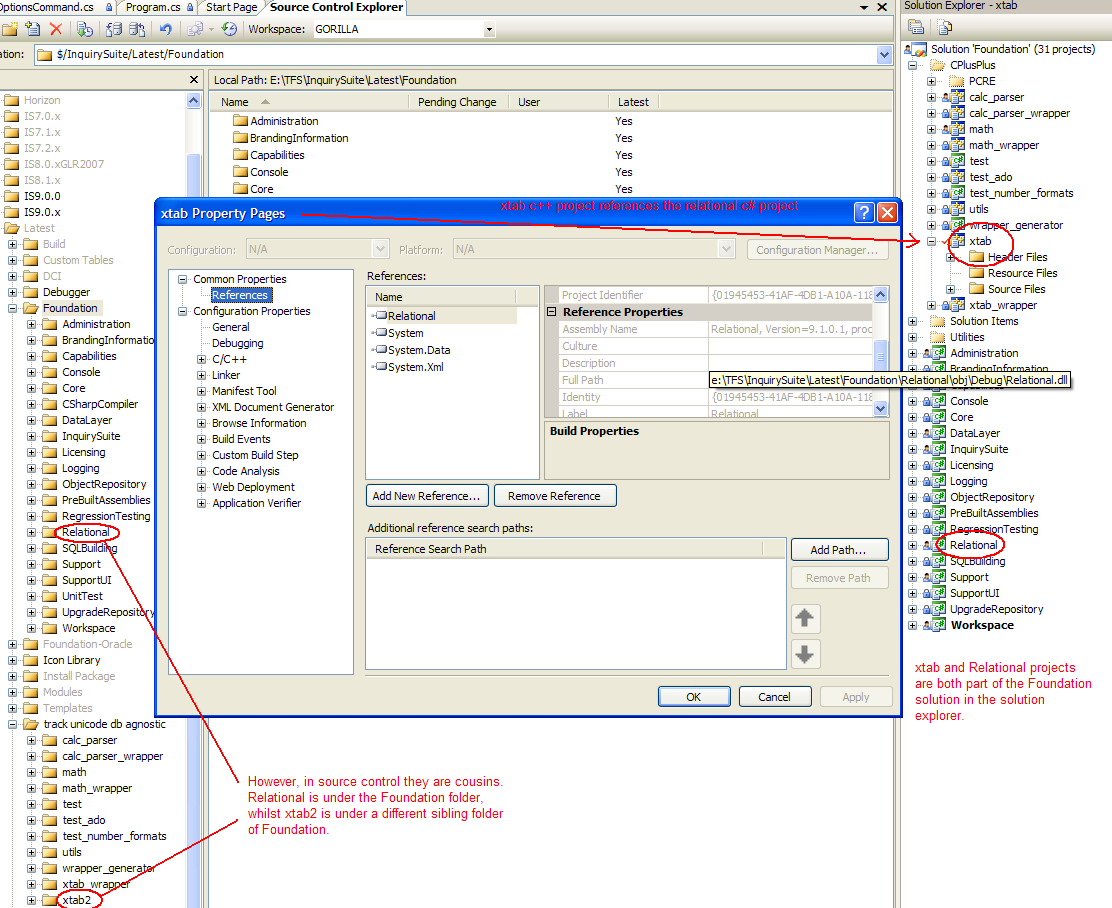
See the attached png for a screenshot of the problem and some descriptive text. The C++ "xtab" project references the C# "Relational" one.
This solution happilly builds under VS2005 - but falls over when building on TeamCity.
The problem appears to be that the reference to the relational project in the xtab.vcproj looks like this:
<References>
<AssemblyReference
RelativePath="System.dll"
AssemblyName="System, Version=2.0.0.0, PublicKeyToken=b77a5c561934e089, processorArchitecture=MSIL"
/>
<AssemblyReference
RelativePath="System.Data.dll"
AssemblyName="System.Data, Version=2.0.0.0, PublicKeyToken=b77a5c561934e089, processorArchitecture=x86"
/>
<AssemblyReference
RelativePath="System.XML.dll"
AssemblyName="System.Xml, Version=2.0.0.0, PublicKeyToken=b77a5c561934e089, processorArchitecture=MSIL"
/>
<ProjectReference
ReferencedProjectIdentifier="{01945453-41AF-4DB1-A10A-118AF8AF78BF}"
RelativePathToProject=".\Relational\Relational.csproj"
/>
</References>
the path is relative to the solution's view of the path not the source control view (or the one that the individual project would see) (see png attached) - so when TeamCity creates it's temporary vcproj - it can't resolve the reference and so removes it - giving you a file that looks like this:
<References>
<AssemblyReference RelativePath="System.dll" AssemblyName="System, Version=2.0.0.0, PublicKeyToken=b77a5c561934e089, processorArchitecture=MSIL" />
<AssemblyReference RelativePath="System.Data.dll" AssemblyName="System.Data, Version=2.0.0.0, PublicKeyToken=b77a5c561934e089, processorArchitecture=x86" />
<AssemblyReference RelativePath="System.XML.dll" AssemblyName="System.Xml, Version=2.0.0.0, PublicKeyToken=b77a5c561934e089, processorArchitecture=MSIL" />
</References>
and thus the build doesn't work.
Can anyone see a solution to the problem, other than moving the C++ projects in under the Foundation fodler in source control.
Thanks in advance,
Danny
Attachment(s):
problem.png
Please sign in to leave a comment.
Could you please try running this build from command line in build agent checkout directory.
Does that work?
Thanks!
Could you please have a look to the thread
http://www.jetbrains.net/devnet/message/5230096#5230096
It is suggested to start using deven.exe instead of msbuild to fix vdproj issue.
Could you please try it.
Hi Eugene,
Yes - this reference is my other thread on the same problem which did reach a resolution. I should have marked this one as "closed" somehow - though I'm not sure how to do that.
Thanks for your help,
Danny