Unable to create VCS Root

Hello,
I've deployed TeamCity (4.5.3) a few days ago, works fine but I have problems with creating VCS roots for build configurations.
My source control is Subversion available on different server (outside LAN) than build server.
I have access to SVN repos from build server and it works fine.
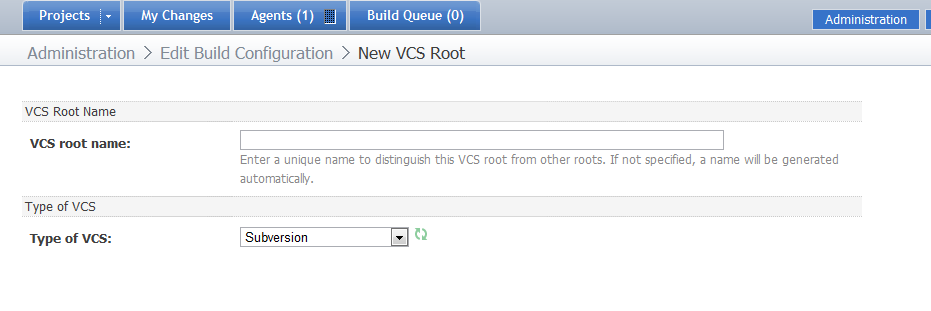
But when I'm trying to create new VCS Root for build configuration I could not enter any properties.
Steps to reproduce:
1. Enter build configuration page and select tab "Version controll settings"
2. Click "Create and attach new VCS root",
3. Then when I choose "Type of VCS:" as Subversion the page looks like on attached screenshot and nothing happens.
I've enabled debug logging, searched logs but I haven't found any error or warning message.
I've no idea what may be the problem here
Any suggestions welcomed.
Attachment(s):
TeamCity-svn-problem.png
Please sign in to leave a comment.
What servlet container do you use and how you deployed TeamCity to it?
I've installed TeamCity via executable file, it is running as a windows service (using my account - with administrative rights - as service login identity).
What is servlet container and how aI could check what I'm using ? (sorry for lame questions)
- M
If you installed TC via .exe file then servlet container is Tomcat. How long did you wait for the page appearing? In fact after the first start servlet container will compile JSP pages, that is why UI can look unresponsive. May be you just did not wait enough for the settings to appear? Have you tried to select different VCS from the list?
> How long did you wait for the page appearing?
I'm still waiting (started before postiong first post here).
> In fact after the first start servlet container will compile JSP pages, that is why UI can look unresponsive.
> May be you just did not wait enough for the settings to appear? Have you tried to select different VCS from the list?
I've tried to setup VCS Root several times, with different types of VCS - always the same effect: page is not changing and even progress indicator is not running.
- M
Are there any error messages in the browser? If you are using Firefox try to check error console: Tools -> Error console
From FF error console:
Warning: Error in parsing value for 'top'. Declaration dropped.
Source File: http://sqldev:88/res/861179811249875879.css?v=1246871194273
Line: 758
Warning: Error in parsing value for 'top'. Declaration dropped.
Source File: http://sqldev:88/res/861179811249875879.css?v=1246871194273
Line: 2546
Warning: Error in parsing value for 'top'. Declaration dropped.
Source File: http://sqldev:88/res/-3202366683557599288.css?v=1246871194273
Line: 209
Warning: Error in parsing value for 'top'. Declaration dropped.
Source File: http://sqldev:88/admin/editVcsRoot.html?cameFromTitle=Edit+Build+Configuration&editingScope=editBuildType%3Abt4&cameFromUrl=%2Fadmin%2FeditBuildTypeVcsRoots.html%3FbuildTypeId%3Dbt4%26init%3D1&action=addVcsRoot
Line: 0
- M
Could you please send your server logs to this address: teamcity-feedback [at] jetbrains.com ?
Done. I've sent logs and configuration files.
- M
I did not find anything strange in the logs. Could you please do the following: stop the service, then start TeamCity server with help of teamcity-server.bat file located in <TeamCity inst dir>/bin directory:
teamcity-server.bat start
I've found a "workaround".
No service restart was needed. Just do the following:
1. Enter build configuration page and select tab "Version controll settings"
2. Click "Create and attach new VCS root",
3. Choose "Type of VCS:" - still the page looks the same and nothing happens.
4. Press F5 to refresh page - all properties controls are now visible and you could enter your VCS root data
Works in: Google Chrome, FF (3.5) & IE (8.0).
That has solved my problem.