Build Agent wont start - Build queued

Hi
I have configured a build agent to run a set of builds. It is configured properly with no errors or conflicts and it shows the builds as being queued but it will not start them.
I started having this issue this weekend with another set of mature builds that have been running for some time. I had to recycle the team city web server to get them going?
Any ideas as to what is happening?
Please sign in to leave a comment.
In the build queue if you move your mouse over the Time to start value a popup should appear explaining why the build is not starting.
It just says delayed. It shows in the queue as being ready. It shows how long the build will take in the case of a mature build but it will not start. My solution is to restart team city server.
But what is shown in the tooltip? Usually for delayed builds there are details why they are delayed. Can you provide a screenshot?
I got the same behaviour with version 7.0.3.

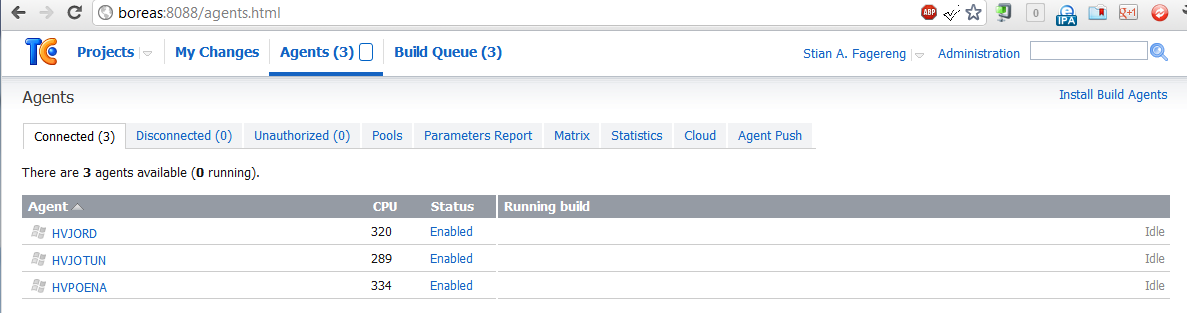
Screenshot of my queue.
My agents just sitting idle
Hangs and Thread Dumps
Anything else you need?`
\\Stian.
Could this be the reason, if so what is the solution?
bump.
Please enable debug logging on Administration -> Diagnostics page (debug-general), then wait for minute and attach here teamcity-server.log file or send it to teamcity-feedback@jetbrains.com
Also please add several thread dumps taken during that time.
Sorry for the delay...
Here are som logs, hope it's sufficient.
threaddumps
Attachment(s):
threadDump-2012-06-29_08.51.27.txt.zip
threadDump-2012-06-29_09.28.02.txt.zip
threadDump-2012-06-29_09.22.53.txt.zip
another log
Attachment(s):
teamcity-xmlrpc.log.zip
and.....
Attachment(s):
teamcity-vcs.log.zip
and......made rar for the last three....
Attachment(s):
TeamCity Loggers.rar.zip
neat feature that you auto-zip uploading txt files. :)
But I did not manage to upload a txt file of 10mb. Had to rar it...
bump - bump.
Stian,
Sorry for the delay...
It seems that TeamCity is hanging trying to communicate with the database.
If still actual, please try to restart TeamCity server (and may be also database) as a remedy.
If this issue reproduces, please let us know so that we can suggest a way to collect debugging information for the case.
It does, so we had to add a job that restarts teamcity each morning.
So a solution would be nice. :)
Hello Stian,
Let me describe what may couse such problem.
The most probably case is that MS SQL server session crashes during some SQL query execution. I experienced such problem with MS SQL 2005 and 2008 two years ago.
In this case one of TeamCity's SQL query causes an interanl error in MS SQL server session that is not handled so the session crashes. MS SQL TCP listener, however, is not nitified (about this crash) and continuing to wait the session response. TeamCity waits for the response of TCP connection
too. It causes that a part of TeamCity hangs.
As of what can we do in this case.
1. Try to specify a connection timeout. Use the 'socketTimeout' option (described here: http://jtds.sourceforge.net/faq.html). It requires also to verify connection at each borrowing from the pool (in other case other TeamCity parts wil crash).
In order to do this, add the folloing properties:
connectionProperties.socketTimeout=3600
testOnBorrow=true
However, TeamCity can use long queries during cleanup, so ensure that this timeout is longer that the cleanup duration.
When such timeout is catched the problematic query should be logged so we'd get ability to refine/tune this query.
2. You can try to use the native JDBC driver instead of the JTDS one. It's described here:
http://confluence.jetbrains.net/display/TCD7/Setting+up+an+External+Database#SettingupanExternalDatabase-Nativedriver
It can help if the problem caused by a JTDS specifics.
Please let me know did something help.
Best regards
Leonid
Thanks for your reply.
I would like to test to add the
connectionProperties.socketTimeout=3600
testOnBorrow=true
options to the db connection settings. But beeing a while since I did the migration I did not manage to get where the dbconnection settings is located.
I did read the faq you linked to. :)
\\Stian.