How do i fix code sign error in team city?

Hello. I'm getting this error. Don't know how to solve. Tryed everything, nothing helps. Trying to run project for ios.
What should i do? it runs perfectly in xcode.
What should i do? it runs perfectly in xcode.
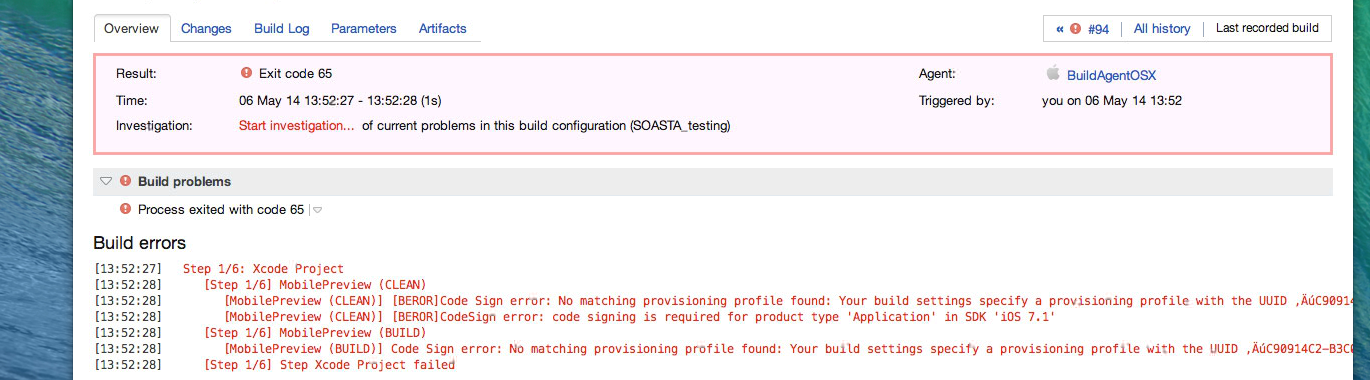
Step 1/6: Xcode Project
[13:52:28][Step 1/6] MobilePreview (CLEAN)
[13:52:28][MobilePreview (CLEAN)] [BEROR]Code Sign error: No matching provisioning profile found: Your build settings specify a provisioning profile with the UUID “C90914C2-B3C0-4538-8D8C-7440D15F0434”, however, no such provisioning profile was found.
[13:52:28][MobilePreview (CLEAN)] [BEROR]CodeSign error: code signing is required for product type 'Application' in SDK 'iOS 7.1'
[13:52:28][Step 1/6] MobilePreview (BUILD)
[13:52:28][MobilePreview (BUILD)] Code Sign error: No matching provisioning profile found: Your build settings specify a provisioning profile with the UUID “C90914C2-B3C0-4538-8D8C-7440D15F0434”, however, no such provisioning profile was found.
[13:52:28][Step 1/6] Step Xcode Project failed
Please sign in to leave a comment.
It says it cannot find the necessary provisioning profile. Please ensure that you checked in this profile to version control.
I'm not sure how exatly i should do that. Can you please explain how do i do that? I'm just new to team city. Can you please provide me screen shots or steps? thank you.
It's not a TC error, it's an XCode error. Please try googling for error "No matching provisioning profile found".
But how come i'm able to complile, archive, and run from xcode that are installed on the same machine without any warnings or errors.
Please check <build_agent_home>/logs/teamcity-build.log. You can find a command line that teamcity executes and directory it was executed in. This should shed more light on what is happening.
Finally figured out. My agent was in HD/AGENT. When i moved it to HD/USER/DESKTOP/AGENT, it began to work. Seems like Agent should be in the USER directory. Still thanks for offering me a help.