Visual Studio Addin not opening files from the "Failed Tests" window.

Hi,
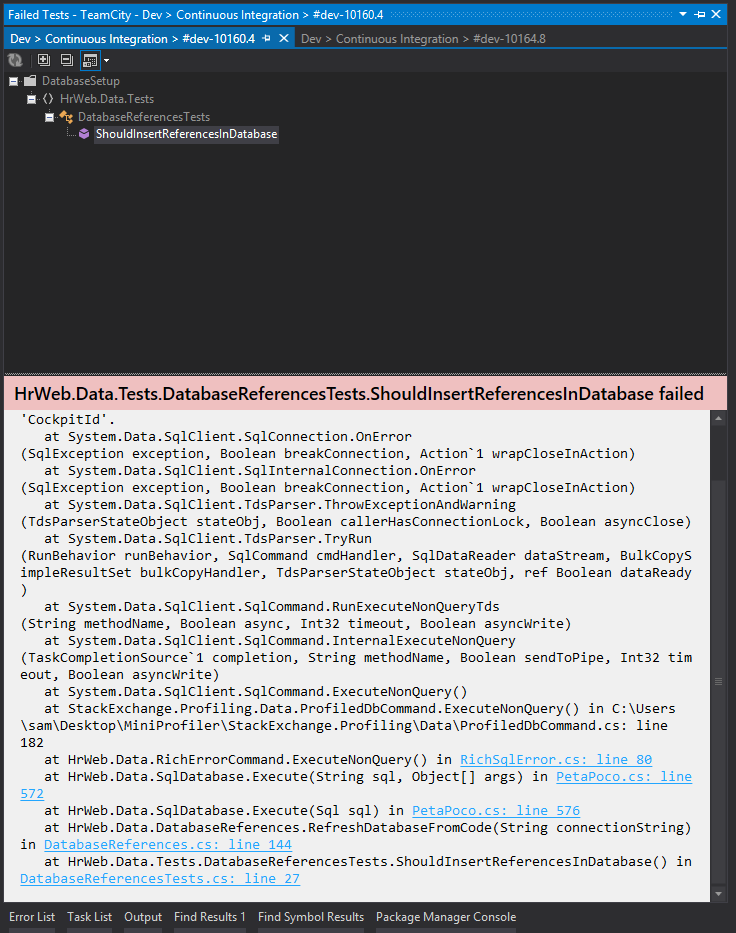
I'm using the VS addin with visual studio 2013 and I have a problem with the "Failed Tests" window.
When I try to navigate the files (clicking on classes or methods in the hierarchy or clicking on links in a stacktrace), visual studio do not react, nothing happens.
What is strange is that the addin DO open files when using "Open in IDE" on files in a changeset in the web interface.
I checked the documentation http://confluence.jetbrains.com/display/TCD8/Visual+Studio+Addin and the only interesting point was to enable .pdb files, wich was aleady done on my part (mabe TC doesn't use them, how can I check?).
Do anyone already has this problem? Can i enable/see a log somewhere? Or should I just report a bug in the bugtracker?
Thanks in advance,
Guillaume L.
Some other details: I run the tests using NUnit on the server, I use VS2013 (no Resharper) on Windows 8.1 locally.
Attachment(s):
Capture-TC-Addin.PNG
Please sign in to leave a comment.
Hi,
Which versions of TeamCity and VS add-in plugin do you use?
Please attach logs, how to collect VS add-in logs is described here.
Hi,
I use TeamCity Professional 8.1.4 (build 30168)
and the last addin (Build 8.1.58.476)
I joined a log but nothing is added when I click/double click on methods in the test window.
Thanks in advance.
Attachment(s):
TCAddin.log.zip
Thank you for the information provided. I've created an issue, please watch and vote for it.
Thanks I voted but couldn't find the watch button, no access for my type of account?
To start watching issue you need to press Star icon on the left side of issue header.