VMWare cloud plugin

Hi,
teamcity version 9.0.2
vmware-cloud 0.5.125
I use the VMWare cloud plugin to launch build on our VSphere infrastructure.
The Cloud profile configuration are:
-Cloud Type = VMware vSphere
Agent Images settings:
-Agent image = PTS-SPD
-Behaviour = Clone the selected Virtual Machine or Template before starting
-Snapshot name = 2015-04-21
-Folder for clones = TC_Clones
-Ressource pool = Default
-Max number of instance = 4
I create a build image on VSphere. When i launch manually the build image, the agent automatically connect to the TC server. If i launch the image by using TC start from the cloud tab, the image are properly launched in VSphere but the agent does not connect to the TC server.
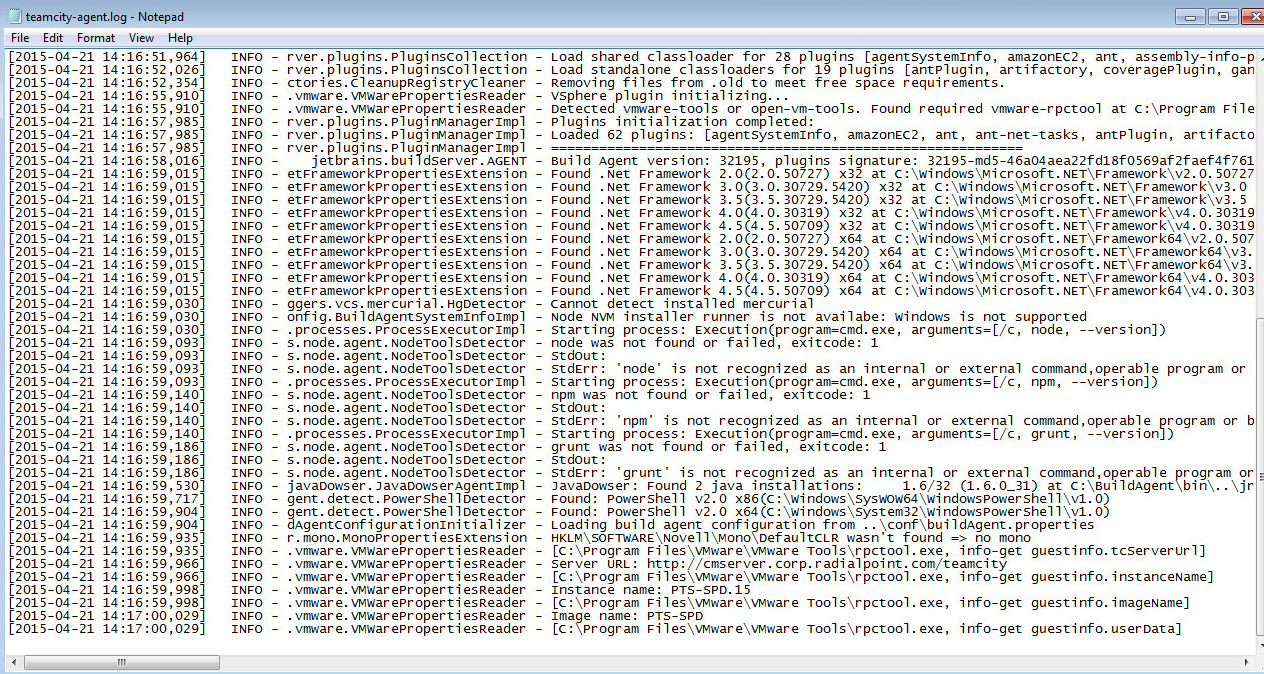
The teamcity-agent.log always stop at the same command, and stay there forever :
. . .
INFO - .vmware.VMWarePropertiesReader - [C:\program Files\VMware\VMware Tools\rpctool.exe, info-get guestinfo.instanceName]
INFO - .vmware.VMWarePropertiesReader - Instance name: PTS-SPD-16
INFO - .vmware.VMWarePropertiesReader - [C:\program Files\VMware\VMware Tools\rpctool.exe, info-get guestinfo.imageName]
INFO - .vmware.VMWarePropertiesReader - Image Name: PTS-SPD
INFO - .vmware.VMWarePropertiesReader - [C:\program Files\VMware\VMware Tools\rpctool.exe, info-get guestinfo.userData]
Any idea why agent seems to froze at getting the userData information and never connect to the TC server ?
Thanks,
Sylvain
Attachment(s):
TCagentlog.png
Please sign in to leave a comment.
If i run the rpctool.exe "info-get guestinfo.userData", i got a hash. See screen capture attached.
Attachment(s):
TCmanualUserData.png
Foud the problem. Base image does not have been activated to TC server.