Failing nightly builds when run through scheduled triggers

Hello There,
We have a situation where nightly builds are failing when run through scheduled triggers, I tried various combination on scheduled trigger screen and nothing seems to be working, not sure how to setup this to make it work. following is my setup in every project
CI configuration: Runs on every check-in with 300 seconds delay, this works OK and triggers builds with almost every checkin unless there is new check-in within 300 seconds which is expected.
Create Release and Deploy to DEV: This configuration creates a release in Octopus and deploy newly created release on DEV environment so that I can run automation packs on new deployment. I don't want to deploy on DEV environment with every check-in and want this to happen nightly only therefore I created a scheduled trigger on this configuration at 8PM.
My requirement is nightly build should only run when there are pending changes for CI or there is new build already present which is not deployed yet. so far there is new CI build it works OK as this is new release in Octopus but if there were no check-in during day for CI then nightly build still kicks in and takes last successful build but it fails as that release already created in Octopus.
Any suggestion how I can sort this out so that I can only run nightly build if there are changes in CI from last build otherwise don't want to run it.
following is trigger screen shot
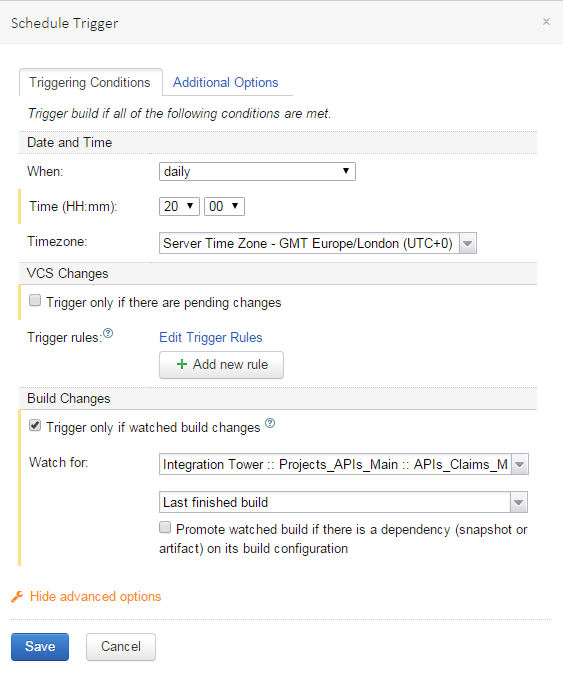
I also tried by ticking "Promote watched build if there is a dependency..." but no luck
I am using "TeamCity Enterprise 9.1.6 (build 37459)"
Thanks in advance for your help.
Regards
Harmeet
Please sign in to leave a comment.
Hello Harmeet,
Could you please attach an Overview page of your failing Build? What or Who triggers it? Do you have a snapshot or an artifact dependency configured between your mentioned Build configurations?
BTW, while not related to your case, it is still worth noting that you are running a bit outdated TeamCity version. It is recommended to upgrade to the latest TeamCity version (10.0.3 as of now) to get all the latest fixes, security improvements and new features.
Hi Marina
Please find below for failed nightly build
Yes, there are snapshot dependencies configured between configurations.
As you can see CI was run at 1PM and was pushed to deployment manually so there were no pending changes at 8 hence it should not have started 8PM build.
Yes we are running on bit outdated version and has plan to upgrade to latest version in next couple of weeks.
please let me know if you need more information for the same.
Regards
Harmeet
Hello Harmeet,
It seems to me that your nightly build was triggered because the build which it monitors and depends on (the CI build) has been changed (at 1PM? it seems at 8:26AM) since the previous run of the nightly build (30 Nov 8PM, right?).
Could you please double-check why CI build was run if there were no changes? Who/what tiggered it (the CI build #1.16.6.71)?
Could you please also review if this is the case you have: https://youtrack.jetbrains.com/issue/TW-46568 ?
HI Marina,
Sorry for late reply as I was on training this week.
CI build 1.16.6.71 was run manually in the morning 8:26AM and was deployed and promoted to all the environments hence I was not expecting this new build to run.
Yes I think this is similar issue as other on TW-46568 but I can't see all the comments so can't be sure.
Thanks
Harmeet
Hello Harmeet,
Could you please try new version after that and let us know if it fixes your problem?