Outdated builds

Hi,
We have TC2017.2 and the user interface keeps telling us that the current build is outdated, and that there's a new build available. This happens when we run a build of a topic branch. From this moment on, TC thinks this is the 'newest' build even though our default branch is ahead of the rest.
I've attached two screenshots. We have a current Enterprise license.
Thanks,
Thomas

Please sign in to leave a comment.
Hi Thomas,
it seems that you are creating history builds: https://confluence.jetbrains.com/display/TCD10/History+Build
The first commits on new branches that are behind the master branch are usually counted as history builds as well. To avoid this, you would need new commits on those branches.
Other than that message, does this disrupt your workflow in some way?
Hi Denis,
I don't think these are history builds. TC8 also had these History Builds: https://confluence.jetbrains.com/display/TCD8/History+Build. We are transitioning to TC10, we have the exact same workflow but somehow TC10 starts reporting outdated builds.
And define "disrupt your workflow". If you mean I can still find my builds, then no. But obviously this is unwanted behaviour. I don't want all my recent builds to reference a (very!) old build.
The first commits on new branches that are behind the master branch are usually counted as history builds as well. To avoid this, you would need new commits on those branches.
The branches you are talking about are topic branches. They exist for a few days and are then merged to master and removed. Not to mention the amount of topic branches exist for a short amount of time, the proposed solution is undoable.
I expect more of TeamCity, especially since it's working perfectly on a previous version. This kind of feels like regression to me.
Happy New Year by the way!
Hi Thomas, happy new year to you too!
The message unequivocally indicates that this are history builds, but I'm not saying that this isn't a regression or a bug, I linked the information as the conditions for history builds are often overlooked or unknown, leading to the message being unexpected by users while it does apply.
I asked if it disrupts your workflow as depending on what issues this causes in your workflow, we might have ways to work around them. For example, it's not the same if there are issues with artifacts, or dependencies not being picked up, or they simply don't show up in the overview. I asked on what the side effects were so I could maybe offer some workarounds for them and reduce its impact for you.
Also, I totally misunderstood your comment about the builds on branches, I thought that you were saying this builds were happening when the default was already ahead, while after reading again you say that they are considered the most actual even after running builds on new commits on the default.
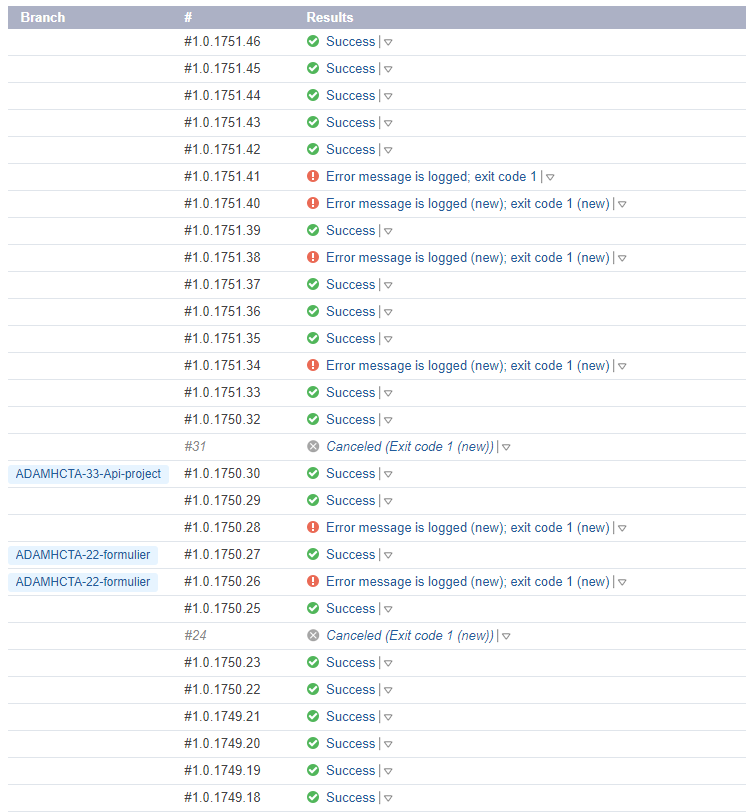
Can you confirm that .45 and .46 on the screenshots weren't run manually on commits older than the last one on the default branch?
Hi Denis,
Thanks for helping out.
I looked it up. Both the .45 and .46 build are started by Git on the default branch. Does it matter that our default branch is a configuration parameter: template.build.branch ?
This behaviour is consequent throughout every builds. I'm sorry for the confusion, let me try to describe the problem again:
We have a default branch (%template.build.branch% which - for this situation - always resolves to master). We create a topic branch, one or more tickets are handled in this topic branch. We have a DTAP routine which deploys our build artifact from "whatever" branch. On some occasions, we would like to 'pre-test' our topic branch.
So for the first time in the build history of this project, instead of building from the default branch we start a custom build and change template.build.branch from master to TICKET-22-something. The build succeeds, our artifacts are reployed by our DTAP routine and everyone is happy (until the ticket is rejected, of course).
But now that we started a custom build, EVERY build will reference this build indicating it as 'the more recent build'. As you can see in the screenshot, .27 is a custom build with the same build branch as .26 but still the .26 is referenced. I now notice that .26 is a failed build as well, which makes it even weirder.
.28 and .29 are newer builds, both started by Git (and thus the default branch).
.30 is another custom build, but using a different branch than .26 and .27, but that doesn't matter: .26 is still 'the more recent build'.
I have now noticed that the warning is gone, another build has used the artifacts of build .62 (not on the screenshot) and the build has become a pinned build. Does that has to do anything?
Hi Thomas, thanks for the detailed description. Just to make sure, are you on 2017.2 or did you already upgrade to the bugfix release 2017.2.1?
I updated from 2017.2 to 2017.2.1 (build 50732) last Friday
Hi Thomas,
sorry for the delay. Could you open an issue in our tracker and provide there the screenshots you posted? We need to investigate deeper and that will keep you informed of any progress in its resolution: https://youtrack.jetbrains.com/issues