TeamCity Low Utilization - 2017.1.3 (build 46961)

I couldn't find why but TeamCity doesn't utilize all my resources.
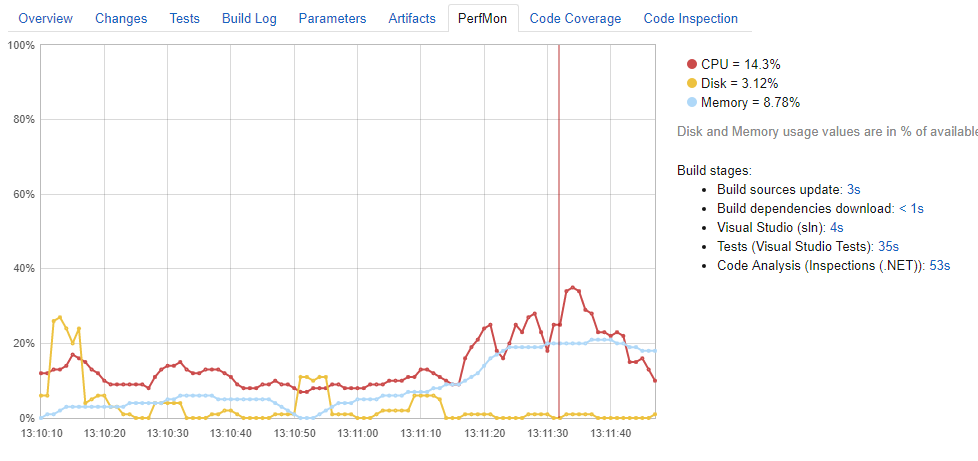
I am running tests in my local environment under 2 seconds but TeamCity takes 35 seconds to complete, this made me suspicious and I checked performance graphics.
Can you please help?
Please sign in to leave a comment.
Hi Ferit,
TeamCity doesn't automatically impose limitations on the performance from the builds. It's possible that depending on the build runner, in your case VS, VSTest and Inspections, the tools that perform the build don't really use the 100% of the CPU, only use 1 core on a multicore system, etc. which would lead to that kind of graph. Could you check whether the same happens if you simply run the same tools outside teamcity?
Is there a way to tell TC to utilize (or Prioritize) hardware resources to boost performance.?
Hi,
It's not TC who isn't using the hardware resources, it'ss the tool that is running the step. In the first case, the compiler, second case the test runner, third case the inspections engine.
During the build steps, the TeamCity process itself is mostly idle. It requests a runner to run some tasks then waits for it to finish while doing some basic communication with the server. If you can configure this tools (the vs compiler, the vs test runner and the inspections engine) to run in parallel somehow, then they can probably be configured via command line arguments to apply the same configurations to the runner. An example where it's specified that it's disabled by default on the own microsoft tooling: https://blogs.msdn.microsoft.com/devops/2016/10/10/parallel-test-execution/
I can't unfortunately offer much more advice on how to make it work, as I'm not that familiar with all those tools.
Hi Denis,
I am going to follow your advice and try running commands by myself which I see from build log. And then I am going to share results here.
Thanks