TeamCity 2017.1.2 MSTest ignoring test cases

Hi All,
I am running MSTest cases out of which few of them are ignored.
TeamCity message: does not have correct signature,
est method marked with the [TestMethod] attribute must be non-static, public, does not return a value and should not take any parameter. for example: public void Test.Class1 .Test(). Additionally, return-type must be Task if you are running async unit tests. Example: public async Task Test.Class1 .Test2 ().
Any help ?
Please sign in to leave a comment.
Hi,
Do your tests run successfully without TeamCity? What is a result if you try to run it in a command line?
It doesn't look like TeamCity problem. Seems, mstest.exe doesn't support [DataRow()] attribute. More details here.
Thanks Nadia for quick response.
Yes, MSTest runs successfully from Visual Studio without any warnings. Even for incorrect signature it does not pop up any warnings which concludes that MS needs to take this up.
I am not sure how to proceed further with this. I shall keep posting the updates.
Thanks again for quick response.
Hi Nadia,
I have an update to share. We have found out that MSTest does support multiple data rows as input. Please check here
Now coming back to the error generated by TeamCity, the error says [TestMethod] attribute must be non-static, public, does not return a value and should not take any parameter.
We think that TeamCity needs to upgrade the MSTest runner to the latest released.
Please let us know your thoughts.
Hi,
TeamCity doesn't have any bundled MSTest version. TeamCity looks for it on agents (e.g. in Visual Studio installation directory). So, to update MSTest version you need to update software on your agents.
Could you please clarify for me: how do you run your MSTest in TeamCity? Using Visual Studio Tests step? Or you've installed our dotnet core plugin?
Hi,
I am using Visual Studio Test as runner type.
Test Engine type: MSTest
Test Engine Version: MS Test 2017
Test file name: Respective dll
Run configuration file: Blank
MS Test Metadata: Blank
Result file: Respective output file name with .trx extension.
PFA of build step.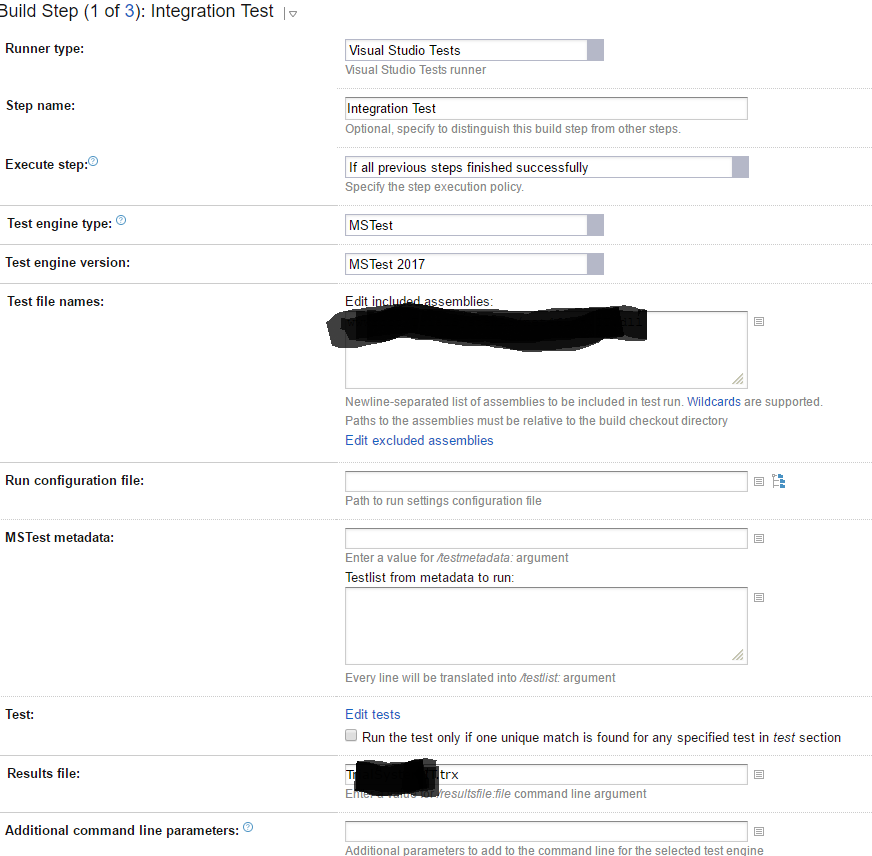
In this case, you should see something like in the build log:
So, you can only update installed on agents Visual Studio version to get newer MSTest version.
I can see this:
MSTest executable: C:\Program Files (x86)\Microsoft Visual Studio\2017\Professional\Common7\IDE\MSTest.exe
My build log does provide me path to MSTest.exe
Atulvshirke,
If you want to use the latest MSTest version I can suggest you installing our not bundled dot net core plugin. After that, you can run your tests as you do it locally (just running the command "dotnet test").
In addition, you will need to install VSTest TeamCity Test adapter if you want to see real-time test reporting in TeamCity.
TL;DR... it looks like MSTest really doesn't support DataRow in the way we expect, VSTest should be used instead, see at the end the solution that worked for me (not sure if it's the recommended way).
I'm having the same issue and so far I think MSTest doesn't support [DataRow()] in the way we're expecting it to... In the example in the link @Altuvshirke shared above, the test method is annotated differently, as DataTestMethod instead of TestMethod, running this test from Power Shell skips those methods. Even though there's probably a way not to skip them... is just not passing the smell test... again, I think that the link shared by @Nadia Burnasheva stands.
I further tested this by manually calling MSTest from my Visual Studio location in Power Shell
> ."<pathToVS>\Common7\IDE\MSTest.exe" /testcontainer:myTest.dll
and got the same output as TeamCity, MSTest tells me that it doesn't know how to run that test and here's an extract from the output:
Results Top Level Tests
------- ---------------
Passed myMethod1
Passed myMethod2
Passed myMethod3
Not Runnable myMethod4
Not Runnable myMethod5
3/5 test(s) Passed, 2 Not Runnable
In contrast, the following command issued the following output extract:
> ."<pathToVS>\Common7\IDE\CommonExtensions\Microsoft\TestWindow\vstest.console.exe" .\
myTest.dll /platform:<platform> /Framework:<framework>
Passed myMethod1
Passed myMethod2
Passed myMethod3
Passed myMethod4 (DataRow1)
Passed myMethod4 (DataRow2)
Passed myMethod5 (DataRow1)
Passed myMethod5 (DataRow2)
Total tests: 7. Passed: 7. Failed: 0. Skipped: 0.
Solution
Change the build step from MSTest to VSTest.