Assigning Build Configuration or Template to Agent Pool

We have around 80 module build projects that are made up of 3 build configurations, each based on a template: Commit (compile); Package; Deploy
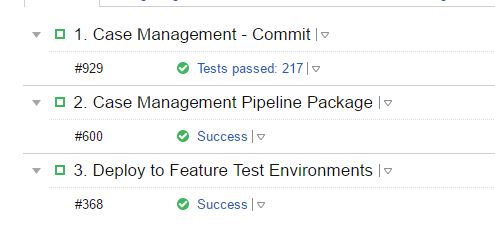
Currently that third step sequentially deploys to five separate test environments. This doesn't scale well and leaves the development teams waiting for all deployments when they probably only care about one specific environment. To get around this we have created an "Orchestrate Feature Test Deployment" script and template that uses the REST API to queue up deployments to specific environments. So we have another new template for deployments that targets only the specified environment. This environment is given by a parameter and the orchestrate script queues a deployment build for each environment, setting the parameter appropriately. This means that the deployments to the feature test environments now run in parallel and elapsed time is much shorter.
The issue we have is that Assignment to Agent Pool is done at a project level. We want all the 4 steps (Commit, Package, Orchestrate, Deploy) to be visible in one place (i.e. under one project) but the agent requirements (in terms of available tools, etc.) are very different between a commit (VS Studio compile along with SQL Studio, NUnit, etc.) and a deployment (Powershell). So we have separate pools: one for the builds and one for the deployment. To correctly assign the deployment build to the deployment pool we have created a sub project just for this purpose.
Is there a better way of achieving this? Can we achieve the environment-specific parallelism in different way? Can we assign the deployment build to the deployment pool in a different way?
This problem exists prior to new "orchestrate" approach where we just tolerate the deployment builds running on the non-deployment pool. But this is a waste of more powerful, better equipped agents. As the orchestrate approach relies on scaling across multiple agents at once, we're keen that the builds run in the appropriate pool.
Please sign in to leave a comment.
Hi Dan,
The easiest way to achieve parallelism is to have a separate build configuration for each parallel task that you want to perform, then, if you need to always run all 5, have a 6th "dummy" configuration that has a snapshot dependency on the previous 6, so when the 6th is triggered it will bring up all previous 5.
Also, to assign build configurations to agents, you can use the "Build requirements". You can assign a parameter with any name you wish as a requirement (for example "system.agent.assigned_to_deployment"), then make sure that all agents that can be used for that task initialize that parameter in their configuration files (the agent will restart itself if it detects a change in its configuration file to put it into effect). It's obviously also possible to use other requirements (such as Powershell or SQLStudio), but wanted to particularly point out that you can just make them up with any arbitrary parameter.
Hi Denis,
Thanks for the suggestions. I can see how that would solve the parallelism with a caveat I'll come to in a bit. But the agent pool suggestion seems a little unmanageable. We would need to manage all our agent assignments through agent requirements in either build configs or templates as, for this to work, both deployment agents and compile agents would need to be in the same pool otherwise we're no better off in terms of our grouping and visibility of all the builds related to one module. Not only does that seem to subvert TC's native agent pool management, it is also extremely opaque as to what is assigned where. Changes to that are likely to prove error-prone.
The build per environment with dummy "kick off" for parallelism would work. The only hesitation I have is that our set of target environments is dynamic - that requires us to add or remove build configs to or from 80 module projects.
Hi Dan,
Our Agent pool management is not (currently at least) thought for different roles, but for different characteristics (installed software, hw capabilities, etc.). I see your point, that's why I mention the "currently at least", and maybe a feature request could help here, as I haven't been able to find one in our tracker for this particular functionality.
Still, compile and deploy agents wouldn't need to be in the same pool as a single project can have multiple pools assigned, provided the agents match the rest of the project requirements, and any given pool can be in multiple projects. You could have as pools, for example, "Windows - Compile", "Linux - Compile", "Windows - Deploy", "Linux - Deploy", assign each one of them to each of the 80 projects, and use them as needed through build requirements.
If you have specific visibility requirements, i can try to help with those as well, but I'd need you to be more specific about which requirements you have.
I understand how assigning the requirements can be more opaque in some cases, as there isn't such a clear distinction when having an overview around the agents, but I think this comes from the mindset of having specific agents do specific tasks, which we have implemented through this agent requirements, as it's literally that, a requirement of a given build. Knowing exactly what your requirements here would be, what information you'd want to see, might also help in either explaining our design choice, finding a way to get it, or pushing for a feature request to get that information.
I would need more information on what "set of target environments is dynamic" precisely means to give a more accurate answer to your last point. If your environments are changing, you could have the required information configured as parameters that can be passed on to the builds (when run manually). You even have the option to configure this parameters in the "dummy" build, and access them from the other builds by using reverse dependency parameters, or configure them at the project / root project level and simply use them throughout many projects/builds. Also, we offer a REST API to configure / kick off builds on demand, which might be of interest also as a way to make changes to multiple builds/projects simultaneously.
Hi Denis,
Apologies for the late response. Your suggestion of using agent properties (we've actually opted for environment vars) is working very nicely. Now that we've tried it, the visibility/opaqueness concerns have proved inconsequential. It's quite apparent where each build is run - thank you.
Regarding our "dynamic" set of environments: we want to deploy to 5 environments at the same time. But this list could change - we add and remove environments to this pool quite often. We currently solve this by having a single build configuration that we trigger through the REST API multiple times - one for each environment and pass in the details for the target environment via parameter settings. From what you've said above, I think this is the best way to achieve this?
Hi Dan,
glad you could make the agent-build config set up work. As mentioned, if you feel it can be improved, we are always open to requests on our tracker here https://youtrack.jetbrains.com/issues/TW.
From your scenario, yes, it seems like a single build configuration triggered multiple times with the REST API with different parameters would be your best approach right now.