TC 10.0.4 and NUnit 3.5
Answered

Today we applied the TC update from 10.0.2 into 10.0.4 and one of our projects that has two nunit 3 builds steps started to fail. The tests it self are ok, and in the log we can see:
"The NUnit runner requires NUnit.Engine.Listeners.TeamCityEventListener, NUnit.Engine.Services.ProjectLoaders.NUnitProjectLoader"
[Step 4/4] The NUnit runner requires NUnit.Engine.Listeners.TeamCityEventListener, NUnit.Engine.Services.ProjectLoaders.NUnitProjectLoader to operate properly. Install the required extensions (https://confluence.jetbrains.com/display/TCDL/NUnit#NUnit-NUnit3Extensions).
[19:21:11][Step 4/4] Starting: "C:\Program Files (x86)\NUnit.org\nunit-console\nunit3-console.exe" C:\BuildAgent\temp\buildTmp\2hbU917VBm4Oy0O2oIUBjuJMofIeZbHh.nunit --result=C:\BuildAgent\temp\buildTmp\2hbU917VBm4Oy0O2oIUBjuJMofIeZbHh.nunit.xml --noheader --agents=1
[19:21:11][Step 4/4] in directory: C:\BuildAgent\work\b58fe1a31c54935f\SixDataF.Data.Translations.Tests\bin\release
[19:21:12][Step 4/4] Runtime Environment
[19:21:12][Step 4/4] OS Version: Microsoft Windows NT 6.1.7601 Service Pack 1
[19:21:12][Step 4/4] CLR Version: 4.0.30319.42000
[19:21:12][Step 4/4]
[19:21:12][Step 4/4] Test Files
[19:21:12][Step 4/4] C:\BuildAgent\temp\buildTmp\2hbU917VBm4Oy0O2oIUBjuJMofIeZbHh.nunit
[19:21:12][Step 4/4]
[19:21:14][Step 4/4] SixDataF.Data.Translations.Tests.dll (35s)
[19:21:50][Step 4/4]
[19:21:50][Step 4/4] Test Run Summary
[19:21:50][Step 4/4] Overall result: Passed
[19:21:50][Step 4/4] Test Count: 79, Passed: 79, Failed: 0, Inconclusive: 0, Skipped: 0
[19:21:50][Step 4/4] Start time: 2017-01-13 19:21:16Z
[19:21:50][Step 4/4] End time: 2017-01-13 19:21:52Z
[19:21:50][Step 4/4] Duration: 35.711 seconds
[19:21:50][Step 4/4]
[19:21:50][Step 4/4] Results (nunit3) saved as C:\BuildAgent\temp\buildTmp\2hbU917VBm4Oy0O2oIUBjuJMofIeZbHh.nunit.xml
[19:21:50][Step 4/4] Process exited with code 0
We also added the nuigetPackage NUnit.Extension.TeamCityEventListener into the project but without any change...
our configuration is:
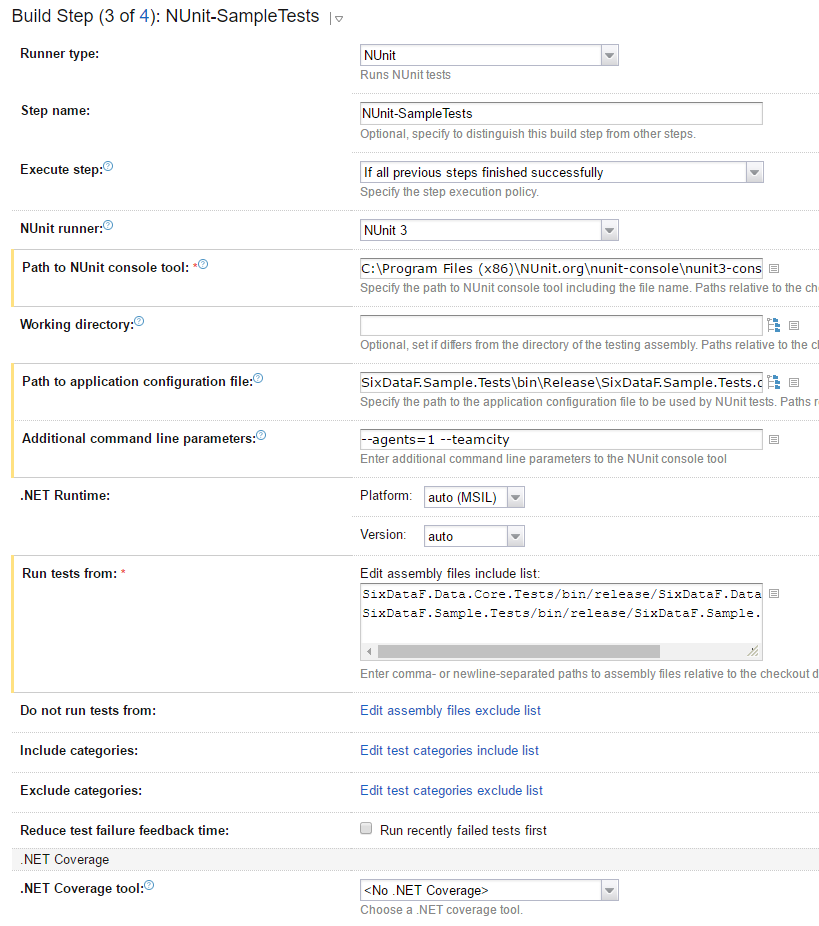 We also added the parameter --teamcity and we still got no luck...
 The others projects that have at least one NUnit step gives the same error but the build is marked green... this is the one that has two NUnit steps and the build goes red.
The packages on projects are:
Snippet
<package id="NUnit" version="3.5.0" targetFramework="net461" />
<package id="NUnit.Extension.NUnitProjectLoader" version="3.5.0" targetFramework="net461" />
<package id="NUnit.Extension.TeamCityEventListener" version="1.0.2" targetFramework="net461" />
Is there an issue with the 10.0.4 ? If someone can enlighten us how is the correct way to configure NUnits test.. please
Thank you
Please sign in to leave a comment.
Quoting our documentation here:
...
The extensions can be installed in bulk using the "NUnit Console Version 3" NuGet package or as separate packages, NUnit.Extension.TeamCityEventListener and NUnit.Extension.NUnitProjectLoader.
...
Did you try installing "NUnit Console Version 3" NuGet package?
Hi Pavel Sher,
Thanks for your reply... but I'm sorry I'm unable to understand what you mean by installing " "NUnit Console Version 3" NuGet package?" this doesn't exist as a nuget package or at least isn't published at nuget.org or is another one?
As I mentioned before, our two test projects have the NUnit nuget package installed :
Snippet
And we added the these two
Snippet
with no success... step 3 and 4 stills fails on TC.
best regards
Sorry I meant "NUnit Console" package. Here it is: https://www.nuget.org/packages/NUnit.Console
Pavel, thanks again.
We've installed the package on both projects, which were added the following ones:
Snippet
But has you can see we're still facing the issue :/ :
Hi Gonçalo Chaves
Try specifying path as `packages\NUnit.ConsoleRunner.3.6.0\tools\nunit3-console.exe` to use installed version of nunit.
NUnit.Console has all required dependencies so there is no reason to add others.
Hi Nikolay,
By changing the path of the NUnit runner from: C:\Program Files (x86)\NUnit.org\nunit-console\nunit3-console.exe into packages\NUnit.ConsoleRunner.3.6.0\tools\nunit3-console.exe the error is no longer logged, and build ends up green.
That means, all of our projects should use the package NUnit.ConsoleRunner , right? Why the runner isn't included with in the TC Runner itself?
So, we should uninstall from our TC Agents the NUnit console runner?
Thanks once again
- According to the best practices your assemblies should depend on https://www.nuget.org/packages/NUnit/ only.
- To use NUnit you could restore nuget package https://www.nuget.org/packages/NUnit.Console/
For example it could be done via command line build step:
`%teamcity.tool.NuGet.CommandLine.DEFAULT%\tools\nuget.exe install NUnit.Console -version 3.6.0 -o tools`
Where `tools` the directory where the nunit console will be installed.
- To run tests specify the nunit path as
tools\NUnit.ConsoleRunner.3.6.0\tools\nunit3-console.exe
In this case you should not have any other copies nunit on your TeamCity agents
Thanks Nikolay for your insights. I can understand that our projects should depend on NUnit packages, otherwise we can't run tests locally when upon development process. I already have the console installed on each TC agent that's why we used the full local path for the build step. Even with that defined we got the previous error regarding the NUnit listeners...
So if I understood your suggestion, we should remove any installation from TC Agents, and always use the nuget package it self for the NUnit runner?
It is up to you. You could restore https://www.nuget.org/packages/NUnit.Console/ and upload it to all agents or you could do it in some build step.