GCE Cloud Profile Image Building

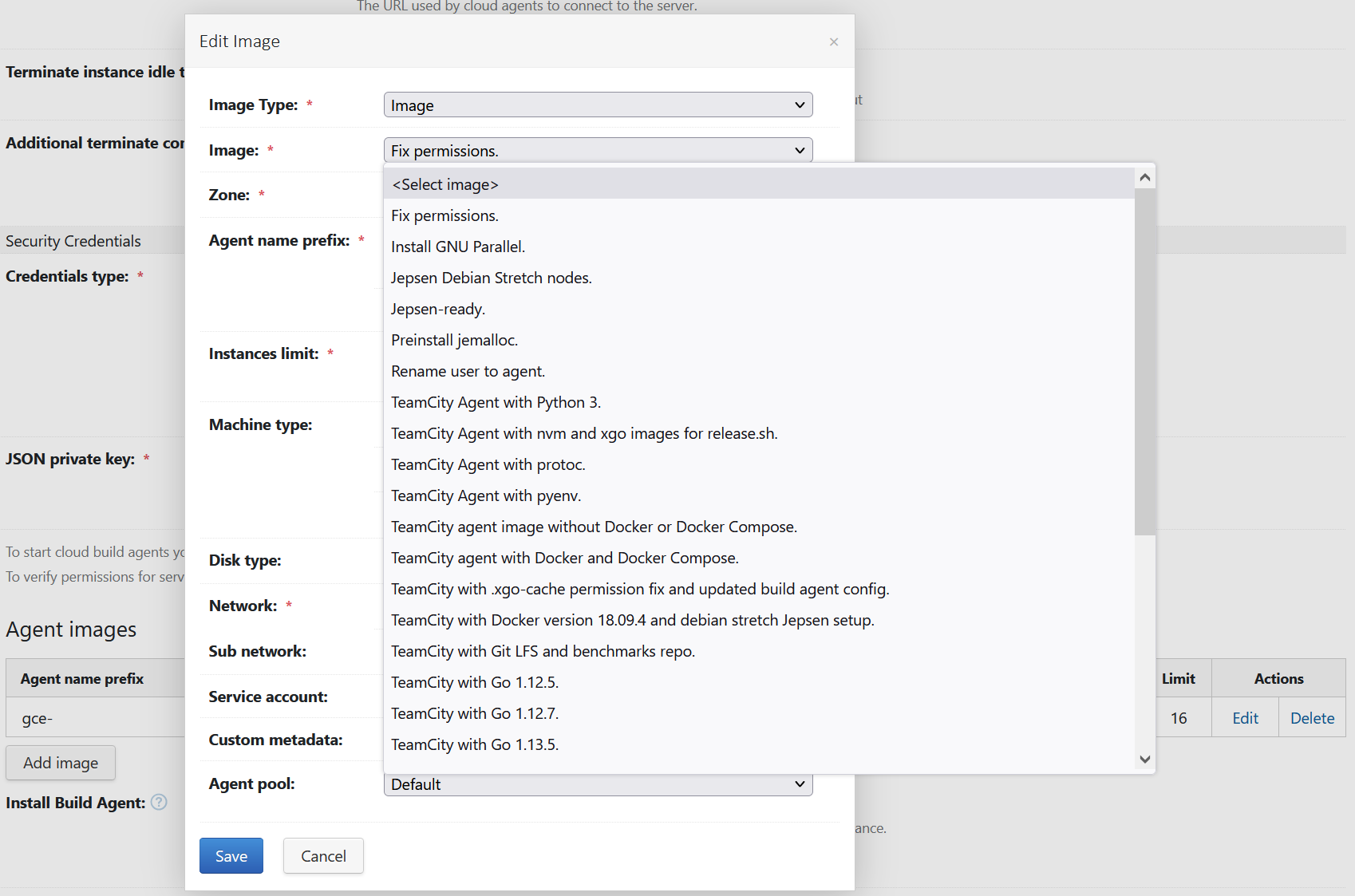
When I select the popup to choose an image, I get a list of images that make zero sense. They look like commit messages. The actual image printed is completely different that what is in the popup. The process to build images and get them reflected and accessible is not really clear. The documentation in this area is limited to non-existent.
The image listed is inconsistent with the images listed of selected. For example, `Fix permissions.`, what is this image exactly?!? When selected, it prints `teamcity-agent-201104` as the image, not `Fix permissions.`, and in Google Cloud, I cannot find any image named `Fix permissions.`, but I do find one named `teamcity-agent-201104`.
This has consumed a large amount of time on this small issue.
Please sign in to leave a comment.
I found out where the list comes from, it uses the "description". It shouldn't use the description. It should use the name. This small thing was confusing.
Hello,
May I ask you which TeamCity version and which Google Cloud Agents TeamCity plugin version you are currently using?
Thank you,
Guilherme