understanding HTTP access tokens and bitbucket : all on-prem

Trying to get an old server that used to fetch code from bitbucket to use a new token. (I've normally used a 90 days HTTP access token) I'm trying to understand the difference between what I am seeing in the Settings for VCS root where it fails to authenticate (my HTTP Access token is read only), while in the web browser I'm clearly seeing things are able to “see” the repo as the console lists the last 3 changes on my on-premises bitbucket repo. How I create token in Data Center https://confluence.atlassian.com/bitbucketserver/http-access-tokens-939515499.html
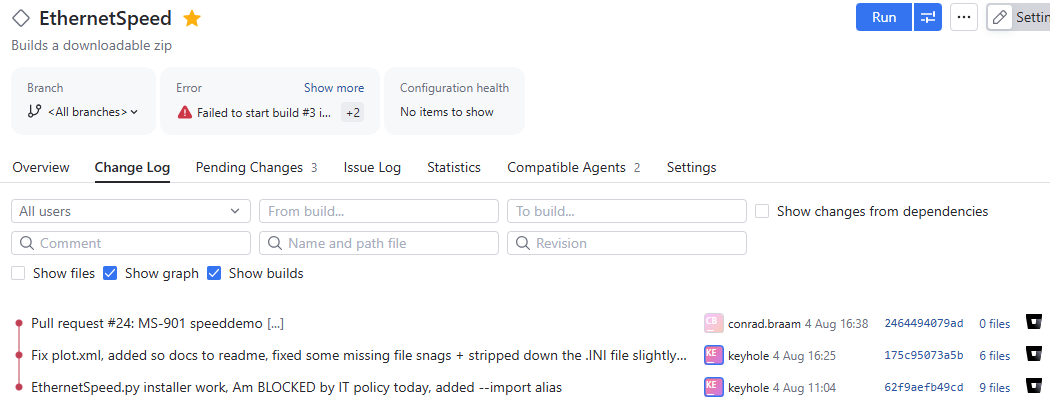
But the build fails to start (red triangle). Was working 2 months ago, but I got distracted so I disabled all jobs until I needed the builds and could find time to generate a new token.

There are 2 different things going on here where the agent is unable to fetch, but the web console clearly can get read access. I don't gasp what is going on in between.
Please sign in to leave a comment.
Do you have a connection to your Bitbucket server configured as described in https://www.jetbrains.com/help/teamcity/configuring-connections.html#Bitbucket+Server+and+Data+Center ?
Best regards,
Anton
Nope, I started reading about that and have no idea when that changed, we are on Bitbucket 10.4 now, someone upgraded it a while back. I am at the point I have to rebuild this old TC server, which is why I put off sorting it out.
OK. The entire security landscape moves so fast it's almost tiring and one has to forget everything you used to do before with keys and actually get a training course :-) Following steps without the context of what it all does, does not give me a sense of security. I suspect I have to get our IT team to set one up so I can use it. Cheers.
Thanks Anton. I have requested the bitbucket admins to create me a read-only application connection just for my test-code repo, as I don't seem to have permissions to create these. Which makes sense, least-privilege security thinking. I'm assuming Bitbucket lets us scope it and that TC will work with a read-only connection.
Will afterwards share a //redacted screenshot afterwards if I remember so that future visitors can get a clear picture.