Build configuration status icon

Hi,
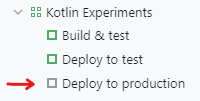
I noticed that the build configuration icon has turned grey while the others are still green. The entire pipeline works correctly, though. I noticed this colour change after updating the trigger for this build configuration. Any idea why it has happened this way?
Thank you!
Please sign in to leave a comment.
What version of TeamCity are you running? Can you please share the steps to reproduce this?
Hi Eric Borchardt, I can reproduce it with version: TeamCity Enterprise 2019.1.5 (build 66605)
I find no documentation that states why is that grey instead of green even in a successful execution.
I am also curious as to what causes this behavior. I have various configurations which build the default branch of the VCS root that show green or red status icons correctly, however other configurations which build other branches almost always show a grey icon, and these affected configurations also do not show the correct status in the external build status page.
I have faced the issue as well.
The issue occures when there are several VCS in a build but they have different main (default) branches (trunk and master), and one of these VCS has incorrect branch specification +:refs/heads/master instead of +:refs/heads/(master). In this case a build will be trigered on trunk branch, but this branch is not recognized as default branch, as result the build status icon has grey colour.
Are there plans to address this issue?