Pull Request Branch Name in Overview/Build Summary

I have set up a build configuration with a VCS Root using the following branch specification in TeamCity 2020.1.1:
+:refs/pull/*/head
With a `Pull Requests` Build Feature added to the configuration in question, using the following target branch filter:
+:refs/heads/hotfix/*
+:refs/heads/spike/*
+:refs/heads/bug*
-:refs/heads/develop
This works well to give me what I needed - only build on submission/update of pull requests for certain branch names. However, because of the VCS Root specification, the build page shows the pull request number (seen in first two lines of image below), but we would like to see the actual branch that the PR relates to (as per the last line in the image below):
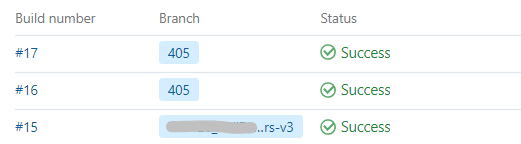
Currently, the only way to see the branch the PR relates to is to expand the build line, and select `Overview` and then `Pull Request Details`; the branch names have more meaning to users, so we would prefer this to be available at the highest level.
I have tried to find customisation options for the build summary information, or find alternative ways to define this name, but have so far drawn a blank.
Is this possible?
Thanks
Please sign in to leave a comment.