Hot to add Agent Requirement to make sure that CLI tool installed.
Answered

Hello,
I'm wondering if there's a way to add cli tool requirement in Agent Requirement section, same way as e.g. require Xcode installed:
`tools.xcode.home`
For example, I need to make sure that jazzy is installed on build agent, and if no - prevent to run build on that agent.
Thanks and best regards,
Nazar
Please sign in to leave a comment.
Hello Nazar,
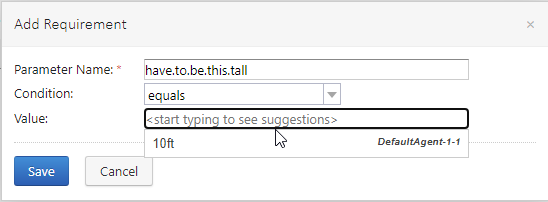
A build agent may have [custom properties specified in its configuration file](https://www.jetbrains.com/help/teamcity/build-agent-configuration.html#General+Agent+Configuration); these properties will be available in the agent context and can be used for definition of Agent Requirement. The file in question is <build agent installation folder>/conf/buildAgent.properties; suppose I add the following line to the file:
As a result, have.to.be.this.tall parameter would be available for the agent in question, and I could use it in the agent requirement:
yeah, I'm aware about this, but that would require to change each agent in addition to installing specific tool.
I was wondering it it's possible to require agent to have cli tool installed as I did with Xcode.
Seem's that's not the case, so I decided to include such checks into my scripts before running them, and if there's no tool installed just fail. Not ideal, but since no better solution, that's the only option.
If there's no built in way to check that through the TeamCity, without adding additional properties - then we can close this unfortunately.
Thanks and best regards
Nazar
Hello Nazar!
For other tools which are detected on agent side, this is handled by the plugin code; essentially, plugin registers a detector on agent side which, on agent start, will check if the tool is present. Thus, there are two options for auto-detect:
1) you could use a custom logic within build context to identify if the tool is present (you could, for instance, run a script on every agent once in a while to update buildAgent.properties and set the property reflecting tool presence);
2) you could consider writing a simple plugin which would handle the detection. It could be a pure agent-side plugin as it only has to detect the tool and add configuration parameters to the agent context; a good example of the runner plugin structure is available here.
I hope this helps.
Hi Fedor,
Thanks for more detailed information. For now it's not worth writing such additional scripts or custom plugin, but in future I will definitely consider this. Still, it would be great if such tool was built in.
Anyways, thank you very much for provided information, it's greatly appreciated.
Best Regards, Nazar