Teamcity testmetadata image URL is encoded

Hi,
I'm trying to add some screenshots to the failed tests using
println("##teamcity[testMetadata testName='test.name' type='image' value='screenshots/screenshot.png']"), where "screenshots/" is the relative path to the image in the build artifacts directory, in accordance with https://www.jetbrains.com/help/teamcity/reporting-test-metadata.html#Images+from+artifacts+directory
I can see that my failed tests have some attached images, but for some reason their URLs are encoded and "/" symbol is replaced with the "%2F", that's why GET image request returning 400 response code and I see "Invalid source" message instead of necessary screenshot after clicking on it.

I have conducted an investigation and found out that payload received from "https://teamcity.****/app/rest/ui/testOccurrences/id%3A***%2Cbuild%3A(id%3A******)?fields=id,metadata" request is fine and contains all the needed metadata with the right value formatting. So URL encoding is performed somewhere on UI.
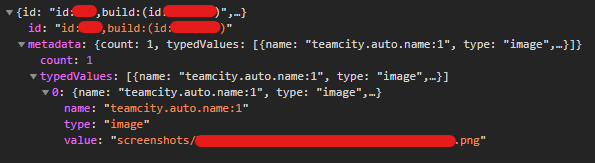
I was wondering if there any way to fix it on my side?
Thanks,
Konstantin.
Please sign in to leave a comment.
Hi Konstantin. Thanks for reporting the issue. Please follow this item in our tracker for the updates on the fix: https://youtrack.jetbrains.com/issue/TW-67563.
In the meantime, you can try to work around it by storing the images in the root of the artifacts folder (without putting them in the screenshots directory). Additionally, the URL should be correct in the classic UI, even if the metadata path contains slashes.