Agent build Steps Requirements are not met after upgrade

Hi
I might have made a huge mistake last week, when I tried to upgrade TeamCity from 9.1.7 (build 37573) to 2019.1.3 (build 66439) (both TeamCity Professional)
Where I'm working right now, we are using TeamCity, but I didn't set it up and I don't have any knowledge about TeamCity except for how to activate a build agent. The people who did set it up are no longer working here, so I can't ask them for help
I tried to use the installer for automatic upgrading, but it didn't quite go as expected, which might be because I later discovered there are two TeamCity folders on this server:
C:\ProgramData\JetBrains\TeamCity
C:\TeamCity
I did a backup of the first folder, before upgrading, the second folder I didn't notice until today. I didn't do anything here, but I don't know if the upgrade messed with any of those files. I did tell it to install into the first folder
When going to the agents list I have noticed several things. They might be all related to the same issue, but I have no idea.
Firstly I noticed the only agent we are using is disconnected. Wasn't like this before the upgrade
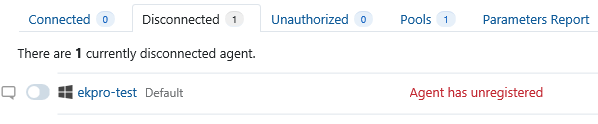
After going deeper into the build, I can see the following errors
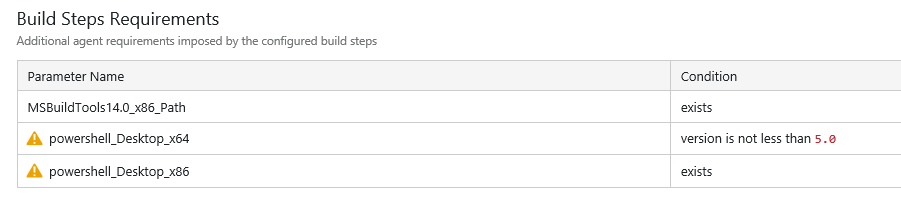
I didn't do anything with the powershell installations. They are both there and both of them is version 5 as far as I can tell. Why is this all of a sudden a problem?
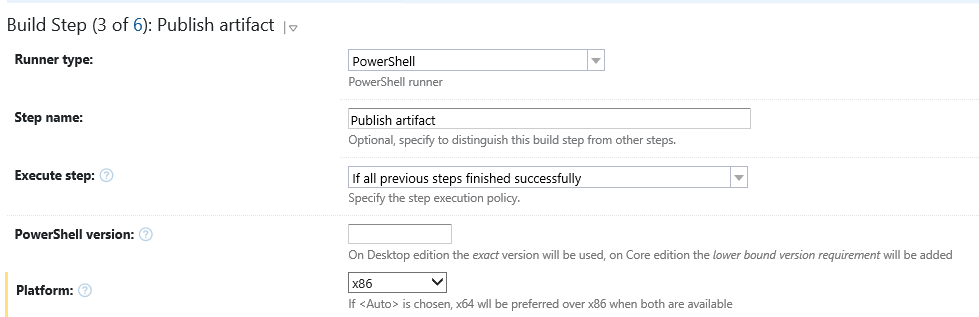
Under build steps I have the following, where powershell is used:

Under the build step for x86, the PowerShell version is not filled out, where in the other one it is set to 5.0
But according to the documentation, leaving it blank should remove the requirement from what I'm reading
"If the version field is left blank, no lower bound on the version requirement will be added, no -Version argument will be used on Desktop editions of PowerShell."
EDIT:
I believe I might have found the solution. Turned out the agent couldn't start, as the port had changes from the old setup to the new setup. I had to fix this in buildAgent.properties. Only way I found out was my running
Unfortunately TeamCity sent me on a wild goose chase with the version problem, when it turned out I had to look a completely different place agent.bat stop from command promt in my buildagent/bin directory
Please sign in to leave a comment.
Hi,
there are a few comments that I'd like to leave here:
-From your message it seems that you installed the upgrade into "C:\ProgramData\JetBrains\TeamCity". This is not recommended, this is the data directory. It's recommended to keep them separate. You can find info on the multiple directories that teamcity uses here: https://www.jetbrains.com/help/teamcity/teamcity-specific-directories.html
-After upgrading the server, the agents will upgrade themselves. For that they will disconnect. Of course, if in your situation the port had been changed, then they cannot connect anymore, but for future reference, the build agent will disconnect and upgrade. If after some 5-10 minutes it's not back up working, there might have been some issues and you should check the teamcity-agent.log and upgrade.log in the logs folder of the build agent. It's important to note that the agent will continue retrying the upgrade constantly so it would make sense to check that they're working properly after an upgrade.
-The build parameters are picked up upon agent start, so when there are no agents available, it's possible that the builds report the parameter as missing, because the agents that would fulfill it aren't available.
-For future reference, we have a guide on how to upgrade (if you are not using automatic upgrade, which was not available in version 9.1.7), please check it out: https://www.jetbrains.com/help/teamcity/upgrade.html
Hope this helps.
Hi Denis,
Thanks for the helpful tips, I wish I had found them before. I did read the upgrade guide, but either I missed the part about different directories, or it wasn't mentioned
I believe it might be a good idea for me to reinstall it, to avoid having it all mixed. If it causes any problems I will sure do that. You are correct, I did install it into the wrong directory. I didn't know there were several directories before it was too late