Move Configuration not shown

I am missing the option to move a build configuration to another project. Are there some (not documented) restrictions that hide the option? According to the documentation there should be a "move configuration" just like "copy configuration" (which is shown).
I found some (rather old and not so serious) YouTube video where there is a "Move configuration" right beside the "Copy configuration". I can only see the copy configuration
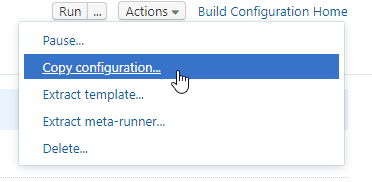
I currently have the structure
- (Project) MyProject
- (Build Configuration) Build
- (Build Configuration) Unit Tests --> chained with "Build"
- (Build Configuration) Nightly Unit Tests
And I want to migrate to
- (Project) MyProject
- (Build Configuration) Build
- (Sub Project) Tests
- (Build Configuration) Unit Tests --> chained with "Build"
- (Build Configuration) Nightly Unit Tests
As I do not want to loose the build history and statistics (and I do not need both configurations) I want to move it. Am I missing something obvious why the cannot move the configuration? We are operating TeamCity Enterprise 2018.2.4 (build 61678).
Greetings
Daniel
Please sign in to leave a comment.
Is your project using Kotlin managed settings? I just asked the same question seeing no Move option for Kotlin-managed projects: https://teamcity-support.jetbrains.com/hc/en-us/community/posts/360003648140-How-to-move-or-rename-a-Kotlin-managed-project-
Yes we do. Mostly for backup and history reasons of the configuration, not for actively changing the scripts. But according to your findings, this really might be the reason.
Hi Daniel and Matthew,
As you have figured out, Kotlin projects are locked from being moved or renamed. This is because of how kotlin projects are generated. As it stands right now, we expect users to move or rename projects from within the kotlin scripts themselves.
Please open a feature request in our tracker here: https://youtrack.jetbrains.com/issues/TW. Please provide as many details as possible as to why you would require to have this feature.
Here is a simple example...
I have an existing XML project A with subproject B, and I am experimenting with replacing B with Kotlin by starting with a "KotlinTest" project, so now I have subprojects:
I get everything working in "KotlinTest" and want to delete B and rename "KotlinTest" to B. Can't do it.
@Denis Lapuente: Can you elaborate how to exactly "move projects from within the kotlin scripts"? As I'd like to avoid that the history is lost, I'd be very grateful for any input.
Added a new issue to YT: https://youtrack.jetbrains.com/issue/TW-60539
Hi Daniel and Matt,
Thanks for creating the issue.
TeamCity handles the objects internally based on the UUIDs that are assigned to them. You can use this references when moving or renaming projects to keep them tied to their past history.
With the UUIDs in mind, you should be able to move the project from one script to another just fine, assuming that both target and destination parents are defined on the same Kotlin script.
If they are on separate scripts, you will need to remove it from one and add it to the holder of its new parent. Keeping the UUID on it should be fine.
If you are attempting to move the project into a project that isn't still in Kotlin settings, you will need to either put its parent into kotlin settings and move it into there, or to create the project in the UI, store it into kotlin, then move the project settings into the newly generated script.
Hi Denis.
I had a look at the generated Kotlin configurations, Am I right with the fact that the "object name" is the UUID you are talking about? I have following files (sorry for the bad formatting, not sure how to paste properly code in here). If I move the MyProj_GitHub_UnitTests.kt file to another project folder, while keeping the class/object name + moving it from the Project.kt , TC will pick it up correctly?
MyProj_GitHub/Project.kt
package MyProj_GitHub
import MyProj_GitHub.buildTypes.*
import MyProj_GitHub.vcsRoots.*
import jetbrains.buildServer.configs.kotlin.v2018_2.*
import jetbrains.buildServer.configs.kotlin.v2018_2.Project
object Project : Project({
id("MyProj_GitHub")
name = "GitHub"
description = "Contains all MyProj GitHub related builds"
vcsRoot(MyProj_GitHub_GitHubDevelop)
buildType(MyProj_GitHub_UnitTests)
buildType(MyProj_GitHub_Continuous)
features {
feature {
id = "PROJECT_EXT_444"
type = "OAuthProvider"
param("clientId", "(removed)")
param("defaultTokenScope", "public_repo,repo,repo:status,write:repo_hook")
param("secure:clientSecret", "(removed)")
param("displayName", "GitHub.com")
param("gitHubUrl", "https://github.com/")
param("providerType", "GitHub")
}
}
})
MyProj_GitHub/buildTypes/MyProj_GitHub_UnitTests.kt
package MyProj_GitHub.buildTypes
import jetbrains.buildServer.configs.kotlin.v2018_2.*
import jetbrains.buildServer.configs.kotlin.v2018_2.buildSteps.VSTestStep
import jetbrains.buildServer.configs.kotlin.v2018_2.buildSteps.script
import jetbrains.buildServer.configs.kotlin.v2018_2.buildSteps.vstest
import jetbrains.buildServer.configs.kotlin.v2018_2.triggers.finishBuildTrigger
object MyProj_GitHub_UnitTests : BuildType({
name = "UnitTests"
vcs {
showDependenciesChanges = true
}
steps {
vstest {
name = "Run Tests"
vstestPath = "%teamcity.dotnet.vstest.15.0%"
includeTestFileNames = """
""".trimIndent()
runSettings = "Tests.runsettings"
platform = VSTestStep.Platform.x64
args = """/TestAdapterPath:Debug"""
param("dotNetCoverage.dotCover.home.path", "%teamcity.tool.JetBrains.dotCover.CommandLineTools.DEFAULT%")
}
}
triggers {
finishBuildTrigger {
buildType = "${MyProj_GitHub_Continuous.id}"
successfulOnly = true
branchFilter = ""
}
}
dependencies {
artifacts(MyProj_GitHub_Continuous) {
buildRule = lastSuccessful()
artifactRules = "test"
}
}
})
Hi,
no, the object name is not the UUID. The UUID is an internal value that is usually not displayed in the UI, but kept internally in the database. You can get to display it by checking the DSL of the objects on the web UI via the "View DSL" option, when selecting non-portable DSL. They should be added to the configuration as well if you export it for the first time in a non-portable format.
You can set your own UUIDs, and teamcity will use those just fine, and you can reassign new ones to the preexisting objects, but keeping in mind that the history of those objects will be lost, as the history is attached to the UUID.
Hi Denis.
Actually I found a solution that is more feasable. Teamcity supports moving already! Just not on the UI that is advertised in the help. If you edit your project settings and go to "General Settings" you also see the list of "Build Configurations". There the action button at the end of the table row provides a "Move build configuration".
Hi Daniel,
thanks for mentioning, I had completely forgotten about that option.
For reference for other users, Daniel also reported this here: https://youtrack.jetbrains.com/issue/TW-60539
We have had an internal discussion about this inconsistency and as it stands right now, this is the current expected behavior. Leaving the action available for build configurations in their admin page creates some issues that doesn't seem to reproduce on the projects page. We plan on adding the ability to move build configurations even if they are defined in the DSL, but it's currently only possible from within the project's admin page.