Build number problem

I had an issue with the build number in Teamcity.
Shortly speaking, I triggered a build (the one in lower right corner in the picture) , this build then triggered the 3 dependent jobs.
We try to use infrastrure as code concept, meaning all the build configurations were automatically generated from code.
Unfortunately there was an build configration update after this job was registered. After update, 2 out of 3 dependent jobs still build, but the one in picture was cancelled without any reason. It doesn't get any build number, and next time, the build number restarted from #1

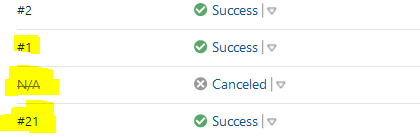
I looked the build log, there is nothing after computing revision.

Then I check the build I triggered directly (the lower right build in first picture), the build number is more wierd. The one connected to the #N/A build, got build number #???, and then next time is #6, then restart from #1
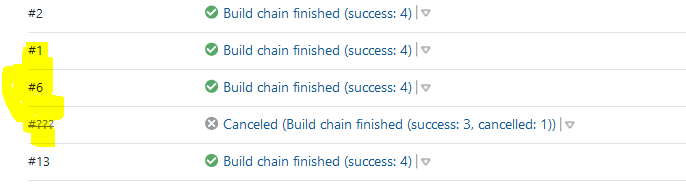
Do you any clue why the build number behave like this, and how to avoid it to happen?
Please sign in to leave a comment.
Hi, and sorry for the delay.
Build numbers are stored in the data directory, in the config folder within their specific subfolders in each project. You say that you have "infrastructure as code" and set up build configurations dynamically. In this case, depending on how you are doing it, you might be disrupting the normal workflow for build numbers/counters.
With this in mind, builds shouldn't be cancelled automatically, even if the settings change, TeamCity should keep the builds in the queue and run them with their previous settings. If they are changed once the builds are started, they should be kept as is, which means that there is likely something else that has canceled the builds.
So please, review your infrastructure as code for hints at what might have happened. Ensure it's not behind the cancelling of the builds. Should it not be clear enough, I'd recommend checking both the folders for possible issues (corrupted files, permission issues), as well as the server logs to see whether something was logged in there. If the logs have already rolled over, please collect them if the issue replicates again.